XTREMEHEAT
Members
-
Joined
-
Last visited
Everything posted by XTREMEHEAT
-
I understood you now, no worries! I did not make any callouts. I am just editing the police backup configuration so that they work properly for Liberty City. There are no callouts that I am making (I actually don't know how to make callouts, sorry).
-
Hey, Can you clarify what do you mean by module? What I meant by LSPDFR crashing was that some calls would crash as they are not intended for the Liberty City map. The above config edits don't have any effect on that. If you meant can I create a dedicated set of config files just for Liberty City, yes I can do that, but it would depend on what vehicle pack you would like and many other things hence it is a bit complex. I can make a simple one which removes all other zones and just keeps Liberty City and people can switch their config files out back and forth if needed. But in that case, I would have to configure it depending on if they are using EUP or not (and which version of it too, I am using EUP 9.4) and if they are using Ultimate Backup or not. It becomes very complex to cater to each person's custom usage so that is why I gave a general explanation on how to do it above.
-
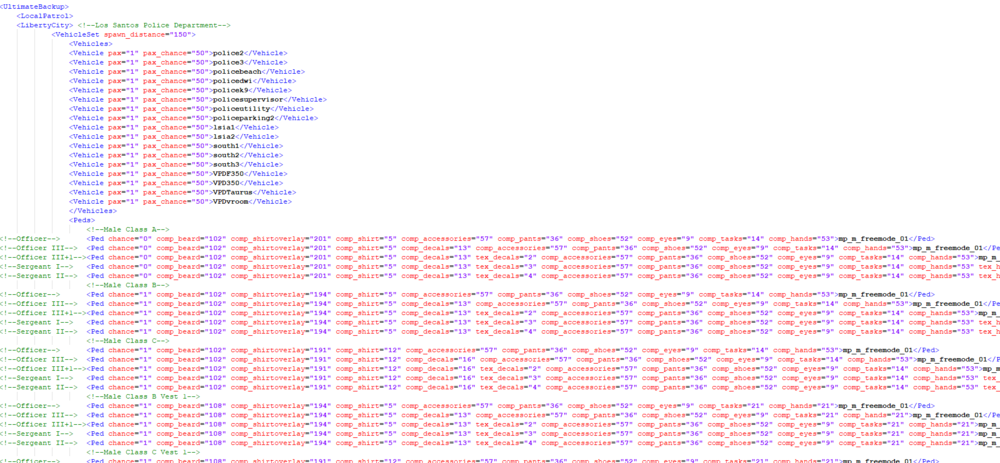
I think I have compiled the entire list of available zones. Other coordinates have no zone associations unfortunately so backup may not spawn there but they may come from neighboring zones (I'm not sure). Many callouts do not work in Liberty City (some do, but it's a hit and miss). To be able to use these zones and get backup, you need to add (copy) the region's list in my first post into your regions.xml file located at C:\Program Files (x86)\Steam\steamapps\common\Grand Theft Auto V\lspdfr\data as shown below: Then, you need to configure your backup xmls to incorporate the "LibertyCity" region into them. This depends on whether you use Ultimate Backup or not but the process should be similar so I will only give the Ultimate Backup version of this. In the DefaultRegions.xml file located at C:\Program Files (x86)\Steam\steamapps\common\Grand Theft Auto V\plugins\LSPDFR\UltimateBackup, there are entries for regions and agencies: meaning in the LosSantosCity region, you can spawn 4 different types of agencies: LocalPatrol meaning LSPD, StatePatrol meaning SAHP, LocalSwat meaning LSPD SWAT, and NooseSWAT. In the LoSSantosCounty region, you will also have the corresponding local (LSSD), and LocalSWAT (LSSD Swat). The state and NOOSE SWAT remain the same of course all throughout the map. The trick here is to incorporate a LibertyCity entry into each of the LocalPatrol, StatePatrol, LocalSWAT, and NOOSESWAT lists just as you have the same for LoSSantosCity, LoSSantosCounty, and Blaine County. What I simply did was in the LocalPatrol section, I copy pasted the existing LosSantosCity entry of the LocalPatrol Section and renamed the newly pasted duplicate LoSSantosCity region to "LibertyCity". So I had something like this: Then I took an existing entry from the state patrol section, copy pasted it into the statepatrol section, and renamed it to LibertyCity. You do this for all the types of patrols you have (local, state, SWAT, NOOSE) etc. Since you typically would want the localpatrol to be city units (not sheriffs) to respond as backup in Liberty City, you would stick to copy pasting or duplicating the LoSSantosCity entry only in the local patrol (and only the LSPD SWAT for LocalSWAT in LibertyCity) and changing the region name to LibertyCity. For the NOOSE swat, you can do the same. Just copy the LoSSantosCity section in the Noose SWAT section, and paste it and change the region name to LibertyCity. Lastly, you need to do the same for your SpecialUnits list, meaning the detectives and so on. If you want these units to spawn ambiently like they do in the normal GTA V map, then do the same for the LSPDFR xml (the above is for Ultimate Backup configuration, not LSPDFR ambient spawn functionality), meaning go to your agency.xml in C:\Program Files (x86)\Steam\steamapps\common\Grand Theft Auto V\lspdfr\data (or if you use EUP then in the custom folder), and replicate the same process above for each type of unit, meaning transport, local, state, etc .... All of the above require very good knowledge of xml configurations. If you are not good at this to begin with, maybe it's not a good idea to experiment and mess around.
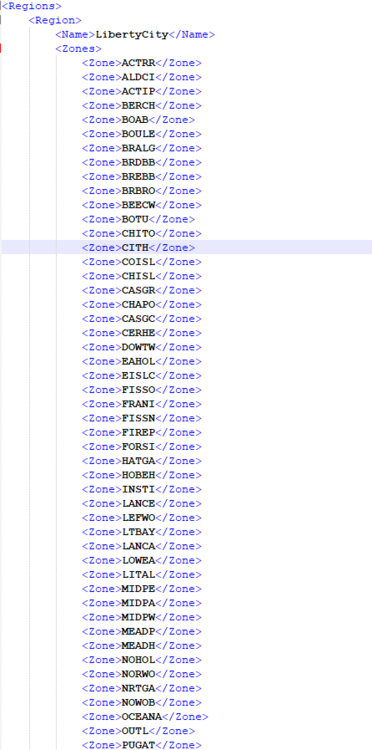
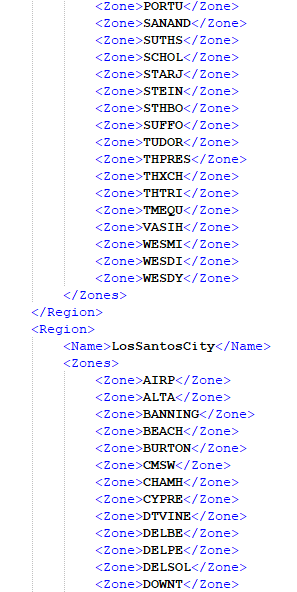
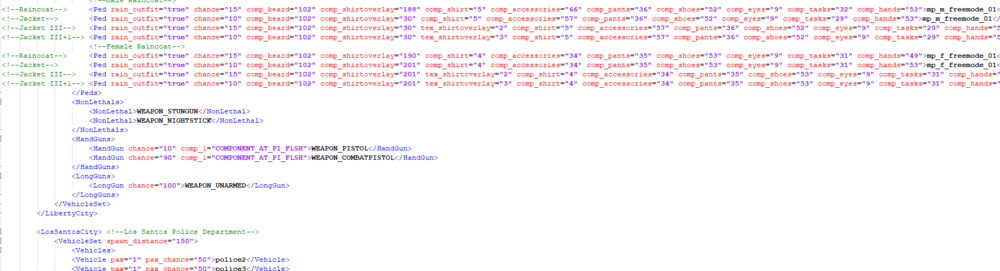
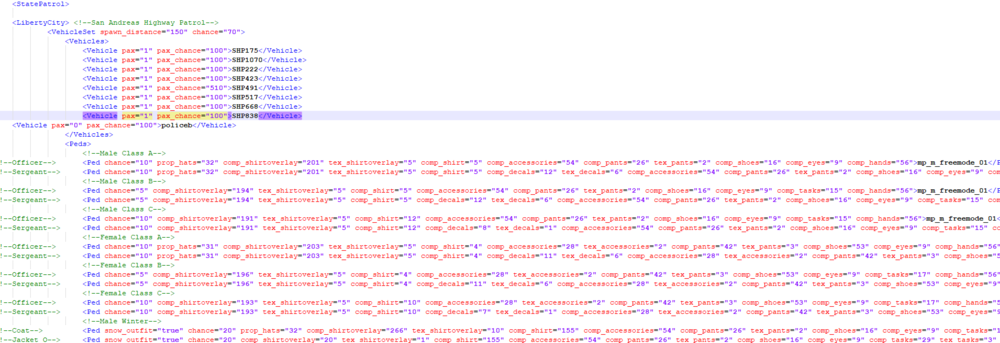 Hey guys, I compiled an incomplete list of the zones for the South-East version of the Liberty City V Remix V 20 map mod for GTA V just in case anyone plans on using it some how (either for designing future callouts for the map or making Ultimate Backup/LSPDFR zone configurations for Liberty City). Here are the ones I was able to compile thus far (in alphabetical order with respect to the first letter): I will try to update them frequently. It takes a long time to get them; I am essentially brute forcing this by driving (I think flying will work too, I will give that shot) through every single part/street of the map and catch their corresponding zone names in the RPH logs. LSPDFR tries to spawn ambient police units in your vicinity, but if it is an unrecognized zone, it throws a warning message indicating there are no ambient units configured for that particular zone such as this: "[TRACE] No valid backup data found for area for LocalPatrol in LosSantosCity in BREBB using SpawnsAmbiently". But many times, the GPS coordinates of countless places on the map simply don't have a corresponding zone that is recognizable so you end getting a warning in the log that says, "[WARN] No game zone found for X:6066.384 Y:-2520.521 Z:10.59935". This is out of my hands and I do not know how to fix this. but it's better than nothing I guess. If anyone wants to contribute to this list, feel free to do so (provided you already installed the South-East version of the Liberty City map mod first). I don't know if the Centered or East version of the map mod also works, but if it does, that would be great.
 I think the instructions maybe a bit outdated. Can you try to install it in the latest patch (patch25ng I believe), and try it? If that does not work, temporarily change the name of the vehicle to fbi2 and then try it (also change the name of the els xml file too). If the second approach works, it means you need to go to the vehicle meta file in \mods\update\update.rpf\common\data\levels\gta5, copy the fbi2 handling lines and paste it again but change the name of the vehicle to noose4 in the lines you just pasted.
- 39 comments
- 27 reviews
You can use the trainer and go to the added vehicles section and choose it or if you're using rage hook, just open up the console (via F4 by default) and type in "spawn noose4" (without the quotes of course).- 39 comments
- 27 reviews
 Cool. Appreciate it. Yeah I figured it may be difficult so maybe just adding a keypress to disable/enable the map at will would be simpler for you...:)
Always been looking for something like this, will make LSPDFR foot patrols realistic!!!
This is great; been looking for something like this! I was wondering if this can be modified down the line to hide vehicle pursuit blips on the map in LSPDFR (while in-vehicle); the GPS route to a call/pursuit vicinity would still show but the actual blip of the suspect won't. A realistic pursuit would require maintaining a visual, not keeping track of it on your own GPS. Or a simpler workaround would be if there can be a keypress so we could disable/enable the map at will while in a vehicle without having to go to the trainer or in-game menu. That way we can simply keep the map on for the GPS functionality when driving to a call and then shut off the map during a chase etc.
Cool. Appreciate it. Yeah I figured it may be difficult so maybe just adding a keypress to disable/enable the map at will would be simpler for you...:)
Always been looking for something like this, will make LSPDFR foot patrols realistic!!!
This is great; been looking for something like this! I was wondering if this can be modified down the line to hide vehicle pursuit blips on the map in LSPDFR (while in-vehicle); the GPS route to a call/pursuit vicinity would still show but the actual blip of the suspect won't. A realistic pursuit would require maintaining a visual, not keeping track of it on your own GPS. Or a simpler workaround would be if there can be a keypress so we could disable/enable the map at will while in a vehicle without having to go to the trainer or in-game menu. That way we can simply keep the map on for the GPS functionality when driving to a call and then shut off the map during a chase etc. Ahh ok. Was taking a stab in the dark, I also was using an outdated version which messed up my LSPDFR. Sorry that I couldn't offer any more suggestions.
- 637 comments
- 75 reviews
Do you have the latest RageNativeUI installed (version 1.8.1) in the main GTA V directory?- 637 comments
- 75 reviews
 I may be wrong but I do recall that there was an EUP UB configuration that did not include extra police departments such as BCSO, RHPD, etc. Is it still available (for EUP 9.4)? I do not use all the other departments. Thank you.
- 368 comments
- 17 reviews
 I'll give it a shot sometime in the future. I took out the ambience using Adobe Audition (using some audio processing to remove background sounds).
- 10 comments
- 1 review
Now that you mention it, yep you're right. Will try to fix it and upload a better one soon. Would love to try the one for Heat but I dont think its possible to drive cop cars.- 10 comments
- 1 review
Hi all, I have recently started replaying some of the NFS games and began working on adding NFS sirens into GTA V. I have seen couple of requests for NFS Rivals Sirens to be made and I too was looking for some online but could not find any. Hence, I worked on them myself and I think the quality is quite good. Check out the preview video below (the vehicle model is NOT mine): Install Instructions: 1) Unzip/Extract my zip folder (using WinRar or 7z etc) and delete the ZIP folder. 2) Open IV and go to: mods\x64\audio\sfx\RESIDENT.rpf\ 3) Right click vehicles.awc and select "Export to openFormats (OAC)." 4) Select the Desktop as the directory. 5) Copy-paste my NFS Rival audio files into the folder on your Desktop named "vehicles." 6) Drag the "vehicles.oac" file from the Desktop back into the OpenIV window and you are done.- 10 comments
- 1 review
-
-

- 2
-
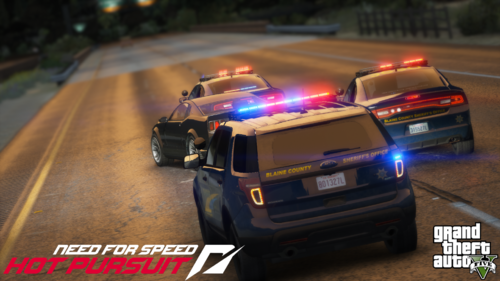 Great siren pack! I didn't even know that I wanted the NFS sirens in GTA V until I seen this mod.
- 14 comments
- 1 review
@purplepotatoes14I was actually able to get much cleaner sirens myself after being inspired by this mod of yours. I turned off the cop vehicle in NFS (I didn't know that you can actually turn the siren on while the engine was OFF) and recorded the sirens. I did have to clean up the ambient wind sounds through Audition and I sharpened the sound using a high pass filter on it. For some reason though, even after I increased the volume, it still sounds a bit low in-game for my taste. Anyways, I would love to share my siren files with you if you would like to do some further processing to make it crisper and louder some how. Please let me know if you would want them.- 14 comments
- 1 review
u can use paint.net software and export the textures using openIV and simply change the resolution of the textures, then reimport them back into the ytd files. Is there any plan to add controller support? Thank you very much.You would need to download the following mods to enable the firetruck. They have the proper configurations by default to enable what you are looking for. The stock LSPDFR agency configs do not have them as I recall.Can you check if you have an entry labelled "lsfd_fire"? A simple Ctrl+F search should do. If there isn't, that would mean the default LSPDFR doesn't have it and you would probably need to use EUP for it.