


XTREMEHEAT
Members
-
Joined
-
Last visited
Everything posted by XTREMEHEAT
-
Yeah my bad, i edited it right b4 u posted. xtremeheat#1086
-
My discord id is: xtremeheat#1086. Feel free to message/add me.
-
Are you throttling your performance by any chance through some battery saver settings? Can your force your gpu to run at Max performance mode from NCP? Also can you check "can you run it" website and see how your pc stacks up against the recommended specs? I don't understand why you seem to be stuck at that fps range. Can you also try the stock gta v without mods, visualv, or anything else and then run the benchmark by pressing tab as indicated under the graphics setting screen in gta v? Just pure stock gta v and my recommended settings? I'm really baffled cause when I had a 1050ti which is a much lower gpu then yours, I was getting higher fps (by using msaa x2). It doesn't make any sense that a weaker gpu can get the same or higher fps than a stronger one at the same settings.
-
@Gamer0856 OK, right off the bat, I can tell you what’s wrong with the settings you have: never use GeForce Experience to optimize your graphical settings, more often than not its gets them wrong and makes things worse. It turns on and maximizes the wrong settings and turns off other needed ones. It is best to manually set them. A good guide is: https://www.geforce.com/whats-new/guides/grand-theft-auto-v-pc-graphics-and-performance-guide But to save you time, the optimal settings should be as follows (you can increment them slowly to higher settings if you wish after getting a proper baseline set): FXAA/MSAA/NVIDIA TXAA: Start off with MSAA x2 and TXAA on, if it is still too aliased for your tastes, then use MSAA x4 with FXAA. Don't use both FXAA and TXAA together (blurs the image too much). Population Density: 50 to 75% Population Variety: 50 to 75% (You can max this out if you have enough Video memory left) Distance Scaling: 100% Texture Quality: Very High (stock GTA V textures can be handled on mid-quality GPUs easily, and definitely the highest can be handled by your card without breaking a sweat, it’s the other real-time GPU processes that kill fps, so revert the texture quality to the highest) Shader Quality: High (you can try Very High later on but really no practical difference and it simply eats FPS) Shadow Quality: I would keep this at High (Very High slows down the GPU a lot especially in grassy areas where the shadows for each blade of grass has to be rendered at high resolution, but when using High, make sure to use Softest Shadows, not sharp or NVIDIA PCSS) Reflection Quality: Very High (you can move it up to Ultra if you have enough fps to spare but you won’t notice much of a difference in quality so keep it at very high) Reflection MSAA: OFF (unless you are standing in front of a glass door and you stand there for 10 seconds, you will notice the reflections are a bit aliased but this is usually spotted by eagle eyed players, otherwise use x2 or x4 paired with Ultra reflections setting above) Water Quality: High (Very High has no practical visual impact and eats more fps) Particles Quality: I keep this at Normal (but you can use Very High, but this will kill fps when explosions occur, fps will have sudden dips in very intense firefights etc) Grass Quality: High (You can try Very High later on, but never Ultra, I run an RTX 2080 and struggle with Ultra grass which also affects the level of shadows rendered for each blade of grass, most systems such as yours should stick to Very High at most, Ultra is asking for death) Soft Shadows: If you are using High quality shadows in the shadow setting discussed earlier, then use softest to blur out the aliasing. If you are using High Quality shadows, use Sharp or softest (your preference). But do not use NVIDIA PCSS, it really loads the GPU. Post FX: High (You can move up to Very High later on if needed, but really not much practical difference and Ultra is really no noticeable difference compared to Very High or High) Motion Blur: Up to you, eats some fps during fast movement, plus visually not appealing in firefights (personal preference) Depth of field effects: Your choice, eats few fps Antrioscopic Filtering: 16x (helps sharpen the textures when looking at them at odd angles, this is a must and must be used with highest quality textures, sometimes in-game this filtering does not work and needs to be forced via the NCP, so check it out, google up some images and see the difference with it on and off at 16x and you will see the huge visual difference) Ambient Occlusion: This eats a good chunk of fps especially depending on your grass quality (I would keep it off at first, then move up to the max setting if I have fps to spare) Tessellation: You can keep it on or off, almost negligible fps impact Advanced Settings: All should be kept off except for high detailed flying and high resolution shadows (if you are using highest quality shadows and sharp shadows combined, otherwise it will not be a noticeable improvement and will eat serious fps but keep it off at first and turn it on later if you wish after having fps to spare). Extended Distance and shadow swallows your fps greatly, unless you are running a card with massive video memory (8+ GB), don’t try this. Again, GeForce Experience is a real pain when it comes to optimization, I don’t even have it installed since it pretty much messes everything up. The above recommendations I gave you should definitely increase your fps (when sticking to my bare minimum recommendations for high visual quality). You can gradually move up to higher settings one by one, but to be honest, I really don’t think you will need to. Let me know what benchmark performances you get in-game. Run one before modifying the settings, and then one after with the bare minimum settings above, you should definitely see an increase in the fps. I’d appreciate if you can post the benchmarks here as well for a reference. Afterwards, perhaps @Adrien Martin can provide some insights regarding your plugins (but you said that your stock LSPDFR was just as laggy so my understanding is the issue is not LSPDFR mainly but rather the actual game [in-game graphics settings]).
-
I really haven't used VisualV since NVR was released so I do not remember the fps hit it causes (from what I vaguely remember though, the fps hit was normal and not severe). You can check it out though by renaming your "mods" folder to something else and remove whatever ENB you are using (by simply cutting out the dll files). Then you probably can see what the average fps hit is. Can you screen shot your graphics settings from the menu, and advanced graphics settings as well? Are you using anything from NCP as well? Your system specs are fine so I do not see why you are having such a significant fps drop. Are you using a custom gameconfig which increases the density of vehicles and peds?
-
In general, Albo's plugins are a serious fps killer, I would definitely remove them in favor of alternatives such as those of Bejoijo's plugins. I had serious fps drops to the 40s with Callouts V and couple of other callouts, I literally had a list of callouts which would kill my fps but I deleted them few days ago otherwise I would have shared it with you. But what I CAN do is tell you what stuff I have installed which are not causing me any issues and perhaps you can start off from there as a baseline (see attached image). Also from personal experience, SOMETIMES Stop the Ped and Ultimate Backup cause fps drops, you can remove it and see just for testing if your fps increases. Testing the callouts are easy; to remove a plugin, just remove the dll, and reload lspdfr from the rage hook console and force duty. Start off with stock LSPDFR (i.e. no callout dll files in the plugins folder), and write down your fps. Make sure to freeze the time and weather in-game using a trainer before you do this so you can have consistent frame of reference. Then unload lspdfr from the ragehook, insert one callout dll file back into the plugin folder, and reload lspdfr and go back on duty. Record the fps, if it is a big drop for example over 6-10 fps, I would remove the dll file again after unloading lspdfr, and reinstall the next callout and observe the fps. Yes it will take time, but it is the best way to see which one is killing the fps, I do this every time I add a new callout just to make sure things are running as smoothly as possible. Hope this helps. Let me know how it goes. I typically average around 50fps now since I am also using NVR which is a huge graphical load on the GPU but without it, I can get close to 80-90 fps (on an RTX card).

-
The texture loss can be either cause you are using mods with high poly vehicles or high resolution textures (4k or even 2k if a lot of the cars are spawned in the world), or it could be due to a faulty callout that's overloading the system right before it crashes. The mini-lags, do they happen when you spawn a backup or something? Is your ambient cop spawning enabled in the lspdfr ini? If it is enabled while the main preload all models is disabled, it may cause mini-lag spikes everytime LSPDFR tries to span either a backup or ambient police vehicle. What were some of the things you did to increase your FPS?
-
Hmm; that's quite strange. I really don't know what else I can suggest besides whatever I already posted earlier, really sorry man.
-
Your stock LSPDFR without any external callouts also runs at 40 fps?
-
Do you have vsync enabled or something? Can you go to your lspdfr ini settings and overwrite it with the following settings: Make sure you make a backup of the current lspdfr ini file before doing this. The above configuration lowers the LSPDFR computational and graphical load. Are you using any scripthookdotnet scripts (i.e. do you have a script folder in the GTA V directory)?
-
 Yeah I figured as much (using CompuLite) although it didn't seem to be having the issue before. No biggie, gonna see what else maybe causing the drop. Thanks.
- 59 comments
- 10 reviews
-
-

- 1
-
-
just curious if this causes a fps hit, I know its only XML (no script or coding), but just wanna make sure, since I get a significant fps drop when I open up the Create Arrest Report menu. it could be something else besides this..
- 59 comments
- 10 reviews
-
-
- 1
-
-
Sweet Lawd, this is what I been lookin for! You can role play really well with so many different lines of questioning to choose from.
- 59 comments
- 10 reviews
-
-
- 1
-
-
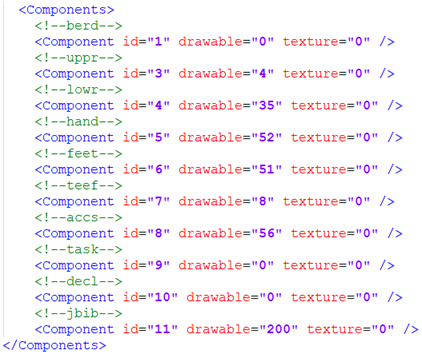
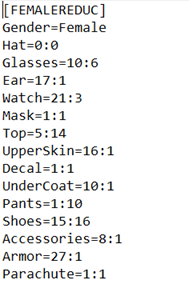
 Hi guys, I saved an LSPDFR off-duty outfit as an EUP custom wardrobe outfit as well via the EUP Menu. How can I allow my backup cops to use this outfit? I assume I have to put it in the LSPDFR EUP XML files such as "outfits_lspd_eup" in the format corresponding to the image (spoiler) below. My EUP outfit configuration is as follows: How do I convert it into the XML format needed to apply it to LSPDFR backup outfits? Or can I somehow directly use the EUP outfit name “femalereduc” in the lspdfr outfit parameter of the XML files such: <Ped chance="6.7" outfit="lspd_jacket">mp_m_freemode_01</Ped> (I tried this but it did not work quite well)? I am not new to editing XML files and have done it extensively before for LSPDFR customization and more; I just need to find the correspondence between EUP outfits and LSPDFR ones to get my LSPDFR backups to use them as well. Can anyone shed some light about this; I'd appreciate it! Thanks.
- 631 comments
- 71 reviews
-
Hi guys, I saved an LSPDFR off-duty outfit as an EUP custom wardrobe outfit as well via the EUP Menu. How can I allow my backup cops to use this outfit? I assume I have to put it in the LSPDFR EUP XML files such as "outfits_lspd_eup" in the format corresponding to the image (spoiler) below. My EUP outfit configuration is as follows: How do I convert it into the XML format needed to apply it to LSPDFR backup outfits? Or can I somehow directly use the EUP outfit name “femalereduc” in the lspdfr "outfit" parameter of the XML files such as: <Ped chance="6.7" outfit="lspd_jacket">mp_m_freemode_01</Ped> (I tried this but it did not work quite well)? I am not new to editing XML files and have done it extensively before for LSPDFR customization and more; I just need to find the correspondence between EUP outfits and LSPDFR ones to get my LSPDFR backups to use them as well. Can anyone shed some light about this; I'd appreciate it! Thanks.
-
Hi guys, I was wondering, there are a lot of male and female ped mods on the other GTA5-mods site. Is it possible to mod the actual body of the character I am using while retaining the face and other features? I spent way too much time on getting the face right, so I just want to mod the body itself. Is it possible for my character's body to be modded (it is a multiplayer ped I am using, not a single player default cop ped) or am I stuck with the one I already have? If you noticed that the character creation doesn't let you play with your height, width, body mass etc..so a lot of multiplayer ped mods on the other GTA5 mod site change the entire body of the ped. Thanks.
-
-
 Yes; actually I found in a recent video that some of the filenames were updated. So that actually solved the issue; I just had to match up the new file names with the older ones. Thanks for the help!
- 221 comments
- 40 reviews
-
Did the hash names change? The only audio files I find in my vehicle.awc are: POLICE_WARNING , SIREN_2, and AMBULANCE_WARNING. The other files (for FBI, Sheriff, Ambulance etc) are not there so I can't really replace them (unless I am expected to add them and not replace).
- 221 comments
- 40 reviews
-
-
- 1
-
-
 Cool. Thanks for the reply! It doesn't happen all the time anyways. Loving it. Thanks for the great mod.
- 118 comments
- 17 reviews
-
-
- 1
-
-
Is it normal to get a significant FPS drop (10-15 FPS) after using the "clear the intersection" voice (I am guessing that it is normal since the plugin probably hooks into every single vehicle and pedestrian in the immediate area simultaneously and this causes some computational burden but just want to make sure)? When I hit that voice over option, I get a 10-15 FPS drop until I drive a couple of blocks away from the area where I used that command.
- 118 comments
- 17 reviews
-
-
- 1
-
-
I love this; always wished for a mod like this especially after seeing real life videos of cops screaming on their PA systems!
- 118 comments
- 17 reviews
-
-
- 1
-
-
-
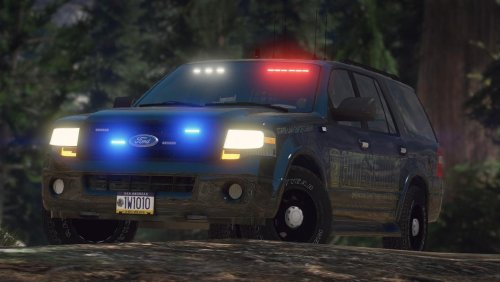 Great vehicle! Never knew I wanted a ford expedition in the game until I saw this model.
- 20 comments
- 3 reviews
-
Doesn't this need specific vehicle meta lines and/or carvariations lines? I am going to edit the skin to make it unmarked but I think we need some meta entries right?
- 20 comments
- 3 reviews


