


The Loot
Members
-
Joined
-
Last visited
Everything posted by The Loot
-
-
Redux should be avoided in the first place.
-
What's the actual issue? Things could be due to being based off of outdated game files (RDE is yet to be updated to Doomsday, for instance, and EUP itself may be older still).
-
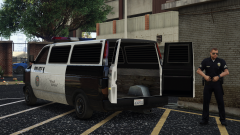 The interior still, tho.
 -
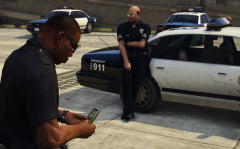 I bet he's playing Snake on there.
 -
It's a small issue, and probably won't be changed.
-
Certain things in Dispatch are hardcoded to use specific models (SWAT type can only use fbi2 or sheriff2, Fire Dept type can only use firetruk), so that won't work. As for the carvariations settings, those light setting are the original firetruck values.
-
Delete the relationships.dat file from update.rpf/common/data.
-
-
The script only replaces vehicles if they've been spawned by the game, sometimes that doesn't happen. In the future, ymap edits will completely replace that script.
-
 As above, cars are installed in either update.rpf/x64/rde/rdevehicles.rpf or rdeemergency/emergencyvehicles.rpf. Not sure what an "addins" folder is used for (some script plugin I assume), but RDE doesn't do anything with it.
- 1,516 comments
- 85 reviews
-
Remove any models you don't want to spawn from dispatch.meta in common\data, vehiclemodelsets.meta in common\data\ai (make sure not to remove or leave empty any groups, just in case), and popgroups.ymt in x64\levels\gta5 (same advice as vehiclemodelsets). As for script files, easiest is just to go into ResponseVehicles.xml and replace the models you don't want with other ones.
- 1,516 comments
- 85 reviews
-
It was just Online content being unhidden or added, AFAIK. I don't think the game itself actually updated.
- 1,516 comments
- 85 reviews
-
Sounds like the dispatch script isn't working, so make sure you have the latest versions of ScripthookV and ScripthookV .NET installed in your game folder.
-
Yep, just change/add vehicle groups under each level. You can do the first by adding them per above, and you can change MaxNoWeaponWantedLevel in ArrestWarrantConfig so any level equal or lower will utilize the stungun. Currently, there's no system to change spawns depending on LFA, but the idea could have some use that might be worth looking into.
-
There was a Granger, but it was cut in before a past release and there's no plans on adding it back. There's an idea of using Carrythxd's Vapid Executioner as a LSPD SWAT vehicle, but nothing is in the works yet.
- 1,516 comments
- 85 reviews
-
Replaces some map spawned vehicles with ones that make more sense (e.g. LSSD cars in the Davis lot and BSCO in the Paleto Bay lot instead of the LSPD cars that spawn there). Perhaps with more work and some luck, the WIP Codewalker tool will actually be successful at changing the cargens so the script isn't needed anymore.
- 1,516 comments
- 85 reviews
-
Files from update.rpf will also be out of date and will cause issues, especially gameconfig. A hotfix should be up hopefully not too much longer after Scripthook gets updated.
- 1,516 comments
- 85 reviews
-
Really shouldn't see more than one on the Hakuchous in most circumstances, but I suppose it could still happen. Those models are slated for an overhaul in the future, and that can probably be fixed with a meta change.
-
That's an unimplemented ped (along with one or two others) slated for use in the future, so there's no vehicle currently for them to use. For the siren sound; the setting is unfortunately linked to all vehicle sounds.
- 1,516 comments
- 85 reviews
-
Well, you can set minimum and maximum distances, but sometimes the game will choose a close spot even then. LSPDFR currently doesn't support helicopters outside of pursuits, and as you can see, they don't behave correctly if you do try it. This may change in future versions, but I don't think this plugin will be likely to touch on them.
-
Yes, you'd have to edit several other files that reference content added there, otherwise it could cause crashes if the game tries to spawn nonexistent peds or vehicles. In other words, if you delete the rdewov folder, you're going to have a bad time.
-
No, the older BCSO Stainer was removed and replaced with an unmarked Buffalo and Seminole. For some reason. LSPDFR config files aren't being installed correctly. Open your OIV file in an archive program (change to zip if needed), find the files, and then install them manually.
- 1,516 comments
- 85 reviews
-
Make sure you have the latest ScripthookV and ScripthookVdotnet installed correctly in the main game folder.
- 1,516 comments
- 85 reviews
-
There is now a female SAHP motor officer (two peds, as with the male officer), but nothing else was released. The Hakuchou needs some work at the very least before much progress will be made there, AFAIK.

