




fire2903rescue
Members
-
Joined
-
Last visited
Everything posted by fire2903rescue
-
-
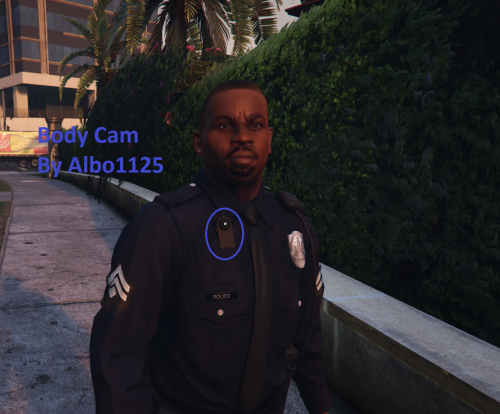 Love the mod, however my audio gets jacked up if I'm using bodycams view, probably something on my end, regardless another grand slam by Albo! If you want a laugh, drive while using it :D :D :D
- 45 comments
- 17 reviews
-
-

- 1
-
-
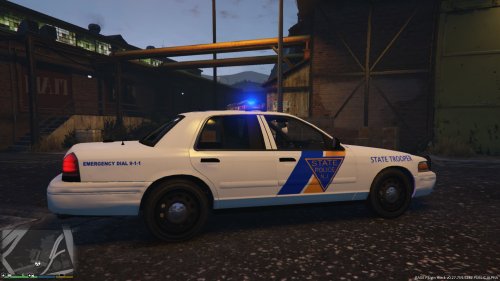
.thumb.jpg.4066677156985e22489bfecddc2f6c45.jpg) Love the model, just not a fan or the Arjent light bar, prefer a Whelen Liberty (Similar to the Ford Taurus Interceptor or even the one on the 2011 charger by martin) Skins are epic in detail. Just REALLY wish it had a different lightbar lol
Love the model, just not a fan or the Arjent light bar, prefer a Whelen Liberty (Similar to the Ford Taurus Interceptor or even the one on the 2011 charger by martin) Skins are epic in detail. Just REALLY wish it had a different lightbar lol- 376 comments
- 81 reviews
-
.thumb.png.e436e916367dd5b950520057d9057b55.png) I have been hawking the sites for a CVPI with the liberty bar, 5 stars hands down! Only wish is for some lights on the push bar, and on the rear deck either at the headliner or deck next to the brake light! So excited to get this CVPI into my game! Awesome awesome awesome!
I have been hawking the sites for a CVPI with the liberty bar, 5 stars hands down! Only wish is for some lights on the push bar, and on the rear deck either at the headliner or deck next to the brake light! So excited to get this CVPI into my game! Awesome awesome awesome!- 50 comments
- 23 reviews
-
Thanks for the tip. I found the bar I want to replace on my CVPIs but don't know how lol. I'll head over there, thank you!
-
Question for those who are actively working on vehicle mods; Is anyone working on an Explorer Interceptor with a whelen liberty bar? Not the arjent or anything, a normal bar?
-
 Mod works perfectly, using the trainer to add active snowfall adds to the realism of winter patrol...absolutely love it!
- 85 comments
- 33 reviews
-
 Albo does it again! I saw Zachs demo video of this on YouTube and I knew I had to have this mod when it was ready for public release! You continue to outdo yourself brother! Keep up the fantastic work!!!!!!!!!!
- 1,081 comments
- 166 reviews
-
-
- 1
-
-
Got it fixed, thank the lord lol. Now someone needs to find out where the glock17 goes for this new update :D
-
Me either...not that it's a HUGE deal....but I liked my Glock17 lol
-
Gotcha. Speaking of that, I had the glock 17 prior to the update. When I placed it back in patchday3....the hawk&little pistol is still there. No idea why. I messed up a bit so I deleted patchday3 to redownload it (no biggie) but I don't know why it wont work. I tried putting it in patchday8 but that crashed the game lol.
-
Hi All, With patchday8ng now in the update folder, my mods folder obviously doesn't have it. Is it NORMAL to use openIV to copy it from the new update and place it into the mods folder in case something you wanna mod is on patchday8ng? Or leave it alone....just wanna make sure nothings gonna go haywire lol Thanks!
-
Bare in mind, the scripts (mods) haven't been updated to work with the new RPH/ScriptHokV and the new game update......little more time give the creators some time :)
-
Mine did the same, however this fixed it. Using openIV....I took the STOCK update folder, went into it and copied the update.rpf, and pasted it in my mods folder, in the same location, and I'm totally fine....the update.rpf (for me anyway didnt contain any changes) plus, if your mod folder has an older update.rpf file, it's gonna crash because the game knows it's out dated. If I confused anyone with what I wrote send me a message, I'll be glad to make a youtube video or skype or something :)
-
From Rages Twitter handle... patience eveyrone....patience...

-
No worries. Every time R* updates the game, it breaks modding, ScriptHookV and RPH have to be updated by their developers to work with the new game code. Just remove your mods folder to the desktop, and openIV uninstall the asi loaders and enjoy the online version until they release the updates :) Once ScriptHookV and RPH are updated go back into openIV and reinstall ASI and openIV loaders and put your mods folder back and you're good to go.
-
It's already on RAGEs website for the updated Plugin....monitor their twitter for the update.....hope you had a mod folder :D https://twitter.com/RAGEPluginHook
-
 Awesome mod, ran flawless but everytime a SWAT unit shows up (Note, I changed numbers to PD units min 2, max 3 and Swat Min 1 max 2) the game totally crashes. Gonna reinstall it and see if that fixes! 5 stars regardless because it's a single button versus flooding the internal backup req screen.
- 89 comments
- 36 reviews
-
-
- 1
-
-
Hey all, I got everything up and running again, minus one vehicle, the city pd car. I take the model I want, go into mods>x64e just like the read me tells me to, I load the game, and my city car isn't right. It's all random colors, stuff doesnt work. All other models and cars/mods are fine. Anyone know what I'm missing?
-
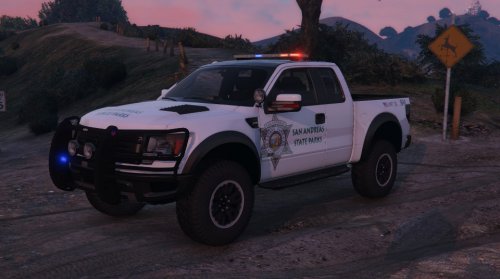 Looks nice but I followed your readme to the letter and the game crashes when loading. Not sure why......never had an issue installing a new vehicle/texture/mod like that. Removed and reverted back to the granger for now.
- 15 comments
- 7 reviews
-
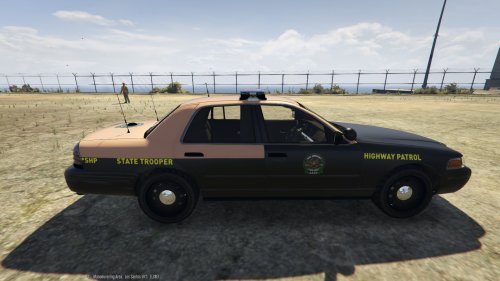 Looks awesome so far!!!! 2 thumbs up!
 -
 Best updated Interceptor to date. Only thing I would love to see is a more updated interior and the light bar, I would LOVE to see the red and blue mixed,not one side red, one side blue if that's possible. Love this regardless!
- 202 comments
- 51 reviews
-
-
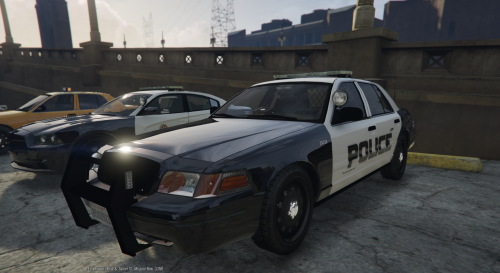 7It's a good CVPI, I LOVE the clear light bar when not in use. Only downsides are the interior are a little hazy, the mirror lights don't follow the door when opening/closing and some of the lightbar just does not illuminate.....not picking your mod apart, it's good! Looking forward to updates.
- 29 comments
- 12 reviews
-
 YOU are the man! Once I get the game to stop crashing upon start up, I need to have it, lol!
- 14 comments
- 3 reviews
.thumb.jpg.4066677156985e22489bfecddc2f6c45.jpg)
.thumb.png.e436e916367dd5b950520057d9057b55.png)

