



fire2903rescue
Members
-
Joined
-
Last visited
Everything posted by fire2903rescue
-
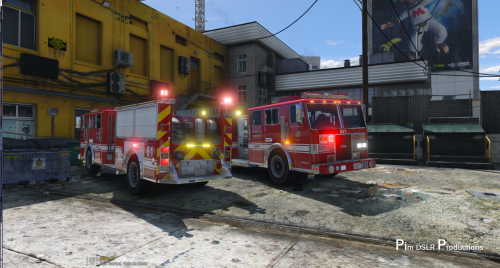 Appreciate the time and effort, but this is really a Seagrave with Pierce written on the front....I'm in the fire service, I'm not being rude, I love that you made this model, it's a lot nicer than the vanilla.
- 58 comments
- 20 reviews
-
Nice job. But this looks like a Seagrave crossed with Pierce.... being in the fire service and all lol.
- 58 comments
- 20 reviews
-
 Don't tell me that, lol I spent $1200 on this build lol. I also need to get a new way to cool it while playing, gets hot, so I know that affects performance. Thanks for the speedy reply. Cheers!
- 3,646 comments
- 306 reviews
-
@Albo1125 When I use speedchecker, the box flickers (not all the time)....any other reports of that? Thanks brotha!
- 3,646 comments
- 306 reviews
-
 Ah finally, got it. I didn't see that in the instructions so apologies....thanks guys. With 7.1 everything went into the dlcpacks but there was nothing I saw instructing you to place the dll. and ini. file into your plugins folder. Unless THATs for 7.0 and beyond...because I took the dll and ini from 7.0 put it into the plugins folder and now it works. So I took the ini and dll file from 7.0 placed it into plugins and now it works, obviously I don't ave everything in 7.1 though. I used the package installer for 7.1 into my mods folder but after I got into the game and pressed F11, nothing would happen, I took dll and ini from 7.0 and it loads now. No idea whats wrong with 7.1 or do I need to just type "LoadPlugin EUPClothingMenu" in the console when the game begins?= to get the 7.1?
- 2,341 comments
- 236 reviews
-
so I type Load EUPClothingmenu ? Sorry for being stupid, I just don't understand.
- 2,341 comments
- 236 reviews
-
So....I'm totally lost. I followed the instructions for 7.1...downloaded skin 2.1....made a character and saved it. When I try to press F11...I get nothing. On, or off duty.. someone help =/ Also, the package installer placed it into the mods folder (EUP 7.1) Skin control went into the directory as a .asi file... ugh
- 2,341 comments
- 236 reviews
-
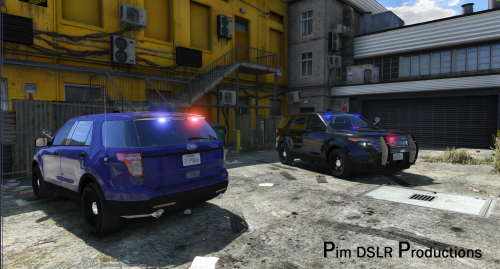 Used your instructions, and when I open the .oiv file, it places the 4 files in the main directory, no clue why. Manually added the files to the right patchday and works great!
- 48 comments
- 18 reviews
-
-
 @alexguirre I updated to newest version, now my brightness is always 1, and it's crazy bright, and I have indicators to false, and they still flash..
- 246 comments
- 45 reviews
-
Found one. Delete my SNT, and downloaded Version 3.4, works!!!!!
-
With the last update (to no surprise) we can't enable snow via Native Trainer....I wish I had made a backup of the last update which DID let you. I installed LMS' snowmod.dll and ran it, doesn't work. I installed single player snow, used rage console to togglesnow, doesn't work. Anyone know a fix? Thanks!
-
.thumb.jpg.4066677156985e22489bfecddc2f6c45.jpg) Anyone have a tip? I'm trying to get this into police slot but when I do the light are all over, I copied the carvariations to add into christmas2 but the light still dont work right..... Ty
Anyone have a tip? I'm trying to get this into police slot but when I do the light are all over, I copied the carvariations to add into christmas2 but the light still dont work right..... Ty- 376 comments
- 81 reviews
-
That's what I was going to do but didn't want it to crash the game lol, gonna try it now. Thanks!
-
I changed handling to police3, works great. <layout>LAYOUT_STANDARD</layout> done. I don't see where police3 replaces audio hash. I see <audioNameHash /> but that's it. Do I just place police3 in between that?
-
Where did you add it, how?
-
Has anyone seen a successful install of the Explorer Interceptor with the Valor bar installed to Sheriff 2 (I know the handling is made for Police 3) so mine rolls every time lol Just wondering if anyone figured it out yet or I'm missing the obvious fix, thank you!
-
I can't believe I didn't notice that....n00b moment. Instant fix, thank you!
-
I have BxBuggs Impala with lightbar in police4, and now all of a sudden, only the first livery shows up in game, the others never show as an option. Police4 goes into mods>x64e>vehicles.rpf Not sure why they aren't displaying, but I see them in OpenIV.....help?
-
 Just what we needed! Looking forward to your improvements on this mod! Works flawlessly. I love the fact I can be primary without having to call state backup hoping for a bike to get behind the fleeing suspect to keep others from ramming. This......THIS! LOVE IT!
- 176 comments
- 46 reviews
-
 Everything works great minus 'Shots Fire on Officers' crashes the system every time I accept that call out...no idea why.
- 174 comments
- 46 reviews
-
-

- 1
-
-
Is it the style of bike? Looks like a crotch rocket...and how a rider would ride one lol..
-
Pretty much. If you're a geek like me and made an extra copy of a bone dry GTA V (anticipating the new release of 0.3) just play with what works, enjoy it and check back after a day or two to see the progress of updated mods. If you did like me, you can drop 0.3 into a "vanilla" GTA V and play the new system without risking crashing due to unsupported mods/etc. Cheers gents!
-
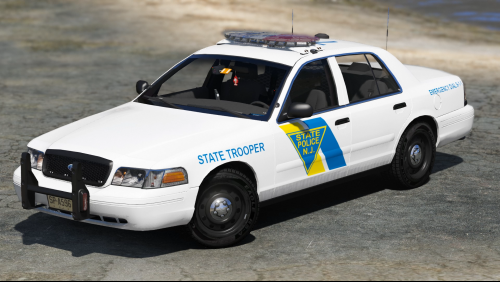 Looks awesome. Just a suggested edit? 'State Trooper' is only on the passenger front fender not the driver as well :) adding this now regardless!
- 4 comments
- 1 review
-
Similar model but not the same, I'm really digging BxBuggs' strobe tubes on the front corners and the rear reverse lights, it's alright, the arjent is growing on me lol. I found an CVPI w a liberty but thats all it has is the bar, hoping that creator updates it with more :D Thanks bro!
- 376 comments
- 81 reviews

.thumb.jpg.4066677156985e22489bfecddc2f6c45.jpg)

