




TheUniT
Friends of LSPDFR
-
Joined
-
Last visited
Everything posted by TheUniT
-
LSPDFR does work with RPH 0.22, just saying. I use pretty much all policing mods available. Won't list them here, it's too many. :P
-
Your topic has been moved to GTA V Support, this is not LSPDFR related. Please post in the correct location in the future.
-
Simple Callouts now supports RPH 0.21 and 0.22 too.
-
Well, I usually just fix it using Simple Trainer V or by typing "repair" into the RagePluginHook console. If you think this is too unrealistic you can also request backup and steal use their car. Or you use Police Toolbox (http://www.lcpdfr.com/files/file/8219-policetoolbox-beta/) to request any new police vehicle.
-
Thank you, I'll try later. :)
-
As I said, if I'm not wrong, RagePluginHook v0.21 and newer don't necessarily require an update for smaller updates to be able to play.
-
Well, CalloutsV itself works but the flashlight and repairing vehicles don't. About More Callouts: Yeah, I barely get this Callout, and if I do, I don't accept it because it's always someone pissing in the street lol.
-
Well, the RPH changelog (v0.21 and newer) says that RPH updates won't be required for small game updates. However, I'm not sure if I understood correctly what it's supposed to mean. Also.. what does this update even do? There was no announcement by R*, which isn't typical. Maybe a hotfix?
-
I think most plugins should work. Are you talking about LSPDFR addons/plugins in general or literally callouts? Whatsoever, I can also confirm that following callout plugins work. Bank CalloutsMore CalloutsStrays CalloutsWorking non-callout LSPDFR plugins that I can confirm working: Bait CarPolice RadioMore Jail Points and Prisoner TransporterSimple Callouts (1.3.0) and Callouts V (0.2.5.1a) don't work.
-
Damn, these are sweet! Do you use any visual settings (in game and/or R* Editor) or mods? I don't like having my screenshots blurry, but these lights look so awesome. O.o
-
This topic has been moved to LSPD First Response Media. Please post in the correct location in the future.
-
No, having backup spawn with added cars isn't possible right now. However, it might be added in future.
-
It used to be sticky at 60 FPS before R* introduced their anti-modding and code obfuscation shit. Now performance is much lower in general for me, even without mods. You can try what CouthInk4 said. I also use a game booster (but a different one), and it works quite nice.
-
Your topic has been moved to GTA V Support, this is not LSPDFR related. Please post in the correct location in the future.
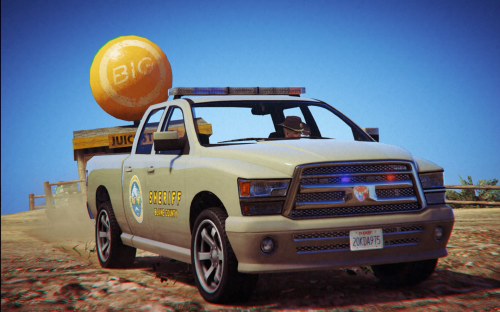 Awesome, always wanted a sheriff's pickup! I have one suggestions though. Could you make a matching white texture like the original Sheriff's Cruiser? Or maybe someone else will make one, let's see.
- 9 comments
- 2 reviews
-
-

- 1
-
I do believe you. I can clearly see it in the screenshot. :P What I meant was I staged an arrest at Trevor's trailer with lots of cops surrounding it. If I don't forget about it, I might post a screenshot later.Yeah. Like, if it's a gang member it could be more likely that he takes off on foot or steals a new vehicle. However, the chance shouldn't be that high because I personally wouldn't try and take off with a bunch of guns pointed at me. This is a large community.In my opinion, when there's a shitload of cruisers around the suspect's wrecked vehicle, he shouldn't try and flee, but rather give up right away and kneel so the officers can slowly approach and put him into cuffs.Wait! You actually got Trevor who sat at the turret arrested? Wow, someone here needs to get a cookie. Might upload a screenshot about an arrested Trevor later. It was a staged scenario though. Spawned some sheriff's cruisers/requested backup and put Trevor into the back of my cruiser. I hope I won't forget about it.This topic has been moved to LSPDFR Media.Looks like you're missing the AdvancedHook.dll (I'm not sure because I'm not familiar with GTA4 anymore). Maybe your antivirus deleted it? Check if it's there. If not, reinstall LCPDFR and be sure that the file is there. If it's gone again after starting GTA4, add it to your antivirus' whitelist. If that doesn't work.. Sorry, I don't know what else could be causing this. I never had this issue. Edit: Oh wait, sorry. The AdvancedHook.dll is indeed there. Didn't have a look at the folder. :s I don't know what else might be causing this. Your topic has been moved to LCPDFR Support Requests. Please post in the correct location in the future.It's like a .rar archive. When you do the procedure with OpenIV I've told you, it will extract it into your game properly. When you have done what I said in my first post, it's installed.It should be stated in the readme. It depends on what mod it is. Normally, you open OpenIV, choose GTA4, hit Tools and there should be something called Package Installer. Click that and it will want you to choose the package at some point. Choose your .oiv file and any options you want.This topic has been closed by G17 Media Community Team Staff as it is a topic regarding support for the RAGE Plugin Hook. We are unable to provide support for the RAGE Plugin Hook, and require all support topics pertaining to this be posted over on the official RAGE Plugin Hook forums: http://forums.ragepluginhook.net/ If you feel this topic has been closed in error, please report this post.

