




TheUniT
Friends of LSPDFR
-
Joined
-
Last visited
Everything posted by TheUniT
-
This topic has been moved to the appropriate forum. Please post in the correct location in the future.
-
 If you would've read the installation or readme, you knew that this file blongd into the LSPDFR folder within the plugins folder. Do that first. After that, do not try to load it. LSPDFR loads it automatically.
- 3,646 comments
- 306 reviews
-
-

- 1
-
-
Happy birthday, Ban. :P
-
-
-
Why would IAA have an AP Pistol? :P
-
Leg das hier (angehangene Datei) in deinen GTA V Ordner und gucke ob es dann funktioniert. RagePluginHook.ini
-
You can start with typing "myVehicle.Mods." and it'll list you available mods. Look into the RPH example project about vehicle mods to see what else you have to do.
-
Du kannst die Konsole (normalerweise) mit F4 öffnen. Wenn du in deinem beschädigten Fahrzeug sitzt, kannst du "repair" eingeben und Enter drücken, um es zu reparieren. Wenn du ein neues Fahrzeug brauchst, kannst du entweder mit B das Backup Menü öffnen, Unterstützung rufen und deren Fahrzeug nehmen oder die öffnest mit F4 wieder die Konsole und gibst ein "Spawn Fahrzeugname". (Natürlich statt Fahrzeugname den Namen eingeben.) Falls du es noch nicht hast, solltest du dir die ScriptHookV (http://www.dev-c.com/gtav/scripthookv/) und den Simple Trainer V (https://www.gta5-mods.com/scripts/simple-trainer-for-gtav) runterladen. Mit dem Trainer kannst du so ziemlich alles mögliche machen (inkl. Fahrzeuge reparieren und spawnen).
-
Geht's um LSPDFR oder LCPDFR?
-
Ich bin mir nicht sicher, aber es sieht so aus, als würde bei dir die SlimDX.dll fehlen. Ziehe die noch mal aus der LSPDFR Installation in deinen Spielordner bzw. installiere LSPDFR neu.
-
This topic has been moved to the appropriate forum. Please post in the correct location in the future.
-
 Sounds great, gonna try it out. By the way, love the sarcastic touch you put everywhere! :P
- 542 comments
- 98 reviews
-
-
- 2
-
-
This topic has been moved to the appropriate forum. Please post in the correct location in the future.
-
Unfortunately, you can only legitimately drop weapons in GTA Online. But you can use Simple Trainer V to delete them manually. Just use the Weapons Menu and choose "Remove current weapon". This topic has been moved to LSPDFR Discussion & Suggestions. Please post in the correct location in the future.
-
 There are plenty of CVPIs out there, just not public.
 -
Sorry, but we do not host, nor do we allow linking files copyrighted by Rockstar Games. If you feel this topic has been closed in error, please report this post.
-
I'm not sure if it's the best one, but I do think this is the most detailed one. Sadly, it was abandoned so most DLC cars' changes aren't included. http://www.moddb.com/mods/realistic-driving-v/downloads/realistic-driving-v-version-09
-
Nice, looks fine to me. I'd take that. x)
-
Awesome. But I won't touch this when the doors won't stay open, the V lighting would be just fine (unless it doesn't work with custom lightbars).
-
Das mit dem Spürhund geht mit Police Radio. Aber die Durchsagen sollten auch ohne jeglichen Mods außer LSPDFR gehen.
-
Die Durchsagen werden soweit ich weiß immer gemacht, wenn du in einer Verfolgungsjagd dicht hinter dem Verdächtigen fährst und Shift (Umschalt) drückst.
-
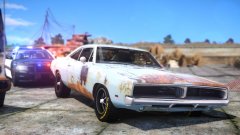 I wonder why the car looks so rusty but the wheels look perfectly fine, like brand new.
 -
This topic has been moved to the appropriate forum. Please post in the correct location in the future.
-
I've just installed LSPDFR and after that RPH 0.22 as usual. However, you'll need at least .NET Framework 4.5.2 and Visual C++ Redist. 2015 to run RPH 0.22, IIRC.

