




TheUniT
Friends of LSPDFR
-
Joined
-
Last visited
Everything posted by TheUniT
-
Yes it does. Well, it should.
-
Well, maybe the buggy mouse cursor problem I had won't be that much of a problem then.
-
Stelle sicher, dass du es richtig installiert hast (siehe Readme). Hast du alles richtig installiert, muss es nicht manuell geladen werden, da LSPDFR API Plugins automatisch lädt. Habe dir das Thema ins Deutsche Forum gemoved, poste nächstes mal bitte gleich am richtigen Ort.
-
-
Probier, ob es geht, wenn du das (Anhang) in deinen Spielordner ziehst. SlimDX.dll
-
Wie gesagt, x64.
-
Also bei LSPDFR ist RPH 0.20 dabei. Welche Dateien meinst du?
-
Hey. Welche RagePluginHook Version hast du? Für 0.21 und neuer brauchst du das hier:. https://www.microsoft.com/de-de/download/details.aspx?id=48145 Benutze die x64 Version.
-
This topic has been moved to the German forum. Please post in the correct location in the future.
-
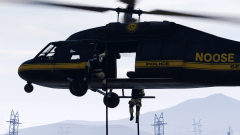 Sexay! Now I just need a download and rappelling NOOSE backup in LSPDFR. :D
 -
This topic has been moved to the appropriate forum. Please post in the correct location in the future.
-
Hello there -- welcome to LCPDFR.com and thanks for trying out LCPDFR! Please do the following: Make sure you aren't using a crack - We don't support cracks or people using pirated software Update GTA IV to 1.0.7.0 (the latest version of the game, or 1.1.2.0 for EFLC) - These patches are needed. Make sure that you run the game as an administrator. Make sure that your GTA IV root folder (and every subdirectory) is not set to "read-only" Ensure that AdvancedHook.dll, ScriptHook.dll, ScriptHookDotNet.asi and Dsound.dll OR Xlive.dll are in the GTA IV ROOT folder Ensure that there is a folder titled 'LCPDFR' in the ROOT GTA IV folder. Check that all the above files exist, if they do not, reinstall LCPDFR with the MANUAL installation. Ensure that you are using up to date versions of every LCPDFR dependency and LCPDFR itself. Install these: https://www.microsoft.com/en-us/download/details.aspx?id=30653 , https://www.microsoft.com/en-us/download/details.aspx?id=30679 In some cases, your issue is resolved after following the above steps. If it did help, please let everyone know in the topic that your issue is resolved. If you do have to post a topic, do the following; Give a clear, detailed description of the problem. Explain any circumstances surrounding the problem. State what solutions you have tried. Post ALL relevant logs (LCPDFR.log, Scripthook.log, ScriptHookDotNet.log, AdvancedHook.log). Include as much information as possible. Post your system specifications. Post what other mods you are using. This includes car and script mods. Post a screenshot of your GTA IV or EFLC game directory. Please note that failure to follow these instructions may cause this thread to be closed. Your topic has been moved to LCPDFR Support Requests. Please post in the correct location in the future.
-
Hm, das kenne ich selber nicht. Frag am besten mal im RagePluginHook Forum nach, da werden die Entwickler versuchen dir zu helfen.
-
Hey. You need to use OpenIV's ASI Manager and install the OpeniV.asi. After that, create a folder called "mods" (important: no capital M) and copy the .rpf file you want to modify into the mods folder. Then modify the file (the one within the mods folder, of course) to your liking. OpenIV.asi will load the files in the mods folder instead of the ones in the original game folder. For more information and instructions, have a look at this. http://openiv.com/?p=1132 Your topic has been moved to GTA V Support, this is not LSPDFR related. Please post in the correct location in the future.
-
-
^^ Well, in a future update, you can still compile it against a newer (say 0.22 or 0.25 right away) version of RPH.
-
Komisch. In der Log sehe ich keinen Fehler. Dass LSPDFR angehalten wird, weil es das Spiel einfriert, ist auch ungewöhnlich.Hast du alles richtig installiert?Schaue außerdem mal in deine RagePluginHook.ini (vorausgesetzt du hast eine, wenn nicht, sag bescheid) und sieh nach, ob eine Zeile "PluginTimeoutThreshold=10000" heißt. wenn nicht, füge diese hinzu.
-
Hi. Die Installation von Police Radio ist eigentlich ganz simpel. Du brauchst aber die richtige Version. Ich nehme an, du hast nur LSPDFR installiert? Dann solltest du die v0.20 der RagePluginHook (in LSPDFR enthalten) drin haben. Du lädst also die Police Radio Version runter, die für RPH 0.20 gemacht wurde (wenn du bei Police Radio auf Download klickst, wählst du "55c909ede79d1_Police_Radio_0.35_RageHook_20_-_hotfix.rar") und öffnest die .rar. Dann gehst du in deinen GTA V Ordner und navigierst zu Plugins -> LSPDFR (falls es keinen LSPDFR Ordner im Plugins Ordner gibt, erstelle einen). Du ziehst, wenn du in diesem Ordner bist, einfach alles aus der PoliceRadio.rar in diesen Ordner. Das sollte dann so aussehen:
-
Am besten den ganzen.
-
Hey. Poste bitte Deine ganze RagePluginHook.log (im Hauptordner von GTA V zu finden) oder hänge die Datei an.
-
True, but the AI cops will still (try and) follow the suspect closely.
-
Komisch, ich habe auch Windows 10 Home und bei mir funktioniert es. Probiere mal stattdessen einfach LSPDFR zu installieren ohne die neueste version der RagePluginHook drüberzuziehen. Wie gesagt funktioniert LSPDFR mit 0.20 am besten.
-
0.24? Ich bin mir nicht sicher, aber installier mal diese beiden Dinge: https://www.microsoft.com/en-us/download/details.aspx?id=48145https://www.microsoft.com/de-de/download/details.aspx?id=48130Außerdem kann es sein, dass LSPDFR mit RagePluginHook 0.24 nicht optimal funktioniert. Probiere lieber 0.20 (in LSPDFR enthalten) oder 0.22 (weil die meisten Mods dafür geupdated sind).
-
Welche Version der RagePluginHook benutzt du?
-
Hello there -- welcome to LCPDFR.com and thanks for trying out LCPDFR! Please do the following: Make sure you aren't using a crack - We don't support cracks or people using pirated softwareUpdate GTA IV to 1.0.7.0 (the latest version of the game, or 1.1.2.0 for EFLC) - These patches are needed. Make sure that you run the game as an administrator.Make sure that your GTA IV root folder (and every subdirectory) is not set to "read-only"Ensure that AdvancedHook.dll, ScriptHook.dll, ScriptHookDotNet.asi and Dsound.dll OR Xlive.dll are in the GTA IV ROOT folderEnsure that there is a folder titled 'LCPDFR' in the ROOT GTA IV folder.Check that all the above files exist, if they do not, reinstall LCPDFR with the MANUAL installation.Ensure that you are using up to date versions of every LCPDFR dependency and LCPDFR itself.Install these: https://www.microsoft.com/en-us/download/details.aspx?id=30653 , https://www.microsoft.com/en-us/download/details.aspx?id=30679 In some cases, your issue is resolved after following the above steps. If it did help, please let everyone know in the topic that your issue is resolved. If you do have to post a topic, do the following; Give a clear, detailed description of the problem.Explain any circumstances surrounding the problem.State what solutions you have tried.Post ALL relevant logs (LCPDFR.log, Scripthook.log, ScriptHookDotNet.log, AdvancedHook.log).Include as much information as possible.Post your system specifications.Post what other mods you are using. This includes car and script mods.Post a screenshot of your GTA IV or EFLC game directory. Please note that failure to follow these instructions may cause this thread to be closed.


