



EvilJackCarver
Members
-
Joined
-
Last visited
Everything posted by EvilJackCarver
-
LSPDFR can be ran on any PC with a Windows NT-based OS (past XP) that is capable of running GTA5 at a reasonable framerate.
-
RPH's commands use RPH's console, accessible (if it's installed) with F4 by default.
-
 Well, you know what they say: "If you're gonna screw up, better to do it in a way that leaves 'em wondering how in the Hell you managed it"!
 -
You could use RPH's "spawn" command, or a trainer.
-
Notes for modstaff in spoiler. Preface This text was adapted from a document by Eric S. Raymond, titled How to Ask Questions the Smart Way. The full document is available here - the authors of this document are in no way affiliated with G17 Media nor myself, and aren't there to answer your questions about how to get whatever it is you're trying to get working, working. Introduction If you're reading this, hi there. I suck at smalltalk and making things sound nice, so I'll open with this: In the world of diagnostics, there are a few right ways to get Solutions... and many, many wrong ways. This post is here to hopefully help nudge you toward the right ways, so that you can get the Solutions you want easier. Of course, getting a good Solution isn't just on the people helping you solve your Problems - and you're naïve if you think that. A lot of the work needed to solve a Problem falls on you. A vast majority of the time, whether the issue gets solved depends not on the Problem itself, rather what the end user did to troubleshoot and what information they posted in their support threads. Depending on how you present your issue and what it may or may not contain, your Problem's thread may get zero replies, or a hundred; it may be solved in an hour, a week, or it may remain an unsolved mystery. This post is here to reduce the odds of that last bit. Still with me? Let's begin. Before you post: Reproduce the issue. Try to reproduce the Problem. If your game is crashing, try to duplicate the crash. If you can narrow the crash down to a certain cause, you're much better off with getting a Solution to your Problem, because if you can reliably reproduce the issue and tell us HOW you reproduce it, we're much more likely to be able to see the Problem ourselves. Also bear in mind your Problem may just be a fluke. Maybe the stars aligned just wrong. Maybe it just ain't your lucky day. A good rule of thumb is three times - if the Problem appears three times, it isn't "just a fluke". Research the issue. Before you present your Problem, do a bit of research. Give the manual or readme of whatever's having issues a read - the manual/readme is certainly there for a reason. They may not have a troubleshooting section, but the Problem could be a simple issue with installation, especially if the Problem cropped up right after you installed a mod or reconfigured one. If nothing turns up in the manual, it's time to move onto the web. Search the forums for your issue, and look through the results. If you have an error code, search it. There's also a simple method that I use when searching that I refer to as "object-deviation" - as in, "object that's the issue, and deviation from how it normally works". (Side note: This is also a very good way to write your thread's title, as stated in the document linked above.) Good example: "GTA5 white police lights". If the Problem is an issue with a plugin, it's a good idea to look through your log files - sometimes, the error will be right there in plain sight, especially if it's a configuration issue. Note that verbosity isn't necessarily a good thing - a lot of forums will search EVERY word in the search bar, without omitting words like "the" or "are". If it's an issue with a mod, be sure to look through the file comments as well; someone may have had your Problem already and it may be solved already for you. If you get nothing on the forums, move on to Google, in quite the same fashion that you searched the forums. Sleep on it. No, I'm serious. Step away from the Problem for the day/night, regardless of how much you want it fixed here and now. Give it until tomorrow, after you wake up and have a level head, and are all refreshed. It's no use trying to diagnose your Problem while tired; you could easily miss important clues. When you post: Post in the correct forum. You'd be surprised at how many get moved or locked because they're in the wrong forum. Use a descriptive title. Some people will read every thread in the support fora, and there's nothing wrong with that. However, most people won't open a thread in a support forum unless the title catches their eye. Most people that look through the support fora will skim the thread titles. Using a descriptive title ensures that your Problem will be seen by someone before they even open the thread. As above, a good convention to use is "object-deviation" - "object of the issue-deviation from normalcy". VERY BAD: "GTA doesn't work" - Saying something "doesn't work" is the absolute kiss of death and will very likely cause the thread to be ignored. Saying it "doesn't work" is like a used-car salesman saying a car has wheels - it tells us nothing we don't already know, for if it did work as intended you wouldn't be asking for support. "GTA doesn't work" is not a question, and we're not interested in playing Twenty Questions to pry your actual Problem out of you. BAD: "GTA crashes" - It's the bare minimum you can get away with, but you can be more descriptive than that. GOOD: "GTA crashes when I drive near the prison" - You have a pretty decent, descriptive title here, saying exactly what's going on - GTA is crashing when you drive near the prison. It doesn't leave what the Problem is for guessing - it's all right there. Don't butcher the English language. No matter how much of an emergency getting your Problem fixed may seem, THERE IS NO NEED TO USE ALL-CAPITALS IN YOUR TEXT; MOST PEOPLE READ THIS AS SHOUTING. LIKE YOU PROBABLY JUST DID. The only notable exception to not using all-caps is to emphasize A SPECIFIC POINT, in moderation. (writing in all-lowercase is more tolerable, but on some typefaces is very hard to read.) Don't abbreviate unnecessarily, typng n smsspk lik this 2 sv k/s makes u look lik a semi-lit boob. If you write like you're a semi-literate boob, you're less likely to receive a Solution and more likely to be a zero-reply thread. Describe your problem and your troubleshooting steps. At the head of the post, you should re-describe the Problem in further detail and explain what you've tried. If there were any effects on the Problem at all - positive or negative, especially negative - list the effects as well. In doing so, less time is wasted on what you've already done and more can be spent on that which you haven't done. Attach relevant logs and configs. If it's an issue with a plugin or an ASI mod, attaching the logs could pin down your Problem to an issue. If it's a configuration issue, attaching your config file could help us point out where you went wrong. Leave questions open-ended. If you have a question about something, leave it open-ended. Yes-or-no questions get yes-or-no answers; leaving a question open-ended allows room for us to suggest a better way to do whatever it is you're trying to do. BAD: "How do I get a RGB car paint colour through a trainer?" GOOD: "I'm looking to get an RGB car paint colour from in the game. I'm trying to do it with a trainer but I don't see a way to do it - any suggestions?" Note how the way the second example is worded subtly encourages you to suggest something better-suited to the task than the trainer. Describe the Symptoms, not wild guesses. It's not useful to tell us your wild guesses as to what you think might be happening sans context - if your diagnostic theories were correct, you wouldn't have a Problem to post in the first place. Write down what your Problem's symptoms are and let us see what we can do. That's not to say educated guesses aren't alright - in fact, they're more than OK if you can tell us how you came to that conclusion; but if you can't give us a logical, rational explanation on how you came up with your guess, you're better off not posting it. Keep public support requests to public channels. Problem solving should be public - if someone else comes upon your Problem later, they can look at your thread and see any Solutions that you may be given. There may be reasons for taking something to PM, but unless you're specifically asked to, you should leave it public - taking it to private channels without permission is generally seen as rude. Now that you've posted: Keep looking for possible Solutions. If you find a Solution to your Problem before someone else does, edit your post and tack on the solution, and make the title clear that it's solved. If you say "nevermind, got it" you look like a dick for not posting what you did to fix it, to any future Solution-seeker that may happen to stumble across your thread. (Above image copyright 2011 Randall Munroe. Link to source) Don't mistake bluntness for rudeness. A lot of communications for a lot of people revolve around tact and courtesy - not here. As you can tell by the way this is written, people here to help you solve problems are very seldom here to make you feel warm and fuzzy in doing so. We're not here to offend you, we're just cutting through the unnecessary fluff. If you feel someone's being rude, keep cool. If they really are being rude, someone will call them out on it. If they don't and you lose your temper, it's quite possible that whoever you just lost it on was behaving within the community's norms. Most flames are best left to burn themselves out - after, of course, you've checked that they're really flames, and not hidden Solutions to your Problem. Don't immediately demand clarification for Solutions you don't understand. Yes, you read that right. If you don't understand, you should use the tools you used to try to find your Solution before you posted it (Google, forum search, manuals, logs, etc.) to try to understand the Solution you've been given. If you're still stumped, THEN ask for clarification. BAD: "What do you mean 'set SECL to DROT'?" GOOD: "I read the manual, but I didn't see anything about DROT under 'SECL'. I did find DROT under 'PRML', and 'ROTA' under 'SECL', though; is it one of these or am I missing something?" Don't bump your thread. No matter how long it's been, have a bit of patience: no response isn't the same as being ignored, though it may be difficult to tell the difference. Bumping your thread may be seen as a sign of impatience to those that may be trying to help. Also, bear in mind the size of the Earth - even if it's high noon where you live, someone with a potential Solution may be fast asleep at 2 in the morning where they live. In Conclusion A lot of our ability to give Solutions depends on your ability to provide information. Threads with a lot of useful information are easier to provide Solutions for, whereas Problems with absolutely no information listed are nigh impossible without us having to force the information out of you. By using the above guide, you greatly increase the odds of getting a useful Solution to your Problem, and you may even learn a thing or two in the process.
-
I could be mistake, but I think -windowed needs a -width and -height parameter.
-
 Yo dawg, I heard you like headache racks.
 -
Sure it is, you just gotta know who made the model. If you know what vehicle you're looking to make a template for, 95% of the time you can usually find a template for them in a model for download.
-
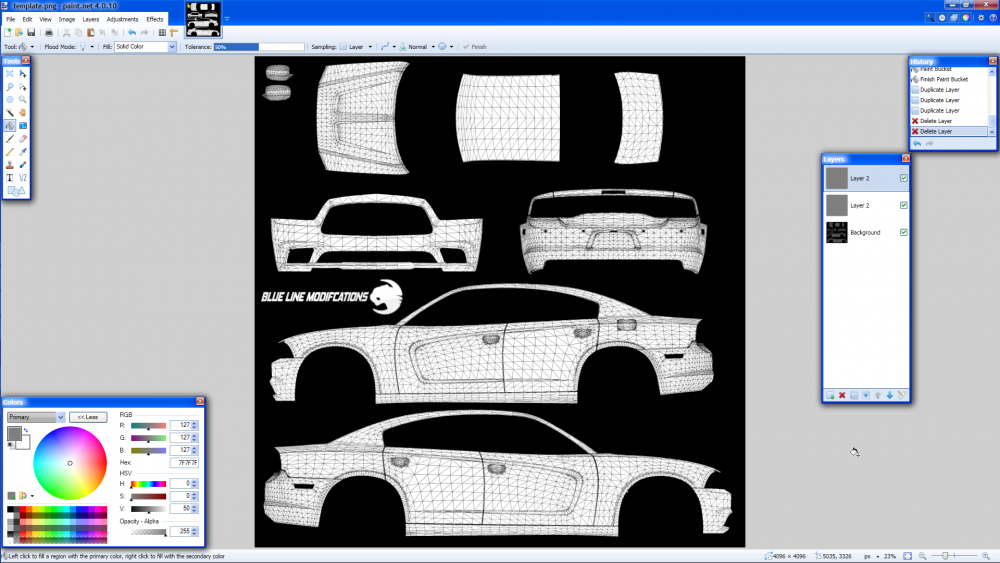
It's possible, but tedious. What you could do is use a white layer (hidden until you go to test), and have another layer you colour on. It's what I (and probably a good majority here) have done. To show off an example (which is a texture I edited for personal use to make an in-joke)... That's how I worked on it - sign_1 is the base paint layer (and the base template that I started using), Layer 1 is the cover-up colours you see by the mirrors. I worked on it with the template visible, and when the time came to export it as .PNG, I ticked the base paint colour (or, in this case, sign_1) to be visible and went from there. This isn't to say that there aren't other ways of doing things - whiting out the template and colouring inside the lines is a perfectly valid way, albeit one that might earn you some funny looks - but a lot of people do it this way for a reason, so that you still have the (imprecise) template polys to line everything up on. Also, a lot of UV mapping - especially in GTA IV on the older Chargers - is imprecise. What I mean by that is, as you get close to the dividing line between two panels on the livery - say, the side view and the back bumper - one of them inevitably starts distorting, and won't exactly be true to the poly grid shown on the template. You also have to account for the outline that's there around the entire outside of the vehicle that you can't see - it may or may not be mapped. In a lot of the older cases (gonna pick on one of the old HSD Chargers here) it IS mapped, so you have a pixel more than you can see on the black-outline template.
__2016-08-29_21-50-52.thumb.png.06bf89e360ecdd71a813f645e6916521.png)
-
-
Layers, they are your friend. What graphics editor are you using? If you're using one that doesn't support layers, it may be a good idea to look at some that do. The screenshot above was taken with PaintDotNet, which is like a Poor Man's Photoshop. Free and it'll get where you need to go, but it won't do much of anything fancy.
-
 If you really want a laugh, I've stopped a guy named Anus Flayer before.
 -
Okay yeah, that's a bit of a mistake. The templates should be used as basis for positioning of your livery's elements, not as a basis for your livery itself. Erasing the lines in a template is a bad idea because: You could easily miss part of the poly grid and have a line in your livery The poly grid is imprecise by nature, and thus you could have outlines on your livery Destroying a template means you no longer have that template. What you should do instead, is make a new layer and use that as your base colour, leaving it hidden while you're working on the elements of your skin - i.e. positioning - and unhiding it when you're done working with it. All that whitespace on the templates are just that - whitespace. With 99 out of 100 templates, I could have a black base colour, but hot-pink whitespace and the hot pink wouldn't show up at all.
-
It already can. Quick question - this your first time skinning? (There's no wrong answer to this question, it's just if you're asking what I think you're asking, you're about to fall into a rookie mistake)
-
Easy way to get a black-and-white template out of a colour one: Grayscale the colour one, add a layer of 50% grey on colour dodge, duplicate the grey layer as necessary. That said, generally speaking it's easier to tell what bits and bobs of a gradiented template are where on the model without having to look at the model; a lot of modellers tend to use a locator gradient (I never learned the proper term) for this very reason.
-
I don't think anyone but Albo has made callouts that use the courts yet. (Someone please prove me wrong, I'm looking for a new callouts plugin)
-
My organised mess I call a desk. You should've seen it a year ago.
-
Hell, why not. Fair warning, my desk is a mess.
-
 Hi-hi, me again, seems you can add the Police Riot to that list. Same stack trace insofar as I can tell; log's attached anyway. I'll run down the list of vehicles and let you know if there are any more. RagePluginHook.log Edit: Seems it's just those two. Minor (trivial!) issues with wrong sirens, though - the PoliceB and Sheriff2 use the same siren as the Police1/2/3.
- 852 comments
- 108 reviews
-
Hi-hi. Using default configuration (I haven't even touched keybinds yet!), I spawned in a lifeguard Granger, and it seems it's crashing the plugin. I'm able to reproduce it consistently - tried twice, succeeded twice. I noticed on the second attempt to reproduce the issue that it's showing all 10 siren buttons on the UI, if that means anything. Just figured I'd report it - not like I use the lifeguard Granger for anything. RagePluginHook.log
- 852 comments
- 108 reviews
-
Ah, misread. My bad.
-
It deals with the lightbar configuration of emergency vehicles.
-
Get a mini-vac and a can of aerosol, pop the side off the PC, turn on the mini-vac and set it down pointed vaguely in the direction of the computer, and go to town.
-
The patrol units, if configured with a police ped in them, will react like an ambient cop. If you shoot randomly near them outside of LSPDFR, they'll respond. If you're in an LSPDFR pursuit near them, they'll join the pursuit. Those vehicles are merely ambient cops, not unlike the cops in GTA 4 that randomly patrol. LSPDFR spawns a backup unit when you tell the game you need backup, regardless of if there's a unit that'll suffice for backup already spawned and in sight.
-
ELS files are vehicle configuration files to be used with the Emergency Lighting System. Without them, the lighting won't work as the mod-author intended. (If you're using it with ELS, it'll still work, however!) They go into the root GTA4 folder, where the executables are. You'd need to edit ELS.ini and set the VCF as appropriate. I haven't played with ELS in a good long while so I don't remember exactly how the INI file goes, but if your config file's name is "ambulanceconfigname", it'd look similar to I don't have the user manual in front of me, though, so you'd be better off reading it to get an idea of exactly how it goes. I'm mis-remembering, Illusionary has it correct.


__2016-08-29_21-50-52.png.b3347328762fbedd16f4f3f8ac0b37d6.png)

