




Iconography
Members
-
Joined
-
Last visited
Everything posted by Iconography
-
Go to the GTA main menu --> graphics settings --> Vehicle Density
-
http://www.lcpdfr.com/cops/forum/topic/492-lcpd-first-response-key-guide/ Or, press Shift + Tab while on duty.
-
If you modded your helicopter it may be best to revert back to the original. GTA hates high poly vehicles.
-
-
-
-
It probably is the game. GTA deletes peds, vehicles, etc after going a ways away and for a certain amount of time in order to save memory.
-
-
I think it's used to add more detail w/o needing more polygons by showing lighting effects... not sure.
-
The mugging callout can't be fixed by the users yet. The developers are working on it.
-
I only remember hearing the mugging one not working when you press Y. Strange. Try a new area, like Algonquin, and then see how it works with just xlive in there now.
-
I took the information I could gather from the links you gave and came up with a card that may work for you. It's $99.99, and the chipset is rock solid from my experience. I used to have the same chipset, but from EVGA rather than Gigabyte. The card is a Gigabyte GTX 260 896MB, with a 448-bit memory interface. It is an old card, probably about five years old now, but it works. It isn't 1GB of VRAM, but it is definitely good enough for GTA. using this card, plus my i7 (I believe I had my i7 at the time), I could play GTA on medium-high settings pretty well. When I had a GTX 260, it worked flawlessly. It ran fine on my 700W power supply, but a 550W or 600W should do it. If you happen to know how many watts your power supply outputs, that will be useful as well. Link: click me. Note that it is double width.
-
Try to patrol a different area, see if the failed to spawn error goes away. Make sure that dsound.dll is not still in your GTA folder. Can you be more specific when you say you can only play certain callouts, please? The mugging one doesn't show code 4 when it's supposed to so pressing Y sometimes won't seem to do anything, if that's one problem you're having.
-
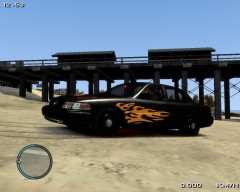 Looks awesome
 -
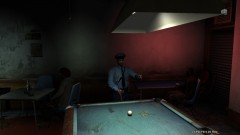 Guy in the corner is staring you down.
 -
This makes me nervous. When you say download, do you mean via Steam or comparable store, or via torrent? And yeah, post lcpdfr.log like Jay asked, that'll help.
-
-
You don't need to add anything. Adding extra things increases the chances of having a non-working copy of the mod. In order to get extra lights, you would need new cars and ELS (Emergency Lighting System). It's a mod.
-
-
-
-
-
-
-
Well there probably isn't anything that Jay can do for you now (unless there's some old stats lying around he can splice in some how). It's nothing to get that upset over, though, it is just a mod remember. I know how disappointing these kinds of things are, though. It's like building a giant tower out of playing cards and having it crash down to the floor at the last minute.


