




DivineHustle
Members
-
Joined
-
Last visited
Everything posted by DivineHustle
-
This was all fun and games until now folks, time to get down to business and be serious here. How about you all just speed up the inevitable and allow me to claim the victory here. Thanks guys!
-
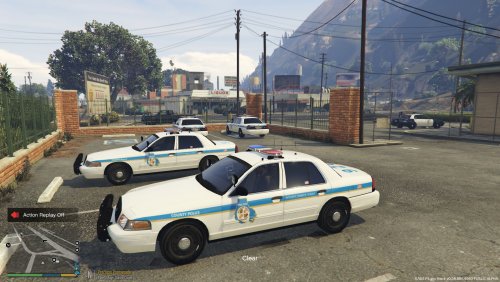 Not bad at all. Basic but decent interior, well rounded car. In order for it to be 100% accurate to the real life counterpart, the blue and red LED on the top light bar need to be switched. Baltimore County Police also don't usually have the radio type antennas on the roof of the car. A great attempt and I give it a 5/5, with my only con for the car being some minor inaccuracies to the real life car.
- 2 comments
- 1 review
-
Do I dare say 1? ......1....
-
Maybe Activision and Infinity Ward should take a hint, eh?
-
 ....Any updates on whether or not this still works? Seems as though many other new downloads are experiencing issues with this.
- 335 comments
- 70 reviews
-
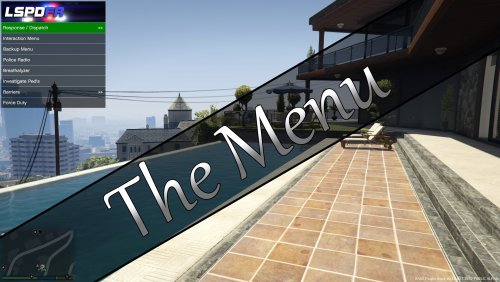 The setup for this is very confusing. I'll see if I can figure it out though. This mod looks like It'd be a big plus in the long run but I literally have no clue what I'm doing, and there isn't any tutorial video to follow on this.
 -
......And in other news, Call of Duty: Infinite Warfare trailer has reached 1.3 million dislikes on YouTube. It's amazing, it seems to get about 30 dislikes every second. Just refresh the page constantly and look at the dislikes.
-
 These looks pretty good. I would like to see some officers that don't have a rank insignia sometimes, adding a bit more variety on that front. I would also love to see the size of the rank insignia made a bit smaller. It would also be nice to see the ranks and patches a bit higher quality. Just small things that I think would be amazing to see. Can't wait to see more of your work! Edit: You listened to what was suggested and did just that plus more. These are amazing! If I could change my rating to 5 stars I would!!
- 273 comments
- 61 reviews
-
-

- 4
-
-
This looks freaking amazing. I'm so sick of all the futuristic type stuff that everyone seems to be doing, especially Call of Duty. Did you hear? Infinite Warfare is featuring Star Wars related space battles, LOL. I'm just happy to see a decent change from the redundancy that we've been getting for a while not. DICE could also create a story that leads into WW2. I feel like this was kind of a test by DICE to see if people would actually want something like this. Just comparing the number of likes to dislikes on the Infinite Warfare trailer to this trailer says it all.
-
 I've resolved the issue. For some reason my RageNative was acting up. I just went on and replaced my old RageNative with the one provided in this file and everything worked. Thanks though!
- 3,646 comments
- 306 reviews
-
I'm getting an issue where every single one of your mods exits right when I go on duty. Traffic Policer, Assorted Callouts, and others all exit, giving me the option to press either 1 or 2 to exit or exit and open a video. Everything else loads up perfectly fine for me. Do you need my logs or?
- 3,646 comments
- 306 reviews
-
-
 How do I download what's being displayed in the picture? I don't see it. Don't mean to be rude or anything but it's very annoying when what's displayed in the picture isn't entirely what we're receiving when the mod is downloaded.
- 101 comments
- 17 reviews
-
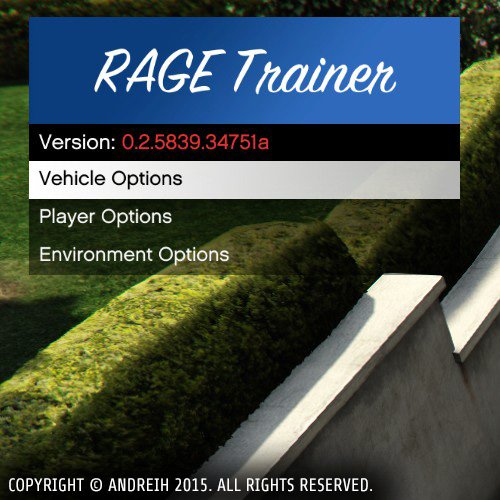 ..Any update on this?
 -
I can second to this. It takes a while for someone familiar with GTA 4 modding to convert to GTA 5 modding alone. I can only imagine how difficult it must be for new, clueless people to mod their GTA 5. It took me a few weeks to gain enough knowledge and learn how to change and modify basic game files, such as cars and pedestrian models. I still don't fully understand how everything works. It just seems like a lot of the tutorial videos out there are either outdated or the instructions don't add up when I actually try to do it myself. I don't think an installer altogether is possible, though there are a lot of mod managers out there. If I continue to run into difficulty I may switch to a mod manager, but even then you're relying on the mod manager to not be broken or incorrect with its file movement.
-
Damnit. I understand exactly what you're saying. To be honest the best option would probably be to suck it up and just reinstall everything. That would ensure the files aren't corrupt, broken, and that the mods all work the way that they should. The only reason why I'm trying to resist going that route is because, like you said, the different GTA versions in accordance with the Ragehook versions in accordance with even individual mods versions. I'm not sure what I'm going to do. I may just install a fresh GTA and then move over my mods like you said. If we get into the details of getting the correct Ragehook version then the correct mod version then ensuring it works, then adjusting the settings within the ini of the mods, it just takes forever you know? Thanks for the help though, I'll try that first and see.
-
I have the legal steam copy version of the game. I was having issues with the mod folder so I changed the actual files of the game. So do you think I'll have to download a fresh clean install of the game? I know GTA updated and Ragehook has to update and then individual scripts and mods have to update as well. Would that be a problem with a new install of GTA? When you say the right folder structure, you mean the automatic folder structure that the game creates during installation? I haven't changed anything with my files other than the actual files itself when modifying content. So basically, copy all of my modded files, put them on the new system, then install GTA through steam?
-
As some of you may know, I made the mistake of ignorantly purchasing an Alienware gaming laptop. I've had nonstop countless problems with it, and I'm going to get a new system. It took me days to get my GTA 5 to a modded, stable state with everything needed to enjoy the game. I'd really hate to go through the entire process again. Is there anyway that you can take the entire GTA 5, and move it onto another system?
-
-
.thumb.png.da31fac1cdbed476577a0aaf4ab60f16.png) Definitely the best partner mod, but needs some work. When I enter a pursuit, my partner will just stand there aiming his gun at the fleeing vehicle. Even when I order him into the car, no response. On certain officers, they'll actually disappear when I drive a bit away from where they were spawned, almost as if they were spawned to remain in that particular spot. Also, sometimes I'll get into the car and the partner won't get in at all. I'll have to keep getting in and out in order for him to get in, and then he takes his sweet time walking around to the passenger side to enter. Sometimes these can be game-breaking problems, completely killing any sort of immersion, realism, and fun in a pursuit. But still, a great start!
Definitely the best partner mod, but needs some work. When I enter a pursuit, my partner will just stand there aiming his gun at the fleeing vehicle. Even when I order him into the car, no response. On certain officers, they'll actually disappear when I drive a bit away from where they were spawned, almost as if they were spawned to remain in that particular spot. Also, sometimes I'll get into the car and the partner won't get in at all. I'll have to keep getting in and out in order for him to get in, and then he takes his sweet time walking around to the passenger side to enter. Sometimes these can be game-breaking problems, completely killing any sort of immersion, realism, and fun in a pursuit. But still, a great start!- 156 comments
- 25 reviews
-
-
- 1
-
-
For some reason when I use this mod, it doesn't have any effect on the brightness of the emergency lights. Still looks very dull on my end. Seems like all new downloaders are having the same issue with this file. Hopefully it's fixed soon, I really want to use this.
- 335 comments
- 70 reviews
-
Detroit is royally screwed. People just don't want to move back to Detroit, there's no incentive.
-
Jock Cranley is corrupt. Sue Marry knows what's best for the City of Los Santos, and what's best for (America?).
-
The situation in Detroit is completely insane. A HUGE portion of Detroit's residents left the city, it's just a mess.
-
CVPI looks good thus far! Gonna be hard to choose between this pack and your previous San Andreas pack, xD.


.thumb.png.da31fac1cdbed476577a0aaf4ab60f16.png)