Sam
Community Founder
-
Joined
-
Last visited
Everything posted by Sam
-
YouTube and Discord have other things to worry about.
-
No, our website is built on the principle that anyone can browse and download. We're not here to shut things off or stop people from downloading mods. This will never change. People downloading mods is not the problem - it is the whole point of having a downloads section in the first place.
-
We invest substantial amounts of time and money into keeping this website online. The security check is part of the protection. Protecting a website like this (with over a million pageviews daily) is a lot different to protecting a small community.
-
Actually, this happens frequently. We don't have the security check for no reason. It is so that people can't force the website offline by making thousands and thousands of download requests which would overload the server.
-
I already checked as soon as you brought this up because it was something I had never heard before. Two other staff members confirmed to me that what you described did not happen, and I checked myself through the moderation history. I'll say this one more time - he was not banned.
-
If you're going to come on here and accuse me of lying, despite me telling you numerous times that you're misinformed, and despite you not providing any proof to the contrary, I would suggest you are not interested in the truth.
-
Cyan already acknowledged what you or others said about Ezra. I've already confirmed to you that the case you raised wasn't true and the member wasn't banned. What else do you want?
-
He's not banned.
-
Do you even know what you're talking about? We investigate every report that is submitted towards us and take action when our rules are broken. We already explained that Discord and FiveM are outside of our control.
-
Again, here we are. People ask for a civil conversation, want to ask questions. That's fine, I'm happy to answer questions. I'm not happy to be called a liar after doing so.
-
Cyan already clearly explained that if someone is ripping models and distributing them on Discord, there's nothing we can do about it. We take action when people break our rules. Our rules do not apply to Discord.
-
I don't know about the ban because it doesn't exist. I'm sorry if that doesn't fit your narrative.
-
Was asking for people to refrain from finger pointing too much? You can't ask for a civil conversation and then start calling people out. We already said that this is something we are looking into.
-
All of it. I won't comment on the moderation history of another member for obvious reasons, but we have never banned anyone for anything remotely close to what you describe.
-
This isn't even true.
-
You can, just go to the page on your tablet.
-
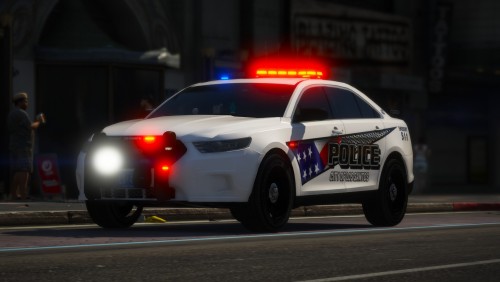 Fantastic piece of work here, always a treat to see something like this pop up. Congratulations on making the front page.
- 37 comments
- 24 reviews
-
-

- 4
-
-
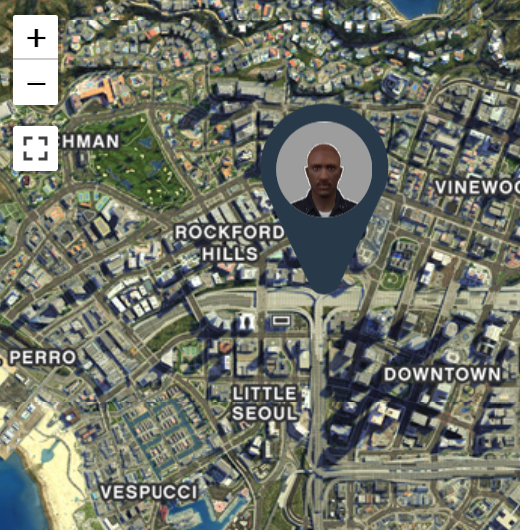 Just a week ago, we released LSPDFR 0.4. Since then, there's been at any given time an average of 620 people playing LSPDFR, peaking at just over 1,200 earlier today. We think these are pretty incredible numbers for a game mod, and we've really enjoyed watching as people get to grips with 0.4 and all of the new possibilities it offers. Today, though, we're introducing two new features as part of LSPDFR Sync - the Activity Feed and the Companion App, available now on the website, which you can find out more about below.
 -
Just a week ago, we released LSPDFR 0.4. Since then, there's been at any given time an average of 620 people playing LSPDFR, peaking at just over 1,200 earlier today. We think these are pretty incredible numbers for a game mod, and we've really enjoyed watching as people get to grips with 0.4 and all of the new possibilities it offers. With that being said, we've been monitoring the support forums and have recognized that there are, of course, a couple of issues with 0.4. We're working to get as many of these sorted as we can and hope to release a small patch to address the most important ones shortly. Today, though, we're introducing two new features as part of LSPDFR Sync - the Activity Feed and the Companion App. Activity Feed The Activity Feed, in a bit of a throwback to the days of LCPDFR's Crime Statistics, is a live activity wall of everything that's going on in LSPDFR 0.4. You can track what your fellow officers are up to with live updates on callouts, traffic stops, arrests, etc. Plus, we've integrated it with the website so everything is linked together nicely as far as Characters and forum accounts go. https://www.lcpdfr.com/lspdfr/04/activity/ Companion App The Companion App is something a little different that we're working on. Open it up while in-game and you'll see an overview of your current session with your Character's location marked on a Google Maps style rendition of San Andreas. As well as some basic info about your Character, we've added a couple of actions that can be performed from the app such as calling backup and going on and off duty. https://www.lcpdfr.com/lspdfrsync/companion/ It's early days, but we definitely have some cool plans going forward for the Companion App.
-
You need to show your full files and not just screenshots.
-
The apartment used is 'int_mp_stilts_b', added in the 'mpartments' update.
-
Check your game folder (the one where GTAV.exe) is and see if you have LSPD First Response.dll there. If you do, remove it.
-
Please do not bump your topic 3 times. I have taken a look at your issue and I believe the problem was us getting the documentation for this wrong. I have updated it, give it a try now: https://www.lcpdfr.com/wiki/lspdfr/04/modding/doc/spawnpoint/
-
-
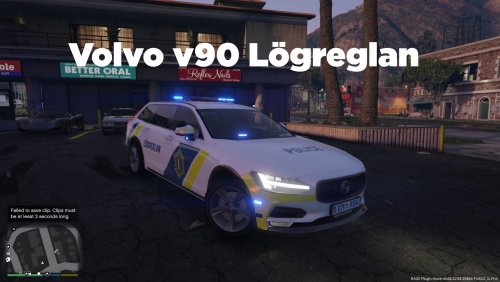 Cool, I saw one of these in Iceland last summer!