




Sam
Community Founder
-
Joined
-
Last visited
Everything posted by Sam
-
Please post your RAGEPluginHook log file.
-
The crash isn't caused by LSPDFR but by Traffic Policer, probably because it doesn't fully support 0.4 yet.
-
Yes, look here: https://www.lcpdfr.com/files/file/22088-eup-outfit-settings-for-lspdfr-04/ It's something you need to configure yourself using the XML customization. Plenty of info and topics in the wiki about it.
-
I decided to create a simple mod to enhance the LSPD outfits too. This is perfect for anyone who doesn't use EUP, and is super easy to install.
-
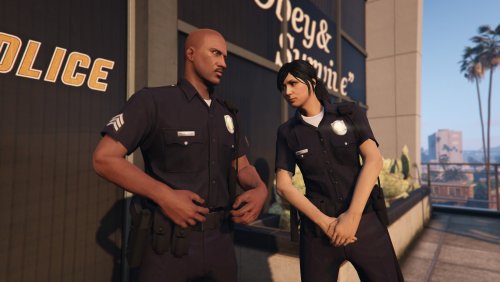 This is a simple edit of the multiplayer character police outfits. I decided to make this to complement the new character system in LSPDFR 0.4. It is perfect for anyone who simply wants more realistic and very lore-friendly police outfits, but doesn't want all of the content and agencies included with EUP. Main features: Bigger, better, LSPD badges with improved textures. Polished shine effect added to the badge and nametag. Gun holster added to the duty belt. LAPD style Officer III, Senior Lead Officer and Sergeant rank patches. There are a couple of other changes too: The badge and rank patches use the same component slot (10), meaning that a sergeant will always have the correct sergeant badge and patches. This also means you can wear the shirt without a badge. It also significantly reduces the filesize and texture space required. Minor texture edits which make the uniform colours more consistent. The female version has been reworked to use the same shirt texture as the male version, which I think looks much better. The models and textures should be very well optimized, and this shouldn't cause any issues with any other mods. It can be used in addition to EUP as well. Tested and working on LSPDFR 0.4 🙂 How to install: Installation should be really simple, just use the OpenIV package manager. You need a mods folder with the latest update.rpf copied into it. This mod will not change any files, it installs itself as its own content pack. After you install, you might need to update your LSPDFR outfit data so that everyone wears the outfits correctly. See below for this. LSPDFR 0.4 Outfit XML: Use the following XML in the outfits.xml file to modify your outfit data so that everything works nicely: Alternatively, just replace your default outfits.xml with this one: outfits.xml
- 40 comments
- 5 reviews
-
-

- 12
-
-
Make sure that you're trying the preload models fix. I'll say as well that I'm not too sure about what effect 4K cars can have but I think there's a good reason why the game does not have 4K textures for vehicles by default. You have to understand that LSPDFR will put some additional stress on the game because there's a lot of things that we need to load as well, and 0.4 certainly loads more than 0.3 does. I think some people have had some luck with trying different gameconfig edits too.
-
Thanks for this.
-
Post your RAGEPluginHook log if this happens please.
-
This is usually caused by other mods and shouldn't be LSPDFR related.
-
Please see here: https://www.lcpdfr.com/forums/topic/89691-common-issues-fixes-and-bugs/
-
For some reason EUP edits the default outfits to remove the badges. If you want to use EUP outfits with LSPDFR, see here: https://www.lcpdfr.com/files/file/22088-eup-outfit-settings-for-lspdfr-04/
-
This can sometimes be caused by other mods and trainers. Some trainers have a "cops ignore me" or "never wanted" option which can cause this. Please try without the trainers.
-
Not currently, sorry.
-
No, it can't be aimed. You can use the old one for that. Read about the character outfits here: https://www.lcpdfr.com/forums/topic/89691-common-issues-fixes-and-bugs/ And for username: go to your Account Settings: https://www.lcpdfr.com/settings/ A lot of people requested the ability to have custom amounts though. I don't think us giving people what they want is a step backwards!
-
We have EMS in 0.4. They can be called from the backup menu Code 3 and will attempt to revive nearby casualties. They are improved quite a bit since 0.3 as well and should be able to deal with dead people inside cars too (which is usually quite funny).
-
Just wanted to drop by and say thank you @Will Zoftrak for taking the initiative to make a list like this, and to keep it up to date. Really cool of you, and a great example for the rest of the community.
-
No objections per se, it's just not something that was ever meant to work in the first place as our traffic stops were only designed for vehicles. How does it work anyway? Do you do stuff when a boat gets pulled over?
-
They can drive anywhere, yeah. Also, if you have two zones right beside each other (especially small zones) and different agencies for each, sometimes you'll see some crossover. And yes, addon vehicles and peds are supported.
-
If the controller binding for this doesn't work, try just holding B instead.
-
Now that LSPDFR 0.4 is here, we want to see your best screenshots from the new version. I'll kick things with off with a couple of mine. If you post more than one, please chose one to display normally and then put the rest in a spoiler tag! If you're lucky, we may feature and share some of your screenshots on our platforms. Feel free to include your Twitter/Facebook/IG username so we can give you a shoutout if we feature your screenshot. Most of the time we will post here: https://www.instagram.com/lspdfrofficial SAHP bringing a pursuit to an end after a successful PIT maneuver (all NPCs pictured!)
-
Does it work without the first person mod? If so, perhaps they disable the controls?
-
If it crashes, post your RAGEPluginHook log please.
-
I'm almost positive this can only happen if you have notifications disabled.
-
Check that you haven't disabled the game HUD/notifications in your game settings.
-
Try this first where it says "Launching LSPDFR and going on duty"

