




Sam
Community Founder
-
Joined
-
Last visited
Everything posted by Sam
-
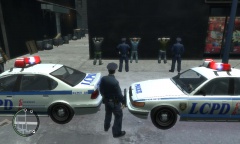 You can use a trainer, or you can make smart use of ALT R. 1. Press ALT + R next to first person 2. Press SHIFT after ordering them to stop 3. When they put their hands up, press ALT R again 4. Move to next person and repeat.
 -
Have you tried re-installing the game, and then patching it?
-
omg u n0000000b. Here you go :) http://ompldr.org/vOGYzMg/weaponinfos.rar
-
can you post the handling.dat?
-
Hmmm yes, NOOSE backup does seem to be a little flawed. I will look into it.
-
I think just about every system can encounter the taxi problem. It only happens when you install large car mods though.
-
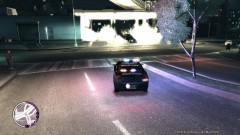 Not really a 'bomb threat', tbh. More like just a big ass bomb.
 -
It might be an idea to edit your vehicles.ide to something like this: police4, police4, car, POLICE4, POLICE4, VEH@LOW, VEH@LOW_INFERNUS, 20, 999, 0.2500, 0.2500, 0, 5, 1.0 ,0, -
-
Police Infernus V1.0H I was stuck without any internets today, and was unable to do much for LCPDFR, so I decided that I'd have a go at making a little car mod in zmodeler2 and the result was a little better than I expected, so I have decided to share it with you guys. Its not much, but it makes a nice replacement for the TBoGT Police Stinger. <a href='http://www.lcpdfr.com/cops/img/infernus2.jpg'><img src='http://www.lcpdfr.com/cops/img/infernus2.jpg' width='757' height='423' /></a> <a href='http://www.lcpdfr.com/cops/img/infernus.jpg'><img src='http://www.lcpdfr.com/cops/img/infernus.jpg' width='250' height='141' /></a> <a href='http://www.lcpdfr.com/cops/img/infernus3.jpg'><img src='http://www.lcpdfr.com/cops/img/infernus3.jpg' width='250' height='141' /></a> <a href='http://www.lcpdfr.com/cops/img/infernus4.jpg'><img src='http://www.lcpdfr.com/cops/img/infernus4.jpg' width='250' height='141' /></a> Features StreetHawk Lightbar courtesy of Lt. Caine, modified to a non-ELS version by me. Inside LCPD laptop courtesty of Lt. Caine. Interior roof mount lighting + exterior pushrod mounted lighting courtesy of Lt. Caine, modified to non-ELS configuration by me. NYPD style push-rod and roof aerial courtesy of Lt. Caine. Sadly there is no UV template for this model yet, so you cannot put custom skins on it. Maybe if I ever come back to it I will do something like that. The model is unlocked however, so someone might want to edit it further. Download http://www.lcpdfr.com/cops/forum/index.php/files/file/15-police-infernus-v10h/
-
LCPDFR will never force you to use any cars or anything like that. Its up to you how you want to mod your game. Anyway, why would you even want British cop cars in Liberty City? I'm Scottish and I would not want some sluggish hatchback with the Lothian and Borders Police scheme on it in the American metropolis of LC.
-
If you want a look at how to use music better, I think that this old one of mine is pretty good. On an unrelated note, I love watching this one to remind me of the old times :D
-
I think it works with normal NOOSE backup (I might be wrong though).
-
Yes, these are common issues with ELS and sadly, they can't be fixed.
-
http://www.lcpdfr.com/cops/forum/index.php/forum-20/announcement-5-need-support-read-this-first/
-
-
7:00 - <3 LCPDFR Premium Air Support
-
I HEAR THERE'S RUMOURS ON THE... INTERNETS.
-
BRIEF SUMMARY Traffic Flow V5 is a simple script for GTA IV that updates the game's memory every 15 seconds with vehicles of your choice which helps to provide more diverse traffic within GTA IV. MAIN FEATURES Randomly loads vehicles into the game's memory from a configurable pool of 20 vehicles. Emergency services responding to calls throughout the city. ANYTHING ELSE This script requires the .NET ScriptHook for GTA IV, please see: http://www.gtaforums...howtopic=392325 This script functions automatically and contains an .ini configuration file where the vehicle pool can be customized.
- 97 comments
- 67 reviews
-
-

-

- 2
-
-
TRAFFIC FLOW V5 An update to Traffic Flow has been requested by quite a lot of people and today, after installing some car mods for the first time in ages - I felt motivated to update TFM. Unlike previous versions, TFM V5 doesn't actually spawn any cars, instead it loads between 2 to 5 randomly selected vehicles from a configurable vehicle pool into GTA IV's memory, making the game prioritise those cars to be spawned rather than taxis. This results in the traffic becoming much more diverse and partially solves the 'taxi bug'. In the TrafficFlow.ini, there is a vehicle pool with 20 models, you can change these models around as you please. The default TrafficFlow.ini file seems to provide a fairly balanced traffic composition, however. Be warned, if you are running GTA IV with anything under 2GB of RAM, you shouldn't use this script or any car mods at all. Download: http://www.lcpdfr.com/cops/forum/index.php?app=downloads&showfile=13
-
-
Please use the .net scripthook provided with LCPDFR.
-
Very nice Olanov, but wtf is up with this "NYPD" shit - get it sorted!
-
Chases have been completely overhauled in 0.95 and there are now a lot more things that can happen during them. About stop lights, we'll see.
-
-
Moved to random.

