
coastiestevie
Members
-
Joined
-
Last visited
Everything posted by coastiestevie
-
R* doesn't care about our desires to have modded things... they want your $$$$ and then to turn around and say we're gonna make updates to break your mods... sad, isn't it? What a pity.
-
You didn't use RagePluginHook to backup your game before the update?
-
I don't mean to be rude, but modders are busy making their own creations. If they answered every request, they'd never be able to make their own things. If you want something yourself, it's like they say, "do it yourself" besides it might come out better when you do it. Look up modding lessons.
-
Make sure you are using the ragehookplugin that comes with LSPDFR, not the version from Rage Hook's website. When I used their website version instead of the one that came with the LSPDFR mod, it didn't let mods work for me. I hope that solved the issue. I can't think of anything else...
-
How many game cars have you replaced with mods? I was getting a memory error myself when I replaced too many. There are also situations where certain modded vehicles will cause this issue. I changed police3 back to the original car and no longer got the memory error. Try that. You might also want to look into adding extra vehicle slots. There's a tutorial on it LOCATED HERE. I haven't gotten any memory errors adding vehicles that way.
-
I 100% agree with you! They need to get their greedy hands out of the modding topic, because quite frankly, we paid money for their game and what we do with it once we own it in single player is OUR business, not theirs!
-
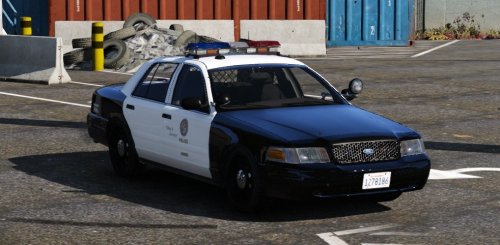 I'm having an issue... whenever I turn on the lightbar, only half of it flashes and it looks like the rotators are popping out of the lightbar...
- 49 comments
- 19 reviews
-
 You've truly outdone yourself! No crashes, no conflicts, just perfect! I love the hand out the window motion, when pulling over a vehicle and telling them to move!
- 3,646 comments
- 306 reviews
-
-

- 1
-
-
-
-
-
-
You didn't have to come at me all cocky, dude. A simple screenshot and you might have an issue on your end would have been sufficient enough, but thanks...
-
There is no vehicle.rpf in patchday2ng
-
Great, that's what I needed to know, thank you!
-
I was just curious to know if the grand theft auto 4 vehicle textures would work on grand theft auto 5? I made quite a few for grand theft auto 4 and wanted to know if I would be able to bring them over?
-
-
-
-
-
If you need assistance downgrading, please contact me
-
Yeah those files from the previous version before the update, you'll want to take those files and COPY them to the game directory. If you move them and not copy, you'll lose them and won't be able to reuse them the next time there's an update. The update.rpf file goes into the update folder, in the game directory. Don't keep the same backup files forever, because eventually the game will be fixed and you'll want to copy those new files and save them as a backup.
-
I wouldn't doubt it... fools
-
PLEASE PLEASE PLEASE, remember to back up the following files: GTA5.exeGTALauncher.exeUpdate.rpfScriptHookV.dlldinput8.dllIf you save these files like on your desktop while the game is working, next time there is an update you can play GTA 5 with LCPDFR, while waiting for the new mod fix.
-
Gahh! I just logged onto steam and it went update on me immediately! I've heard from several others that it's already broken all the mods. Anyone else affected?


.thumb.png.5fbbb989547defaeeb5c22864df62b54.png)
.thumb.png.e436e916367dd5b950520057d9057b55.png)