



SoCal Thero
Members
-
Joined
-
Last visited
Everything posted by SoCal Thero
-
Yea sure
-
I've made one that I made a Template for. However I don't know how well the tow hook and everything would look on the body because basically I would have to take the tow trucks hook components and have to stretch them so that they look proper on where the flat bed is on the truck. I could possibly take the front half of the truck and kind of "CHOP" it off minus the back half and attach it to the tow truck that way. But that might look a little weird to. If you just don't like the look of the current tow truck in that download as well I have a non rusted version of the tow truck as well. Its not the MTL but at least it isn't rusted out. If you really want the MTL I could take a look at it and see how it looks. Let me know. Heres where you can find the template model I have already as well as the non rusted version of the regular tow truck: https://www.gta5-mods.com/vehicles/air-port-service-and-service-vehicles-template-pack#comment-600104
-
Are you converting the car or just a part for the car? If your converting the car. @Lundy has released a DEV version of the 2003 already. Worth it not having to spend a lot of time converting one when their is one already here.
-
That and also that time wear&tear have gotten to the vehicle as well.
-
Hurk made a download that helps too.
-
You'll have to find unlocked versions of the stuff you wanna add and then use zmodeler to add them to the vehicle model.
-
Thats just the concept of it. Their is no way the final product would look that ugly......At least I hope not lol.
-
Can you provide templates for the people that might take this on? saying a cvpi kind of opens up a few possibilities.
-
Most people go with 8 skins as a max. Are you doing more than this?
-
-
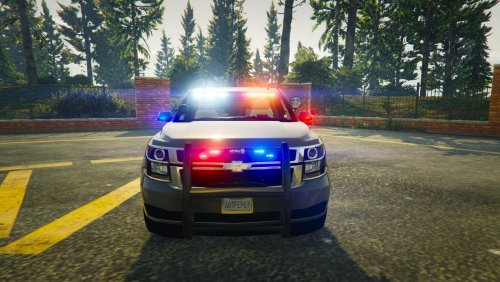 Amazing Vehicle as always man. Every little detail worked out and all the nice features to go along with it for however I wanna run it in game. GREAT JOB!
- 24 comments
- 14 reviews
-
Damn that is a lot of work. Good luck for you. Be looking forward to the Murrieta and Temecula skins from the California side myself :)
-
Hey Boss @72will I took a look at your file and I was able to get it to work sort of (I don't have a texture file so it'll look funny in the screen shot below) but the problem was the console and the computer and camera. They need to be setup for a LOD. Just create two dummies and move them into your chassis heirarcy. After that name them what you want (I named one misc_z the other misc_x) and after that while L0 is not ticked on I clicked on the dummy clicked on convert node to compound, then clicked on the lock, then clicked on L0 and then moved the mesh or the actual object itself into the window just below group then unclicked L0 then the lock and that resolved the issue. If you need more help feel free to reply here or pm me if you need me to help out with something else or if I worded something confusing.
-
Ya I took it down already.
-
Ya that is true for the higher lods but if they are not in one then they are not within a dummy I'm assuming no? I haven't tested it yet since I didn't have time to try it out today but I'll take a look tomorrow and see if I can pin point it for you
-
Did that make it work?
-
Probably the lods are not setup is why
-
Is this in its extract state for Zmodeler file? If so I can tell you your hierarchy is not setup right for starters that might cause it before I looked into fixing it. Everything outside the chassis and sheriff2 need to be placed in there. Also another thing as well The Console, Computer, and Video Camera are not setup for LOD's as I didn't even have to press what LOD I wanted and they show up. That is probably the major contributing factor in it not working.
-
Just came across the idea of maybe having a Praise forum for modders who help out the community. Maybe have each topic a User's name and then other members could reply within it of their praise or give thanks. Just an idea.
-
Another project that I'll maybe release as a Dev Model but someone over at GTA 5 Mods (I won't reveal his name so he isn't bombarded with request lol)was nice enough to take on my object request for me and sent it over my way. I still have to finish touching up the textures as well as make it so the pink part of the mustache lights up at night but this is a Lyft Mustache that I am going to start adding to the in game cars as an extra. Basically so that it randomly spawns in each car as a possible lyft driver on duty transporting and picking people up around town. If you don't know what Lyft is visit: https://www.lyft.com/ Below is a preview video on one of my template vehicles from my pack over on GTA5mods.com. Don't mind the paint job and what vehicle I'm using as it was thrown together in less than 5 mins lol.
-
Someone was nice to fulfill this request. Thank you Saul
-
If its an extra you can just remove it in game however if it isn't I don't believe you can without editing the model in Zmodeler 3
-
Ha-ha so this is why you wanted more in my pack lol. Glad to see your on here too and glad your liking the vehicles :)
-
 If that's the case then the model is fine it's def something with the meta. Is this originally under the sheriff 2 slot? Maybe try putting it there and modify its meta to see
- 158 comments
- 54 reviews
-
@Thehurk Is it named as Paint1 within the []? Also within it does it have the Vehicle specmap as the first one? and Manual UV setup to #2? If its easier and you have Skype hit me up. Thero2002@aol.com and just use screen share and I can look at it for you and if anything rule out what it is exactly
- 158 comments
- 54 reviews



