
SoCal Thero
Members
-
Joined
-
Last visited
Everything posted by SoCal Thero
-
You're Welcome
-
Go to the zmodeler site and download the added script/add on and follow the instructions on the topic. Its pin at the top of the GTA 5 forums
-
Send me a PM so I have you on the list to try it out. I've created a huge pack of vehicles that are template however being as they are not police related I felt shouldn't have been uploaded to LSPDFR. However you can find them here once admin approval has been made: https://www.gta5-mods.com/vehicles/air-port-service-and-service-vehicles-template-pack
-
Hey Everyone, Sorry for the delay but been getting so caught up in the new GTA online update haven't been vehicle modeling lately but I am back now. I am back at working on the GMC Yukon Denali again. Still need to figure out an Arjent lightbar to get it to work right. But reason I'm writing is I wanna send out a beta test of the vehicle before I release it. The marked unit in the video anyways. Would anyone be wanting to beta test the vehicle and give me some feedback on things that could possibly improve the vehicle more?
-
It also has to do with the model itself and how it is setup its pretty simple really if it is already mapped and unlocked to open in ZModeler all you have to do is find the line the vehicles body is mapped to in the material browser and change paint 1 to paint 3 in the title as well as how the game defines it
-
 It's not unusual haha
 -
There is a MVA mod callout out there already where you talk to the drivers but it seems like its missing a few things that would make it that much better. I hope @timnboys makes it as that would be nice to see.
-
If its not unlocked then their isn't anyway for someone to make a lightbar as they wouldn't have access to the model.
-
I don't see where it says but is the model unlocked?
-
I've only converted 1 car so far and it came out pretty decent. I could give it a try in between projects I guess
-
Are you talking about the wheels? That shouldn't be hard to fix
-
@SnowInHD send me a message of what it is and I could possibly do it for you.
-
Thank you both for explaining it to me. I'll try and figure out the rest from here. Appreciate the help!
-
Bump
-
Hey Everyone, Thanks in advance to anyone that can help me. I don't know Why GTA 5 lights are so hard for me to grasp and work on. I understand how GTA 4 lights worked with ELS which I thought was a challenge in itself but GTA 5 puts it on a whole new level of confusing. I have two light bars on this vehicle I'm building but the lights are obviously not position correctly on where they should be when they are flashing. I have the lights themselves set on the lightbar housing itself however as you can see in the attached photos they are all over the place other than where they should be. Can someone teach me what I am doing wrong with sirens? I've read this topic: But I am having a hard time understanding how it works still. I get the idea of what each number is used for in regards to how it faces however the rest of it might as well be in another language because thats about how much I understand of it lol. Thanks Again.
-
Cant wait to see the command center complete. Looks like great progress so far!
-
New thing I'm working on. Still gotta make some tweaks to the textures and components and lights as lights are my kyrptonite. A seperate file will be included of an Undercover version where the door badges, GMC Wheels, and Roof Rack will be included for people to choose from one or the other.
-
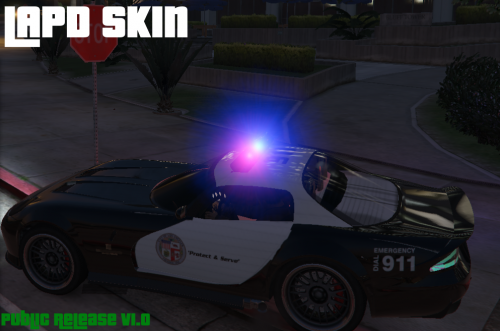 It is. Reason being is the roof was an extra so I told him to change that because it would look weird so that it's always a roof model now
 -
yea its good and bad in a way for some people and different for others but we just have to live with it like it is I guess.
-
Are you talking about just skins for vehicle models or like the model itself being changed? If you are changing the model itself you would need permission. If you are making Skins only for vehicle models you can simply upload the skins in the textures area and link the vehicle models that they are made for in your skin upload.
-
When Rockstar comes out with an update for GTA online they just create a new folder in the update folder and any updates that are made are put in it and it overwrites any in the previous folders or X64E folder. If you notice if you put say Police2 vehicle model in x64e and not in the updated folder with it in there it will not change at all in game because of this.
-
Not feeling it personally.
-
No problem man figured the notification wasn't working so tagged your name instead to do it. Hope it works out good for him. I'm learning glass breaking now if I get it to work I'll update it and tag you so you know.
-
@Ghnty5 hope its what you were looking for.
-