
Skip to content
View in the app

A better way to browse. Learn more.

LCPDFR.com

A full-screen app on your home screen with push notifications, badges and more.

To install this app on iOS and iPadOS
  1. Tap the Share icon in Safari
  2. Scroll the menu and tap Add to Home Screen.
  3. Tap Add in the top-right corner.
To install this app on Android
  1. Tap the 3-dot menu (⋮) in the top-right corner of the browser.
  2. Tap Add to Home screen or Install app.
  3. Confirm by tapping Install.

Callout Interface 1.4.1

(46 reviews)

7 Screenshots


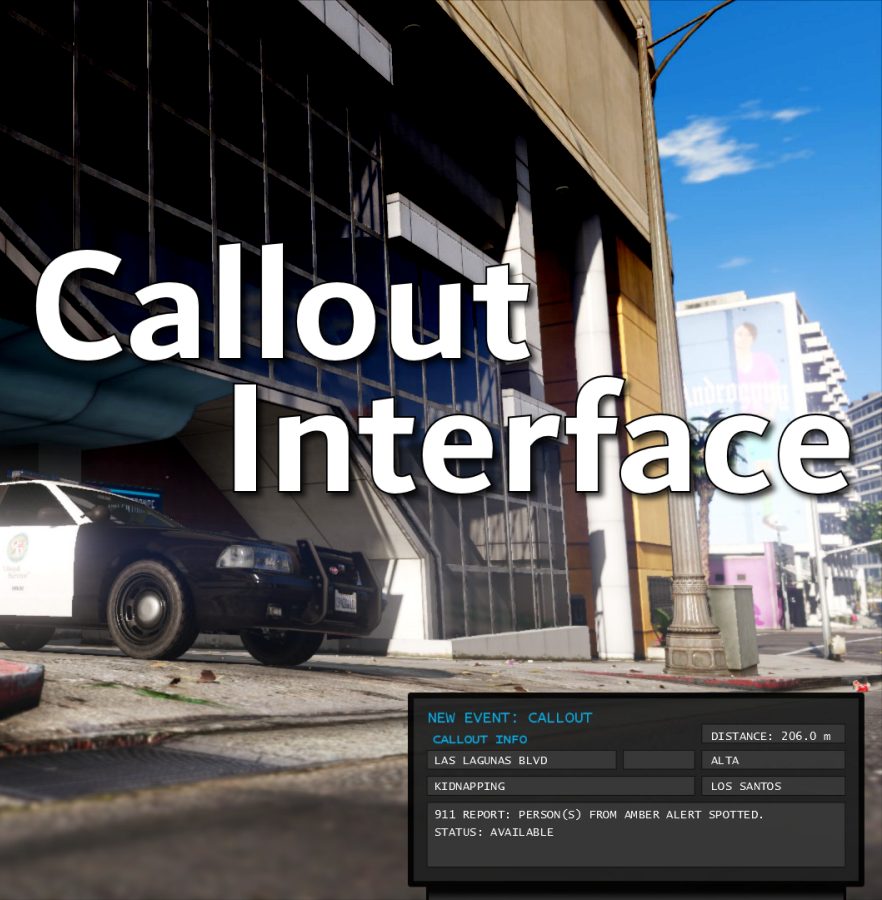
Callout Interface
A new way to interact with callouts.
 

Features:

  • RAGENativeUI menu front-end to start a callout
  • Force a random callout via keybind
  • Advanced MDT with multiple status buttons and tabs
  • Callouts can be sent to the MDT while you're on another callout
  • A fully functioning ALPR system with advanced camera layouts
  • External license plate display


Support:
Discord Serverhttps://discord.gg/AuJCUag

Developer API https://github.com/Immersive-Plugins-Team/CalloutInterfaceAPI


Recommended Callout Packs:

686 Callouts  link
Chaos Calloutslink
Super Calloutslink


New in Version 1.4.1


Edited by opus49
added latest dev diary and some new screenshots

What's New in Version 1.4.1

Released

New in Version 1.4.1

Added

  • Dependency checker
  • Hot key for toggling ALPR key on/off
  • Automatic tab switching (when enabled)
  • Automatic blips for ALPR
     

Changed

  • Toggling off MDT will exit interactive mode
  • Delayed and put checks around camera object creation


Fixed

  • Fixed a bug with ALPR debug mode where the graphics would get stuck


New in Version 1.4

Added

  • Realistic multi-camera ALPR system
  • Dynamic traffic stop that nobody someone likes
  • External license plate display widget
  • Silent callout system and log

Changed

  • Completely overhauled the MDT
  • Migrated graphics handling to RawCanvasUI

Short Description

Interface with callouts.

User Feedback

Recommended Comments

Tha Mexikan

Members

(edited)

are u going to add the code 4 button on the next update?

Edited by Tha Mexikan

ZH540

Members

21 hours ago, TheAzerCZ said:

I did the same and doesn't work for me neither 😞

Glad it wasn't just me! It's very hard to prove your following steps without it coming across as your provoking the author, which I'm definitely not doing. It's just frustrating when your following everything to the letter and it's not happening. It's not as if installing it is hard either.

The way I resolved it was simply to remove all the callout interface files from the GTA V & Plugin folders again and then instead of copying across the files, I unzipped everything into the GTA V folder directly, it ultimately has worked. Just go into the GTA V folder afterwards and remove the readme, 

opus49

Insiders Author

2 hours ago, ZH540 said:

Glad it wasn't just me! It's very hard to prove your following steps without it coming across as your provoking the author, which I'm definitely not doing. It's just frustrating when your following everything to the letter and it's not happening. It's not as if installing it is hard either.

The way I resolved it was simply to remove all the callout interface files from the GTA V & Plugin folders again and then instead of copying across the files, I unzipped everything into the GTA V folder directly, it ultimately has worked. Just go into the GTA V folder afterwards and remove the readme, 


I promise you that makes no difference. This tells me you didn't include ALL of the files from the archive the first time. I know what it feels like to be sure you did something, but dragging and dropping vs unzipping don't functionally do anything different.


I assure you I don't feel provoked, nor do I wish to provoke you  I'm offering you and the other person an easier path. Had you looked in your log you would have seen which file or files were either missing or out of date.  It really is that simple.


Anyway, glad to hear you got things working, regardless of the path you took. 


ZH540

Members

4 hours ago, opus49 said:


I promise you that makes no difference. This tells me you didn't include ALL of the files from the archive the first time. I know what it feels like to be sure you did something, but dragging and dropping vs unzipping don't functionally do anything different.


I assure you I don't feel provoked, nor do I wish to provoke you  I'm offering you and the other person an easier path. Had you looked in your log you would have seen which file or files were either missing or out of date.  It really is that simple.


Anyway, glad to hear you got things working, regardless of the path you took. 


As and when I've had time today I've gone through my unzipped folder and compared it to the files unzipped into GTA V folder. As I said, all the files copied over are indeed all the same and nothing was missing, so to my thinking the only thing that could have caused the issue was the RAGE file, mine must have been older and not in fact newer as I previously thought,this is the only difference I could conceive between any files. And that's how unzipping directly did actually make a difference to the install! Because previously,I had not included the rage file,believing mine was the newer version. 


Thought I'd explain my process. I'm about to go in-game now and give it's first actual run and enjoy it - loved your previous version.

Cut56

Members

(edited)

Hello,


I wanted to ask you a question, I used your plugin which worked very well. I also installed your various callouts.

On the other hand, following a problem in my game (nothing to do with calloutinterface I assure you 😉 )

I just need to go back. So I temporarily deleted your calloutinferface files from my game.

On the other hand my game crashes now, by doing F4, it tells me that "calloutinterface has not been detected" yet I have deleted all the files. It looks like my game hasn't been cleaned well yet I'm sure everything has been deleted.

Do you have any solution for that, or explanation ?


I think I understood, in fact it is the callouts (686 callouts for example) which searches for the calloutinterface that I have temporarily deleted. Does this mean that calloutinterface must be installed in the game for playing with this callouts ?


Thank you

Edited by Cut56

Charlie686

Members

12 minutes ago, Cut56 said:

think I understood, in fact it is the callouts (686 callouts for example)

Sounds like a question for me! (and thank you for using 686 Callouts)


CalloutInterfaceAPI is a required file -- however, Callout Interface is not required. 

If you would like to remove Callout Interface, you must keep that file installed for the compatible callout packs.

It will handle various things for the callout packs, even if Callout Interface is not being used.


I hope this answers your question! 😄

TheAzerCZ

Members

(edited)

13 hours ago, ZH540 said:

Glad it wasn't just me! It's very hard to prove your following steps without it coming across as your provoking the author, which I'm definitely not doing. It's just frustrating when your following everything to the letter and it's not happening. It's not as if installing it is hard either.

The way I resolved it was simply to remove all the callout interface files from the GTA V & Plugin folders again and then instead of copying across the files, I unzipped everything into the GTA V folder directly, it ultimately has worked. Just go into the GTA V folder afterwards and remove the readme, 

I just found a solution. The problem was related with Rage Plugin Hook blocking the files. I just made a backup of files that the plugin overwrites, overwrote them, unblocked them and after initial crash, the plugin succesfully loaded. And has to be said, the plugin is excelent, well done 🙂

Edited by TheAzerCZ

opus49

Insiders Author

13 minutes ago, TheAzerCZ said:

I just found a solution. The problem was related with Rage Plugin Hook blocking the files. I just made a backup of files that the plugin overwrites, overwrote them, unblocked them and after initial crash, the plugin succesfully loaded. And has to be said, the plugin is excelent, well done 🙂

I'm glad you got it working, but none of this is necessary.  You just need to install the files that come with my downloads.  Yes, if LSPDFR is loaded at the time you try to install the files, it won't work.  Otherwise, RagePluginHook will not "block" them.  I'm only replying so other people don't think they need to go through any of this.  The log quite clearly will tell you which file is missing or outdated.

TheAzerCZ

Members

7 hours ago, opus49 said:

I'm glad you got it working, but none of this is necessary.  You just need to install the files that come with my downloads.  Yes, if LSPDFR is loaded at the time you try to install the files, it won't work.  Otherwise, RagePluginHook will not "block" them.  I'm only replying so other people don't think they need to go through any of this.  The log quite clearly will tell you which file is missing or outdated.

Well, when I add new files to my game root folder, then launch RPH, it asks me to unblock those files. That's what I'm speaking about. Of course I haven't installed the mod while in game, that's obvious it can't work like that.

ZH540

Members

@opus49 I'm not sure if it's related or if this is even helpful to you, but since installing this, I've had a couple of instances where my ELS has stopped working,log is clear of any related errors.


Also, advice please! Is it better to remove Compulite and the ALPR mod now? I'm yet to learn all the features and usability of your mod,but thought I'd ask in case removal of those mods would help the process etc. Thanks.

opus49

Insiders Author

6 hours ago, TheAzerCZ said:

Well, when I add new files to my game root folder, then launch RPH, it asks me to unblock those files. That's what I'm speaking about. Of course I haven't installed the mod while in game, that's obvious it can't work like that.

Actually it's not obvious at all. You can unload LSPDFR, add the files, then load it again.


I would love to see a screenshot of RPH asking to "unblock" files. It's impossible that unzipping directly into the folder would make a difference.

TheAzerCZ

Members

3 hours ago, opus49 said:

Actually it's not obvious at all. You can unload LSPDFR, add the files, then load it again.


I would love to see a screenshot of RPH asking to "unblock" files. It's impossible that unzipping directly into the folder would make a difference.

It's not that hard to find some screenshot. There's one for an example. I got the same message after replacing files with yours 🙂


opus49

Insiders Author

33 minutes ago, TheAzerCZ said:

It's not that hard to find some screenshot. There's one for an example. I got the same message after replacing files with yours 🙂


So this is when you start RagePluginHook, not when you install the files.   Did you click "No?" 

TheAzerCZ

Members

49 minutes ago, opus49 said:


So this is when you start RagePluginHook, not when you install the files.   Did you click "No?" 

Yes, it is like that. I think we don't get each other. Your mod includes files that comes natively with RPH. From my own experience, I don't overwrite them, because some mods use older .dlls that cause RPH not working at all. That's the blocking from RPH I'm speaking about, although you use same dlls. Still they have to be overwritten and unblocked on RPH side. That's just my point of view, otherwise I don't get why it shouldn't work.

opus49

Insiders Author

(edited)

2 minutes ago, TheAzerCZ said:

Yes, it is like that. I think we don't get each other. Your mod includes files that comes natively with RPH. From my own experience, I don't overwrite them, because some mods use older .dlls that cause RPH not working at all. That's the blocking from RPH I'm speaking about, although you use same dlls. Still they have to be overwritten and unblocked on RPH side. That's just my point of view, otherwise I don't get why it shouldn't work.

But you are incorrect.  My plugins do *NOT* come with RPH files.  RAGENativeUI is not a Rage file.  It's a 3rd party library written by a member of our community.  And the other .dll files that go in the root directory are *MY* libraries.  

Edited by opus49

TheAzerCZ

Members

Just now, opus49 said:

But you are incorrect.  My plugins do *NOT* come with RPH files.  RAGENativeUI is not a Rage file.  It's a 3rd party library written by a member of our community.  And the other .dll files that go in the root directory are *MY* libraries.  

I really didn't mean to make you angry nor make you feel like I wanna you, not all. I'm just saying that whenever mod requires me to replace dlls files that are already in my root game folder, I don't do that for a logical reason. So that means that I copied everything except RageNativeUI and mod still didn't work. Strange.

opus49

Insiders Author

1 hour ago, TheAzerCZ said:

I really didn't mean to make you angry nor make you feel like I wanna you, not all. I'm just saying that whenever mod requires me to replace dlls files that are already in my root game folder, I don't do that for a logical reason. So that means that I copied everything except RageNativeUI and mod still didn't work. Strange.


Believe me, I'm not angry in the least.  I just know what I'm talking about since I'm the one who wrote it.  But I assure you, not angry at all.
 

I believe you didn't replace the .dll's -- that's why you were having the original problem.  This is what I've been trying to say from the beginning.  The error message that started all of this is a message that I wrote.  I check both the presence and the version of the .dll's necessary to function.  If they are old or missing, I send that error to the screen.  So if you see it, there's only one possible cause -- an old or missing .dll in the GTAV folder.


Cut56

Members

On 12/06/2023 at 23:10, Charlie686 said:

Cela ressemble à une question pour moi! (et merci d'utiliser 686 légendes)


CalloutInterfaceAPI est un fichier requis -- cependant, Callout Interface n'est pas requis. 

Si vous souhaitez supprimer Callout Interface, vous devez conserver ce fichier installé pour les packs de légendes compatibles.

Il gérera diverses choses pour les packs de légendes, même si l'interface de légende n'est pas utilisée.


J'espère que cela répond à votre question !😄

Thank you very much 😉 

retrocidalTV

Members

i am not 100% positive but after plaYING for a bit i am no longer able to accept call out i can force them etc but i can no longer accept them I AM TESTIN now so but i have felling it this mode but who knows

GTA Fanatic

Members

@opus49 So i have seen several gamers using the callout interface but theres looks slightly different like it has a skin upgrade how do i get that. Thanks in advance.

Hondo1977

Members

WOW!! This has progressed into an AWESOME plugin. Very cool adds that pc component that wasnt there. Man has this really grown GOOD JOB pleasure to enjoy!!

RealCanadian

Members

Super sweet plugin the update changes it up alot in a positive way. The only thing I have come across is for some reason not having access to changing the ALPR camera layout settings, it's seems gray out and disabled I'm not sure why.

Hiarly

Members

thanks for your work, it sure took a lot of programming hours, I haven't installed it yet but I will tonight, thanks again!

LuxNogizaka

Members

(edited)

Even tho I have Grammar Police installed, the buttons for status aren't working 100%.
I get the notification with the correct status, but it doesn't actually set it.
Can someone pls help?


Edit: found that it has already been answered sry.

Edited by LuxNogizaka

armymen12002003

Members

I'm having lag spikes for when this is activated any help would be appreciated.


Create an account or sign in to comment

Latest Mods

Account

Navigation

Search

Search

Configure browser push notifications

Chrome (Android)
  1. Tap the lock icon next to the address bar.
  2. Tap Permissions → Notifications.
  3. Adjust your preference.
Chrome (Desktop)
  1. Click the padlock icon in the address bar.
  2. Select Site settings.
  3. Find Notifications and adjust your preference.






