Skip to content
View in the app

A better way to browse. Learn more.

LCPDFR.com

A full-screen app on your home screen with push notifications, badges and more.

To install this app on iOS and iPadOS
  1. Tap the Share icon in Safari
  2. Scroll the menu and tap Add to Home Screen.
  3. Tap Add in the top-right corner.
To install this app on Android
  1. Tap the 3-dot menu (⋮) in the top-right corner of the browser.
  2. Tap Add to Home screen or Install app.
  3. Confirm by tapping Install.

EUP Backup Configurations [9.3] 7.4.2 Hot-Fix

(23 reviews)

11 Screenshots

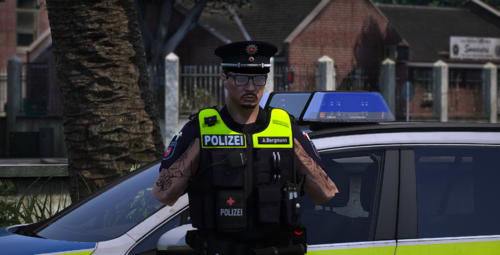
This Emergency Uniforms Pack (EUP) Backup Configuration "EUP Backup Configurations [9.3]" replicates the use of the lore-friendly police agencies and emergency services from Grand Theft Auto V for LSPDFR (Los Santos Police Department First Response) with the addition of all EUP Uniforms for your character and AI officers including a custom ambient spawning system for all jurisdictions!


This modification also brings several new stations to San Andreas featuring an exclusive EUP uniform selection within the Duty Selection Menu/EUP Menu and includes EUP Badge Props Configurations all in one package with a unique feature - weather variations!


This EUP Backup Config currently offers Class A, Class B, Class C, Utility, Beach Detail, Polo, Detective, Tech, Fatigues, and many more uniforms for all of the police agencies and departments.


This works with and without Ultimate Backup/Stop The Ped excluding the EUP medical coroner units. If you want the EUP coroner units, you must install Stop The Ped. Otherwise, traffic policer is a good alternative for non-EUP coroner units.


Configured for Law & Order 9.3 + Serve & Rescue 1.5


Featuring 60 plus exclusive departments and agencies for all of your LSPDFR needs!


Thank you everyone for 150,000+ downloads! Let me know if you enjoy this mod by leaving a review! Much appreciated!


You can use WINRAR or 7-ZIP to open the modification files


Bonus Features:


[Click to reveal spoiler tag]:


Spoiler

Callout Local Patrol Configurations (If Developers Enable Them)


Custom Ambient Spawning System!


Custom Stations:

NOOSE HQ, Fort Zancudo HQ, Vespucci Beach Station, Gruppe Sechs Security HQ, Cayo Perico Park Ranger Station, Davis Fire Station, El Burro Heights Fire Station, Fort Zancudo Fire Station, Los Santos International Airport Fire Station, Paleto Bay Fire Station, Rockford Hills Fire Station & Sandy Shores Fire Station


Custom Drop Off Locations:
NOOSE HQ, Fort Zancudo HQ, Vespucci Beach Station, Gruppe Sechs Security HQ, Cayo Perico Park Ranger Station, FIB HQ, LA Mesa, Rockford, Vespucci, Davis, Beaver Bush & Bolingbroke Penitentiary


EUP Backup Included Within The Default Backup Menu

EUP Backup Included Within The Ultimate Backup Menu

EUP Badge Props Configurations

Exclusive EUP Uniform Selection Within The Duty Selection Menu/EUP Menu


Exclusive EUP Units:

Air Medic (EUP)
Air SWAT (EUP)

Coroner (EUP)
Dirt Bike Police (EUP)
Fire Chief (EUP)
Fire Pilot (EUP)
Gang Unit (EUP)
Harbor Patrol (EUP)
Riot Police (EUP)


Weather Variations! [Rain/Snow]


Backup Options:


All departments come with sub-division uniforms; Air Unit/SWAT/etc.


[Click to reveal spoiler tag]:


Spoiler

Local:


Rockford Hills Police Department (EUP)

Del Perro Police Department (EUP)

Los Santos International Airport Police Department (EUP)

Los Santos Port Authority Police (LSPP) (EUP)

Los Santos Police Department (LSPD) (EUP)
Los Santos Police Department Metro (LSPDM) (EUP)

Los Santos County Sheriff's Department (LSSD) (EUP)

Blaine County Sheriff's Office (BCSO) (EUP)
Blaine County Sheriff's Office Vintage (BCSO) (EUP)

San Andreas State Parks (SASP) (EUP)
San Andreas State Parks Lifeguard (SASP) (EUP)

Los Santos Department of Recreation and Parks (LSDRP) (EUP)

San Andreas Department of Fish and Wildlife (SADFW) (EUP)

National Park Service (NPS) (EUP)


State:


San Andreas State Prison Authority (SASPA) (EUP)

San Andreas Highway Patrol (SAHP) (EUP)
San Andreas Highway Patrol Commercial Vehicle Enforcement (CVE) (EUP)

North Yankton State Patrol (NYSP) (EUP)


Fire/EMS:


Los Santos Fire Department (LSFD) (EUP)
Los Santos Fire Department EMS (LSFD) (EUP)
Los Santos Lifeguard (LSLG) (EUP)

Los Santos County Fire Department (LSCFD) (EUP)
Los Santos County Fire Department EMS (LSCFD) (EUP)

Blaine County Fire Department (BCFD) (EUP)
Blaine County Fire Department EMS (BCFD) (EUP)

Coroner (EUP)

San Andreas Medical Services (SAMS) (EUP)

Wildlands Firefighter (SAF) (EUP)
Forestry and Fire Protection (SAF) (EUP)


Federal:


Border Patrol (EUP)

Drug Observation Agency (DOA) (EUP)
Drug Observation Agency SRT (SRT) (EUP)
Drug Observation Agency Task Force (EUP)

Federal Investigation Bureau (FIB) (EUP)
Federal Investigation Bureau Police (EUP)
Federal Investigation Bureau K9 Police (EUP)
Federal Investigation Bureau SWAT (ATU) (EUP)
Federal Investigation Bureau HRT (HRT) (EUP)
Federal Investigation Bureau Task Force (EUP)

International Affairs Agency (IAA) (EUP)

National Office of Security Enforcement (NOOSE) (EUP)
National Office of Security Enforcement SEP Units (SEP) (EUP)
National Office of Security Enforcement PIA (EUP)

United States Marshals Service (USMS) (EUP)


Military:


Coast Guard (USCG) (EUP)
National Guard (EUP)
Military Police (EUP)
United States Air Force (EUP)


Security:


Bobcat Security (EUP)
Chuff Security (EUP)
Gruppe Sechs Security (EUP)
Gruppe Sechs Security Armored Divison (EUP)
L&L Security (EUP)
Merryweather Security (EUP)
Securoserv Security (EUP)


Special Units:


Air Medic (EUP)
Air SWAT (EUP)
Dirt Bike Police (EUP)
Fire Chief (EUP)
Fire Pilot (EUP)
Gang Unit (EUP)
Harbor Patrol (EUP)
Riot Police (EUP)


This EUP Backup Config currently offers Class A uniforms alongside Class B and Class C for all of the police agencies and departments.


All Class A Uniforms come with campaign hats and rank (Insignia) variations including, but not limited to;

LSPD: Officer, Officer III, Officer III+1, Detective I, Detective II, Detective III, Sergeant I, Sergeant II, Lieutenant, and Captain
LSSD: Deputy, Deputy II, Sergeant I, Sergeant II, Lieutenant, and Captain
BCSO: Deputy, Senior Deputy, Sergeant I, Sergeant II, Lieutenant, and Captain
SAHP: Officer, Sergeant I, Lieutenant, and Captain


Q&A:


[Click to reveal spoiler tag]:


Spoiler

Common Questions and Answers for EUP Backup Configurations 6.4 or Later


--> Is Ultimate Backup & Stop The Ped Required?

Partly. This modification also includes EUP backup including Police Officers, Military Police, Fire, and EMS units for the default backup menu.


If you do not want to have the special units (see below) then you can safely play this modification without Ultimate Backup and Stop The Ped installed.


Please note Ultimate Backup includes Coroner, Traffic Stop Backup, Felony Stop Backup, Towing Service, Spike Strips, Roadblocks, and canines alongside special units.


The choice is up to you, as the ambient spawn system works with and without Ultimate Backup and Stop The Ped installed.


(Air Medic, Bicycle Units, Dirt Bike Units, Fire Chief Units, Fire Pilot Units, Gang Units, Harbor Patrol, K9 Units, Riot Police, SAHP CVE, USAR Technicians, etc.)


--> When I Spawn At The Military Base The Guards Are Hostile?

You must disable 'Restricted Areas' in simple trainer to fix this issue.


--> Why Do I Spawn In The Water When Loading Into LSPDFR?

You do not have the Cayo Perico script by Vincentsgm. You must install it or edit stations.xml and remove Cayo Perico to fix this issue. Note removing Cayo Perico from stations.xml will cause you to lose the station and suspect drop-off locations on the island.


--> Why Do I Have An Empty Inventory When Selecting A Department In The Duty Selection Menu?

I do not set an inventory in some of the departments due to the AI firefighters using police weapons if they were to have load-outs configured in inventory_eup. You may use HoldMyGun by Sebo to give yourself a loadout including a fire extinguisher.


--> How Do I Remove Hats?

You can select the "No Hats" folder when installing EUP Backup Configurations or you could remove them yourself. You can locate "prop_hats" in Ultimate Backup XML files, and Prop id= in the data folder XML files and set them to 0. The same goes for any other type of prop - just locate the phrase "Prop" or "Prop id".


--> How Can I Change The Vehicle Settings?

You can rename the vehicle files by locating "<VehicleSet>" in Ultimate Backup or "<Vehicles>" in the LSPDFR data folder and agency XML.


--> Are addon vehicles supported?

Yes - please refer to the answer to the previous question.


--> Is EUP Menu Required (It's Obsolete)?

No. EUP Menu is not required, but it's recommended for easier navigation for uniform selection.


--> I Loaded LSPDFR, But EUP Badge Props Are Not Working Correctly?

You launched LSPDFR with force duty using the RAGE Console. You must go on duty at any police station marked on the map, and select the department you desire.


--> I Loaded LSPDFR, But Insignia (Ranks) Are Not Working Correctly?

You launched LSPDFR with no internet connection, or the servers of LSPDFR are down. Ensure you have an internet connection and the servers of LSPDFR are up and running before reporting this issue.


--> My Menus Conflict After Loading LSPDFR During The Duty Selection Menu.

You did not wait long enough before proceeding to the next menu. You must wait until LSPDFR, and all plugins are loaded before proceeding into the duty selection menu.
Your screen will be clear of notifications, and pop-ups indicating LSPDFR has fully loaded.


--> Do I Need The K9s?

No. K9s are built into Ultimate Backup already and will default to SHEPHERD if no settings are present.

Vests are not included within Ultimate Backup, but my modification has configurations enabling the vests made by martinct.


--> Can I Play Using More Than One Map At A Time?

NO! LSPDFR will crash if you try to load or install more than 1 custom map at a time. It's recommended to only enable North Yankton if you want to play there (and vice versa). Be sure to not have any other maps loaded or installed before attempting to do so.


--> I Want To Change My Settings - How Do I Do This?

You can refer to the following websites for more information about XML customization;
https://www.lcpdfr.com/wiki/lspdfr/04/modding/doc/component/
https://wiki.rage.mp/index.php?title=Clothes
and Ultimate Backup Reference XML within the optional Ultimate Backup XML folder.


Vehicle Slots that I use (regarding backup units & ambient units):


[Click to reveal spoiler tag]:


Spoiler

Vehicle Slots that I use (regarding backup units & ambient units):


Police - LSPD / DPPD / LSPP / RHPD / LSIA
Police2 - LSPD / DPPD / LSPP / RHPD / LSIA
PoliceB - SAHP / LSPD / LSSD / LSPP / BCSO
Police3 - SAHP
Police4 - SAHP
Riot - LSPD / LSSD / BCSO / SAHP / NOOSE / DPPD / RHPD
Police Mav - LSPD / LSSD / BCSO / SAHP / NOOSE / Air Medic
Police Old 1 - North Yankton State Patrol
Police Old 2 - North Yankton State Patrol
PRanger - SASP / NPS / LSDRP / Game Warden / LE Ranger
PBus - San Andreas State Prison Authority
Barracks - National Guard
Crusader - National Guard
Sheriff - BCSO / LSSD
Sheriff2 - BCSO / LSSD
FBI -  Gang Unit / Unmarked Unit / NOOSE / IAA / FIB / Special Unit
FBI2 - Gang Unit / Unmarked Unit / NOOSE / IAA / FIB / Special Unit
Fire Truck - Los Santos Fire, Los Santos County Fire, Blaine County Fire / San Fire Wildlands
Ambulance - Los Santos EMS, Los Santos County EMS, Blaine County EMS / San Andreas Medical Services
LGUARD - Los Santos Fire, Los Santos County Fire, Blaine County Fire
Speedo - Coroner Van
Dilettante 2 - Merryweather
Stockade - Gruppe Sechs Security
Stockade3 - Bobcat Security
FBI2 - Securoserv
FBI2 - L&L Security
FBI2 - Chuff Security


You can rename the vehicle files by locating "<VehicleSet>" in Ultimate Backup or "<Vehicles>" in the Agency EUP XML file inside of the LSPDFR custom data folder.


Required Modifications (Prerequisites) EUP 9.3 Version (Full List In Download)


Download Links [Click to reveal spoiler tags]:


Spoiler

Required Modifications (Prerequisites)


LSPD First Response 0.4.9 (Build 8564)
By G17 Media

Emergency uniforms pack - Law & Order
By Alex_Ashfold

Emergency uniforms pack - Serve & Rescue
By Alex_Ashfold

Ultimate Backup
By BejoIjo

https://www.bejoijo.com/post/ultimate-backup


Stop The Ped
By BejoIjo

https://www.bejoijo.com/post/stop-the-ped


EUP Menu
By Alex_Ashfold

EUP Badges
By Alex_Ashfold

Cayo Perico Island for Single Player
By Vincentsgm

German Shepherd / Malinois - K9 Dog
By martinct

RAGENativeUI
By alexguirre

https://github.com/alexguirre/RAGENativeUI/releases


HoldMyGun
By Sebo


How To Install EUP Backup Configurations | EUP 9.3 | GTA 5 LSPDFR (2021)


EUP Backup Configurations (Mod Showcase) | EUP 9.3 | GTA 5 LSPDFR | 4K


EUP 9.3 and Backup Install Easy [Emergency Uniform Pack] - GTA 5 LSPDFR


EUP 9.3 Install with INSANE BACKUP Units! GET THIS FREE!


Terms and Conditions: Do Not Re-Upload Without My Permission. Do not redistribute this modification in any way, shape or form, instead, please give a link to the modification.

Edited by Joe C Wilson
Description

What's New in Version 7.4.2 Hot-Fix

Released

**What's New in Version 7.3?**


- New configurations for patrol vests have been added for various police departments, including LSIA PD, LSPP, LSPD, LSPD Metro, DPPD, RHPD, SASP, SADFW, NPS, LSSD, and BCSO.
- New protective goggles have been added to SWAT uniforms (found in the Body Camera and Patrol Vest folders; additional updates will include other folders in a future update).
- Body cameras have been introduced for bicycle uniforms.
- The LSPD Metro uniforms have been updated to feature appropriate class pants and a duty belt holster.
- Canine backup has been added for the LSPD Bomb Squad (Ultimate Backup).
- An issue preventing canines from appearing when called for backup has been fixed (Ultimate Backup).
- The entrance to the NOOSE station has been moved to a more accessible location.
- Police station garages have been added for players who do not use a trainer menu (Cayo Perico Police/Fire Station).
- Police station garage spawn points have been fixed at the following locations: Beaver Bush Ranger Station, Cayo Perico Police/Fire Station, Davis Fire Station, Paleto Bay Fire Station, Park Ranger Office, and Sandy Shores Fire Station.
- Body cameras have been removed from tactical uniforms due to clipping issues.


**What's New in Version 7.4?**


- Replaced patrol vest antennas with body cameras in separate optional config folder.
- Fixed the SAHP riot police helmets (Ultimate Backup).


**What's New in Version 7.4.1?**


- Added Body Camera To SAHP Polo Uniform
- Updated the Patrol Vest Body Camera folder to properly fit all newly added body cameras on suits, detective uniforms, and other miscellaneous uniforms (LSPD, LSSD, BCSO, SAHP, FIB, DOA, RHPD, DPPD, and Gruppe Sechs).


**What's New in Version 7.4.2?**


- Fixed Duplicate File Error (outfits_doa_eup.xml)


**What's New in Version 7.4.2-Hot-Fix?**
 

- Fixed Duplicate File Error (stations.xml)


Short Description

Data folder, EUP Menu, and Ultimate Backup all in one using EUP Law & Order 9.3 and Serve & Rescue 1.5 configurations

User Feedback

Recommended Comments

GragsterGaming

Members

On 8/2/2025 at 11:37 AM, Joe C Wilson said:

Is there anything you would like to see added? The only thing I need to include is variations of patrol vests. However, this mod is so big that I’ve thought about working on it, but haven’t followed through. There’s just too much to do.

Honestly, i would love just to see your work. you do so awesome, and im looking forward to it! 

allofthelights

Members

Is there a map for better visual representation of all the zones and what they include?

Joe C Wilson

Members Author

15 hours ago, allofthelights said:

Is there a map for better visual representation of all the zones and what they include?

The Metro Division of the LSPD patrols the metropolitan areas. The highway patrol may respond if you are near a designated highway area, but they will not respond if you are too close to wilderness areas. Game wardens are assigned to wilderness areas, while Fish and Wildlife officers respond near the sea. Additionally, the LSSD has a small patrol area in Davis; however, each department generally operates within its specific patrol zones.

Joe C Wilson

Members Author

Hi, everyone. I'm starting to work on updates for EUP Backup Configurations. If you have any specific requests for additions or changes, please let me know. I have several ideas I'd like to incorporate, so I welcome your feedback and suggestions. Here’s a brief overview of what I plan to change in EUP Backup Configurations:


1. Make all SWAT and NOOSE units appear more tactical (a suggestion from the community).
2. Refresh and modernize the LSPD subdivisions' clothing (also a community suggestion).
3. Edit the LSPD Metro Division uniforms to create a clearer distinction between patrol uniforms and K9 uniforms (this is part of my planned implementation).
4. Add patrol vest configurations for all departments that utilize vests (another planned addition).
5. Increase K9 backup options for SASP, NPS, etc. (this is also part of my plans).


Please note that due to the extensive nature of the extra configuration folders, I have decided to discontinue support for two specific folders: one with body cameras without hats and another with old-style body cameras. The reason for this decision is straightforward—there are too many files to edit, and the usage of these folders is quite limited. However, I will keep them in the download as optional configurations for anyone who wishes to reference them for their own XML edits.

Joe C Wilson

Members Author

Important notice: While working on the updates for version 7.3, I discovered and resolved the issue of canines not appearing when called as backup. This will be addressed in the next update. If you have any other suggestions or feedback, please let me know. Thank you.


The addition of vests for the airport police is nearly complete, except for the EUP Menu. Soon, you will likely notice how different the game feels with patrol vests for both you and the NPCs. I must say, it’s going to be well worth it in the end.


The Port Authority and Airport Police will soon receive new patrol vests. Additionally, the following departments will also be equipped with the new vests: LS Police, Del Perro Police, Rockford Hills Police, Park Rangers, Game Wardens, State Parks, LS County Sheriff, Blaine County Sheriff, and NOOSE Police.


Please note that I am equipping these vests with antennas instead of body cameras; however, you can easily swap out the antennas for cameras on the vest itself if you prefer. To add some variety, I am combining the body camera folder with the new patrol vest config folder because I am removing the old camera style folder, along with the no-hat option that included body cameras.


In the new 7.3 update, there will be three configurations for you to choose from: 
1) Original Version - This is the standard design intended for the game. 
2) LAPD Duty Belts - This folder focuses on changing the LSPD duty belts to match those of the LAPD. 
3) Vintage Sheriff Uniforms - This folder modifies the Blaine County Sheriff's Office uniforms to a vintage brown color. Personally, I enjoy using this configuration from time to time, as it pairs well with vintage sheriff vehicles. 


Each of these folders contains four configurations: 
1) Body Cameras 
2) No Hats - This option removes all hats except for helmets. This was primarily created to prevent clipping issues for female characters with long hair, resulting in a cleaner appearance. 
3) Standard Uniforms - This configuration excludes body cameras, removed hats, and patrol vests, providing the regular fitted uniforms you would expect while on patrol.

4) The New Patrol Vests - This is self-explanatory. 


I hope this clarifies what is offered and reduces any confusion.


I have decided to limit the number of extra configurations, as having too many has become excessive and confusing. It’s easy to mistakenly edit the wrong folder when there are so many to manage.


I believe it’s time to tidy up the mod and reshape it to align more closely with its original vision. I appreciate your understanding regarding this decision, and I look forward to the new update coming soon.

Could contain: clothing, person, man, jacket, outdoor

Could contain: sky, person, outdoor, clothing, vehicle, man, car, law enforcement, officer, wet suit, police

Could contain: clothing, outdoor, person, sky, man, sunglasses, goggles, standing

Could contain: clothing, person, sky, outdoor, security, police officer, officer, law enforcement, man, uniform, police

Joe C Wilson

Members Author

I have finished adding patrol vests for the following departments:


1) Los Santos Port Authority  
2) Los Santos Airport Police  
3) Los Santos Police Department  
4) Los Santos Metro Division 


I've added protective glasses to all SWAT uniforms. I thought about including balaclavas, but the mask clipping issue from single-player mode remains unresolved. If that bug gets fixed, I might update the uniforms.


There are only eight more departments left to equip with patrol vests, and I’m excited to share this big update with all of you.


The following departments still need vests. Please let me know if you have any suggestions or feedback on EUP Backup Configurations. Thank you!


1) Del Perro Police  
2) Rockford Hills Police  
3) Park Rangers  
4) Game Warden  
5) State Parks  
6) LS County Sheriff  
7) Blaine County Sheriff  
😎 NOOSE Police  

Could contain: clothing, person, human face, man, military uniform

Could contain: clothing, building, man, person, outdoor, footwear, street, night, skyscraper, road, city, people, light

Could contain: clothing, person, man, human face, building, trousers, outerwear, gentleman, sleeve, shirt, dress shirt, male person, official, pocket, collar, outdoor, standing, wearing

Joe C Wilson

Members Author

The Del Perro PD patrol vests are done! Once Rockford Hills PD patrol vests are finished, then there will merely be park rangers and sheriff departments left to finish, including NOOSE. What an improvement already! Can't wait to share the update with you guys!

Could contain: clothing, person, outdoor, man, law enforcement, human face, police officer, security, official, officer, sunglasses, government agency, uniform, police

Could contain: vehicle, land vehicle, person, clothing, law enforcement, man, police, car, wheel, officer, police officer, emergency service, outdoor, uniform

Could contain: clothing, person, outdoor, police officer, man, law enforcement, trousers, security, police, officer

Joe C Wilson

Members Author

I missed some folders while fixing the canine backup units yesterday. Kindly redownload version 7.3 if you have installed it already, and replace it with the 7.3 hot-fix. If you have any other feedback or suggestions for EUP Backup Configurations, please let me know. Thank you!

E.J.B

Members

Suggestion, can you add bodycams to the vests?, example:Could contain: clothing, person, building, sky, outdoor, man, ground, protective garment

Joe C Wilson

Members Author

1 hour ago, E.J.B said:

Suggestion, can you add bodycams to the vests?, example:Could contain: clothing, person, building, sky, outdoor, man, ground, protective garment

If you prefer cameras over antennas, I can change that. It might take me a couple of days to go through all the files again, but it’s no big deal.

Joe C Wilson

Members Author

3 hours ago, E.J.B said:

Suggestion, can you add bodycams to the vests?, example:Could contain: clothing, person, building, sky, outdoor, man, ground, protective garment

Done. In a future update, I will make sure to adjust certain camera mounting positions for specific uniforms, such as detective suits. Manually editing each file one by one would take too long and lead to more brain fog. In the meantime, I've included the antenna folder for those who want to use both options while I work on updating the configurations sometime in the future.

E.J.B

Members

in the next update, can you add the option to use the older bodycams?, because i'm not sure if i really like the models of the new ones

Joe C Wilson

Members Author

11 hours ago, E.J.B said:

in the next update, can you add the option to use the older bodycams?, because i'm not sure if i really like the models of the new ones

I have removed those folders from the latest update and deleted them from my PC. You can edit the custom folder files, such as "outfits_bcso_eup.xml," by changing component number 1 from 90 to 101. This slot should correspond to the old-style camera. 


For Ultimate Backup, locate "comp_beard" and change the value from "91" to "102." The EUP Peset Outfits also use the same slot ID of 102.


I used to include both the old-style and new-style camera configuration folders, but I find it overwhelming to keep them both updated. Managing the extra configuration folders has become too much for me, as this mod is just too massive to ensure that each playstyle is up to date with the latest version.

Also, it's worth noting that editing XML files in Notepad++ will save you a tremendous amount of time. I utilize the replace function with regular expressions in search mode, which saves me so much time. This allows me to replace all instances of a specific string of text at once. Just remember to save the file and keep it open in Notepad++ in case you need to undo all changes quickly—simply press 'Ctrl + Z' to undo.

brock6602

Members

(edited)

crash

Edited by brock6602

Joe C Wilson

Members Author

3 hours ago, brock6602 said:

crash

Could you please share your Rage Plugin Hook log with me when you have a moment? It's located in the GTA 5 root folder as the RagePluginHook.log text file. Once I have a chance to review it, I might be able to help identify the crash issue. Thank you!

brock6602

Members

14 hours ago, Joe C Wilson said:

Could you please share your Rage Plugin Hook log with me when you have a moment? It's located in the GTA 5 root folder as the RagePluginHook.log text file. Once I have a chance to review it, I might be able to help identify the crash issue. Thank you!

it's good it works now I had a problem with eup good job

SnakeDoc29

Members

My lspdfr is giving me a infinite loading screen now after this update:


[9/14/2025 10:00:37 PM.440] Started new log on 9/14/2025 10:00:37 PM.440
[9/14/2025 10:00:37 PM.443] ====================================================================================================
[9/14/2025 10:00:37 PM.432] Log path: C:\Program Files (x86)\Steam\steamapps\common\Grand Theft Auto V\RagePluginHook.log
[9/14/2025 10:00:37 PM.443] Log verbosity: Trivial
[9/14/2025 10:00:37 PM.450] Initializing input system
[9/14/2025 10:00:37 PM.451] AppDomainPool::InitializeAppDomain: Creating new app domain "PreInitializedDomain_0".
[9/14/2025 10:00:37 PM.451] AppDomainPool::InitializeAppDomain: Creating new app domain "PreInitializedDomain_2".
[9/14/2025 10:00:37 PM.453] AppDomainPool::InitializeAppDomain: Creating new app domain "PreInitializedDomain_3".
[9/14/2025 10:00:37 PM.453] AppDomainPool::InitializeAppDomain: Creating new app domain "PreInitializedDomain_1".
[9/14/2025 10:00:37 PM.456] Initializing game console
[9/14/2025 10:00:37 PM.469] Console key has been set to F4 (key code: 115)
[9/14/2025 10:00:37 PM.580] Initializing console variable "ConsoleScrollAmount".
[9/14/2025 10:00:37 PM.580] Type: System.Int32, Reading section: "Miscellaneous", key: ConsoleScrollAmount
[9/14/2025 10:00:37 PM.583] Read value: <null>
[9/14/2025 10:00:37 PM.583] Initializing console variable "ConsoleKey".
[9/14/2025 10:00:37 PM.583] Type: System.Windows.Forms.Keys, Reading section: "Miscellaneous", key: ConsoleKey
[9/14/2025 10:00:37 PM.584] Read value: F4
[9/14/2025 10:00:37 PM.584] Setting value of console variable "ConsoleKey" to stored value.
[9/14/2025 10:00:37 PM.584] Console key has been set to F4 (key code: 115)
[9/14/2025 10:00:37 PM.584] Initializing console variable "PluginTimeoutThreshold".
[9/14/2025 10:00:37 PM.584] Type: System.Int32, Reading section: "Miscellaneous", key: PluginTimeoutThreshold
[9/14/2025 10:00:37 PM.585] Read value: 60000
[9/14/2025 10:00:37 PM.585] Setting value of console variable "PluginTimeoutThreshold" to stored value.
[9/14/2025 10:00:37 PM.585] Initializing console variable "AlwaysShowConsoleOutput".
[9/14/2025 10:00:37 PM.585] Type: System.Boolean, Reading section: "Miscellaneous", key: AlwaysShowConsoleOutput
[9/14/2025 10:00:37 PM.586] Read value: <null>
[9/14/2025 10:00:37 PM.586] Initializing console variable "ShowConsoleCommandInfoOnPluginLoad".
[9/14/2025 10:00:37 PM.586] Type: System.Boolean, Reading section: "Miscellaneous", key: ShowConsoleCommandInfoOnPluginLoad
[9/14/2025 10:00:37 PM.586] Read value: False
[9/14/2025 10:00:37 PM.586] Setting value of console variable "ShowConsoleCommandInfoOnPluginLoad" to stored value.
[9/14/2025 10:00:37 PM.586] Initializing console variable "ShowOnScreenWarnings".
[9/14/2025 10:00:37 PM.586] Type: System.Boolean, Reading section: "Miscellaneous", key: ShowOnScreenWarnings
[9/14/2025 10:00:37 PM.587] Read value: <null>
[9/14/2025 10:00:37 PM.587] Console initialized
[9/14/2025 10:00:37 PM.587] Initializing forms manager
[9/14/2025 10:00:37 PM.588] Cleaning temp folder
[9/14/2025 10:00:37 PM.589] Version: RAGE Plugin Hook v1.122.1386.17277 for Grand Theft Auto V
[9/14/2025 10:00:37 PM.594] ================ RAGE Plugin Hook ================
[9/14/2025 10:00:37 PM.606] Waiting for launcher interop
[9/14/2025 10:00:37 PM.614] Detected Windows 7 Professional (64-bit) (6.1.7600.0)!
[9/14/2025 10:00:37 PM.615] Checking game support
[9/14/2025 10:00:37 PM.680] Product name: Grand Theft Auto V
[9/14/2025 10:00:37 PM.682] Product version: 1.0.3586.0
[9/14/2025 10:00:37 PM.682] Is steam version: True
[9/14/2025 10:00:37 PM.682] Is enhanced version: False
[9/14/2025 10:00:47 PM.684] Initializing DirectX
[9/14/2025 10:00:47 PM.684] Initializing Direct3D
[9/14/2025 10:00:47 PM.684] Getting game swap chain
[9/14/2025 10:00:47 PM.699] Swap Chain created: 0x7FF6C0F181F8
[9/14/2025 10:00:47 PM.699] Swap Chain VTable: 0x1C4FE2F2EB0
[9/14/2025 10:00:47 PM.699] 0x748948FFFBDFE5E9;0x8D48564157551824;0x170EC814890246C
[9/14/2025 10:00:47 PM.699] D3D11Present: 0x7FFAC1B42CA0
[9/14/2025 10:00:47 PM.699] D3D11ResizeBuffers: 0x7FFAC1B7CD50
[9/14/2025 10:00:47 PM.699] D3D11ResizeTarget: 0x7FFAC1BAA280
[9/14/2025 10:00:47 PM.699] D3D11SetFullscreenState: 0x7FFAC1B7D550
[9/14/2025 10:00:47 PM.699] Getting device
[9/14/2025 10:00:47 PM.699] Retrieved device
[9/14/2025 10:00:47 PM.699] Initializing D3D11 Renderer
[9/14/2025 10:00:47 PM.699] Creating wrapper
[9/14/2025 10:00:47 PM.700] Direct3D initialized
[9/14/2025 10:00:47 PM.700] Initialized DirectX
[9/14/2025 10:00:47 PM.700] Direct3D watcher thread spawned
[9/14/2025 10:00:47 PM.746] Wrapper created
[9/14/2025 10:00:47 PM.750] Effect created
[9/14/2025 10:00:47 PM.750] Creating buffer
[9/14/2025 10:00:47 PM.751] Created buffer
[9/14/2025 10:00:47 PM.751] Creating blend state
[9/14/2025 10:00:47 PM.751] Created blend state
[9/14/2025 10:00:47 PM.751] Done with creation
[9/14/2025 10:00:47 PM.797] Initializing texture system.
[9/14/2025 10:00:47 PM.797] Initializing texture system; phase 1
[9/14/2025 10:00:47 PM.797] Initializing texture system; phase 2
[9/14/2025 10:00:47 PM.803] Initializing texture system; phase 3
[9/14/2025 10:00:47 PM.804] Initializing texture system; phase 4
[9/14/2025 10:00:47 PM.809] Initializing texture system; phase 5
[9/14/2025 10:00:47 PM.810] Initializing texture system; phase 6
[9/14/2025 10:00:47 PM.811] Initializing texture system; phase 7
[9/14/2025 10:00:47 PM.813] Initializing texture system; phase 8
[9/14/2025 10:00:47 PM.814] Initializing texture system; phase 9
[9/14/2025 10:00:47 PM.814] Initializing texture system; phase 10
[9/14/2025 10:00:47 PM.816] Initializing texture system; phase 11
[9/14/2025 10:00:47 PM.817] Initializing texture system; phase 12
[9/14/2025 10:00:47 PM.817] Initializing texture system; phase 13
[9/14/2025 10:00:47 PM.817] Initializing texture system; phase 14
[9/14/2025 10:00:48 PM.201] Direct3D watcher thread ended
[9/14/2025 10:01:09 PM.413] LoadingScreenMsg: Initializing game support
[9/14/2025 10:01:09 PM.665] Initializing game support
[9/14/2025 10:01:10 PM.174] Current PedPool Capacity: 256
[9/14/2025 10:01:10 PM.174] Current PedPool Capacity: 000001C47D61AE90
[9/14/2025 10:01:10 PM.174] PedPool found at: 000001C47D61AE90
[9/14/2025 10:01:10 PM.174] Current PedPool Capacity: 256
[9/14/2025 10:01:10 PM.229] CollectionsArraySize found: 48000
[9/14/2025 10:01:10 PM.549] LoadingScreenMsg: Velocity limit removed
[9/14/2025 10:01:10 PM.847] Compatibility level: 0
[9/14/2025 10:01:10 PM.847] Supported version detected
[9/14/2025 10:01:10 PM.847] ==================================================
[9/14/2025 10:01:10 PM.847] LoadingScreenMsg: Patching code
[9/14/2025 10:01:11 PM.098] LoadingScreenMsg: Waiting for game initialization
[9/14/2025 10:01:11 PM.348] Waiting for game initialization
[9/14/2025 10:01:11 PM.449] LoadingScreenMsg: Initializing core
[9/14/2025 10:01:11 PM.701] Initializing hook
[9/14/2025 10:01:11 PM.701] LoadingScreenMsg: Completing interoperability
[9/14/2025 10:01:11 PM.952] Completing interoperability
[9/14/2025 10:01:11 PM.952] Initialization code 1.
[9/14/2025 10:01:11 PM.952] Initialization code 2.
[9/14/2025 10:01:11 PM.952] Initialization code 3.
[9/14/2025 10:01:11 PM.957] 1 Address: 0x00007FF6BEBEB908
[9/14/2025 10:01:11 PM.957] Calling func 1
[9/14/2025 10:01:11 PM.969] 2 Address: 0x00007FF6BF7FF082
[9/14/2025 10:01:11 PM.969] 3 Address: 0x00007FF6BE19605E
[9/14/2025 10:01:11 PM.986] Address: 0x00007FF6BF7FF02C
[9/14/2025 10:01:11 PM.986] Unknown var: 0x00007FF6C0870750
[9/14/2025 10:01:11 PM.986] Initialization code 4.
[9/14/2025 10:01:11 PM.986] Initialization code 5.
[9/14/2025 10:01:11 PM.986] Completing interoperability, phase 1
[9/14/2025 10:01:11 PM.986] Completing interoperability, phase 2
[9/14/2025 10:01:11 PM.987] Highest ID is: 0x0
[9/14/2025 10:01:11 PM.987] Completing interoperability, phase 3
[9/14/2025 10:01:11 PM.987] Completing interoperability, phase 4
[9/14/2025 10:01:11 PM.987] Completing interoperability, phase 5
[9/14/2025 10:01:11 PM.987] Completing interoperability, phase 6
[9/14/2025 10:01:11 PM.987] Completing interoperability, phase 7
[9/14/2025 10:01:11 PM.987] Highest ID after injection is: 0x7fffffff
[9/14/2025 10:01:11 PM.987] LoadingScreenMsg: 
[9/14/2025 10:01:12 PM.238] LoadingScreenMsg: Loading Story Mode
[9/14/2025 10:01:13 PM.768] LoadingScreenMsg: Loading and Populating Game World
[9/14/2025 10:01:14 PM.019] LoadingScreenMsg: 
[9/14/2025 10:01:24 PM.914] Initializing console variable "IsDeveloperModeEnabled".
[9/14/2025 10:01:24 PM.914] Type: System.Boolean, Reading section: "Miscellaneous", key: IsDeveloperModeEnabled
[9/14/2025 10:01:24 PM.914] Read value: <null>
[9/14/2025 10:01:24 PM.914] Initializing console variable "TimeScale".
[9/14/2025 10:01:24 PM.914] Type: System.Single, Reading section: "Miscellaneous", key: TimeScale
[9/14/2025 10:01:24 PM.914] Read value: <null>
[9/14/2025 10:01:24 PM.929] Loading plugin from path: C:\Program Files (x86)\Steam\steamapps\common\Grand Theft Auto V\Plugins\CopHolster.dll
[9/14/2025 10:01:24 PM.932] Loading plugin "C:\Program Files (x86)\Steam\steamapps\common\Grand Theft Auto V\Plugins\CopHolster.dll".
[9/14/2025 10:01:24 PM.969] Creating new instance of RemotePlugin in new AppDomain: "CopHolster_AppDomain".
[9/14/2025 10:01:24 PM.969] AppDomainPool::InitializeAppDomain: Creating new app domain "CopHolster_AppDomain".
[9/14/2025 10:01:24 PM.998] Initializing remote plugin: "CopHolster_AppDomain".
[9/14/2025 10:01:25 PM.030] <UNLOADED PLUGIN>: Initializing input system
[9/14/2025 10:01:25 PM.031] <UNLOADED PLUGIN>: Initializing game console
[9/14/2025 10:01:25 PM.033] <UNLOADED PLUGIN>: Initializing forms manager
[9/14/2025 10:01:25 PM.094] Initialized remote plugin: "CopHolster_AppDomain".
[9/14/2025 10:01:25 PM.096] Plugin "Cop Holster" was loaded from "CopHolster.dll".
[9/14/2025 10:01:25 PM.097] Loading plugin from path: C:\Program Files (x86)\Steam\steamapps\common\Grand Theft Auto V\Plugins\DamageTrackingFramework.dll
[9/14/2025 10:01:25 PM.097] Loading plugin "C:\Program Files (x86)\Steam\steamapps\common\Grand Theft Auto V\Plugins\DamageTrackingFramework.dll".
[9/14/2025 10:01:25 PM.140] Creating new instance of RemotePlugin in new AppDomain: "DamageTrackingFramework_AppDomain".
[9/14/2025 10:01:25 PM.140] AppDomainPool::InitializeAppDomain: Creating new app domain "DamageTrackingFramework_AppDomain".
[9/14/2025 10:01:25 PM.162] Initializing remote plugin: "DamageTrackingFramework_AppDomain".
[9/14/2025 10:01:25 PM.174] <UNLOADED PLUGIN>: Initializing input system
[9/14/2025 10:01:25 PM.176] <UNLOADED PLUGIN>: Initializing game console
[9/14/2025 10:01:25 PM.177] <UNLOADED PLUGIN>: Initializing forms manager
[9/14/2025 10:01:25 PM.198] Initialized remote plugin: "DamageTrackingFramework_AppDomain".
[9/14/2025 10:01:25 PM.198] Plugin "DamageTrackingFramework" was loaded from "DamageTrackingFramework.dll".
[9/14/2025 10:01:25 PM.199] Loading plugin from path: C:\Program Files (x86)\Steam\steamapps\common\Grand Theft Auto V\Plugins\LSPD First Response.dll
[9/14/2025 10:01:25 PM.199] Loading plugin "C:\Program Files (x86)\Steam\steamapps\common\Grand Theft Auto V\Plugins\LSPD First Response.dll".
[9/14/2025 10:01:25 PM.316] AppDomainPool::InitializeAppDomain: Creating new app domain "LSPD First Response_AppDomain".
[9/14/2025 10:01:25 PM.316] Creating new instance of RemotePlugin in new AppDomain: "LSPD First Response_AppDomain".
[9/14/2025 10:01:25 PM.336] Initializing remote plugin: "LSPD First Response_AppDomain".
[9/14/2025 10:01:25 PM.350] <UNLOADED PLUGIN>: Initializing input system
[9/14/2025 10:01:25 PM.351] <UNLOADED PLUGIN>: Initializing game console
[9/14/2025 10:01:25 PM.353] <UNLOADED PLUGIN>: Initializing forms manager
[9/14/2025 10:01:25 PM.556] Initialized remote plugin: "LSPD First Response_AppDomain".
[9/14/2025 10:01:25 PM.557] Plugin "LSPD First Response" was loaded from "LSPD First Response.dll".
[9/14/2025 10:01:26 PM.000] DamageTrackingFramework: GameFiber started!
[9/14/2025 10:01:26 PM.026] LSPD First Response: [TRACE] Started loading LSPDFR
[9/14/2025 10:01:26 PM.026] LSPD First Response: [INFO] Running LSPD First Response 0.4.9 (0.4.9299.20427)
[9/14/2025 10:01:26 PM.027] LSPD First Response: [INFO] Compiled on 17 Jun 2025 15:20:52 UTC
[9/14/2025 10:01:26 PM.027] LSPD First Response: [INFO] Copyright © 2015-2020, G17 Media, www.lspdfr.com
[9/14/2025 10:01:27 PM.214] DamageTrackingFramework: DamageTrackerFramework loaded. Local DamageTrackerFramework Version: 2.0.0 | Local DamageTrackerLib Version: 2.0.0
[9/14/2025 10:01:30 PM.160] LSPD First Response: [TRACE] Thread CopManager #1 initialized
[9/14/2025 10:01:32 PM.034] Cop Holster: We have 869 vehicle model names in total.
[9/14/2025 10:01:32 PM.044] Cop Holster: We have 1112 ped model names in total.
[9/14/2025 10:02:12 PM.114] LSPD First Response: [TRACE] Game has stopped loading
[9/14/2025 10:02:15 PM.759] LSPD First Response: We have 869 vehicle model names in total.
[9/14/2025 10:02:15 PM.767] LSPD First Response: We have 1112 ped model names in total.
[9/14/2025 10:02:15 PM.888] LSPD First Response: [WARN] Path without extension: lspdfr/data/custom
[9/14/2025 10:02:15 PM.892] LSPD First Response: [WARN] Path without extension: lspdfr/data/custom
[9/14/2025 10:02:19 PM.601] LSPD First Response: [TRACE] ExpandableFileParser::Parse: Reading content from file:lspdfr/data/outfits.xml
[9/14/2025 10:02:19 PM.666] LSPD First Response: [WARN] No name for outfit variation at line 479
[9/14/2025 10:02:19 PM.666] LSPD First Response: [WARN] No name for outfit variation at line 504
[9/14/2025 10:02:19 PM.666] LSPD First Response: [TRACE] ExpandableFileParser::Parse: Reading content from file:C:/Program Files (x86)/Steam/steamapps/common/Grand Theft Auto V/lspdfr/data/custom/outfits_army_eup.xml
[9/14/2025 10:02:19 PM.668] LSPD First Response: [TRACE] ExpandableFileParser::Parse: Reading content from file:C:/Program Files (x86)/Steam/steamapps/common/Grand Theft Auto V/lspdfr/data/custom/outfits_bcso_eup.xml
[9/14/2025 10:02:19 PM.672] LSPD First Response: [TRACE] ExpandableFileParser::Parse: Reading content from file:C:/Program Files (x86)/Steam/steamapps/common/Grand Theft Auto V/lspdfr/data/custom/outfits_bobcat_eup.xml
[9/14/2025 10:02:19 PM.672] LSPD First Response: [TRACE] ExpandableFileParser::Parse: Reading content from file:C:/Program Files (x86)/Steam/steamapps/common/Grand Theft Auto V/lspdfr/data/custom/outfits_chuff_eup.xml
[9/14/2025 10:02:19 PM.672] LSPD First Response: [TRACE] ExpandableFileParser::Parse: Reading content from file:C:/Program Files (x86)/Steam/steamapps/common/Grand Theft Auto V/lspdfr/data/custom/outfits_coastg_eup.xml
[9/14/2025 10:02:19 PM.673] LSPD First Response: [TRACE] ExpandableFileParser::Parse: Reading content from file:C:/Program Files (x86)/Steam/steamapps/common/Grand Theft Auto V/lspdfr/data/custom/outfits_coroner.xml
[9/14/2025 10:02:19 PM.673] LSPD First Response: [TRACE] ExpandableFileParser::Parse: Reading content from file:C:/Program Files (x86)/Steam/steamapps/common/Grand Theft Auto V/lspdfr/data/custom/outfits_doa_eup.xml
[9/14/2025 10:02:19 PM.698] LSPD First Response: [FATAL] Error loading outfits System.Xml.XmlException: There are multiple root elements. Line 417, position 2.
[9/14/2025 10:02:19 PM.698] at System.Xml.XmlTextReaderImpl.Throw(Exception e)
[9/14/2025 10:02:19 PM.698] at System.Xml.XmlTextReaderImpl.ParseDocumentContent()
[9/14/2025 10:02:19 PM.698] at System.Xml.Linq.XContainer.ReadContentFrom(XmlReader r, LoadOptions o)
[9/14/2025 10:02:19 PM.698] at System.Xml.Linq.XDocument.Load(XmlReader reader, LoadOptions options)
[9/14/2025 10:02:19 PM.698] at System.Xml.Linq.XDocument.Parse(String text, LoadOptions options)
[9/14/2025 10:02:19 PM.698] at eNaadWoAIriwzApIfSzrHJDSuxOK.ToDuRRuUNgvXUDwencoRiLCZrkCd.hEkiCiCYdzlygJLYvruxjCKYtHFj(String )
[9/14/2025 10:02:19 PM.698] at srLddtqMFEbKrIMNScnxfrkgKRBxb.cpwhHUMgQlLGEmbFaePeCdJxHTVYA[](String , String , String , Func`2 ) in D:\GTA V\LSPD First Response\LSPD First Response\Engine\IO\ExpandableFileParser.cs:line 28
[9/14/2025 10:02:19 PM.698] at eNaadWoAIriwzApIfSzrHJDSuxOK.ExFlhzldhjCGXawchHMwLDuDlKnRA() in D:\GTA V\LSPD First Response\LSPD First Response\Mod\Character\CharacterOutfit.cs:line 23
[9/14/2025 10:02:19 PM.698] LSPD First Response: [FATAL] Failed to initialize PlayerCharacterManager
[9/14/2025 10:02:19 PM.712] LSPD First Response: [TRACE] Thread PedHistoryManager #1 initialized
[9/14/2025 10:02:19 PM.713] LSPD First Response: [TRACE] Thread PlayerCharacterStatsManager #1 initialized
 

Joe C Wilson

Members Author

12 minutes ago, SnakeDoc29 said:

My lspdfr is giving me a infinite loading screen now after this update:


[9/14/2025 10:00:37 PM.440] Started new log on 9/14/2025 10:00:37 PM.440
[9/14/2025 10:00:37 PM.443] ====================================================================================================
[9/14/2025 10:00:37 PM.432] Log path: C:\Program Files (x86)\Steam\steamapps\common\Grand Theft Auto V\RagePluginHook.log
[9/14/2025 10:00:37 PM.443] Log verbosity: Trivial
[9/14/2025 10:00:37 PM.450] Initializing input system
[9/14/2025 10:00:37 PM.451] AppDomainPool::InitializeAppDomain: Creating new app domain "PreInitializedDomain_0".
[9/14/2025 10:00:37 PM.451] AppDomainPool::InitializeAppDomain: Creating new app domain "PreInitializedDomain_2".
[9/14/2025 10:00:37 PM.453] AppDomainPool::InitializeAppDomain: Creating new app domain "PreInitializedDomain_3".
[9/14/2025 10:00:37 PM.453] AppDomainPool::InitializeAppDomain: Creating new app domain "PreInitializedDomain_1".
[9/14/2025 10:00:37 PM.456] Initializing game console
[9/14/2025 10:00:37 PM.469] Console key has been set to F4 (key code: 115)
[9/14/2025 10:00:37 PM.580] Initializing console variable "ConsoleScrollAmount".
[9/14/2025 10:00:37 PM.580] Type: System.Int32, Reading section: "Miscellaneous", key: ConsoleScrollAmount
[9/14/2025 10:00:37 PM.583] Read value: <null>
[9/14/2025 10:00:37 PM.583] Initializing console variable "ConsoleKey".
[9/14/2025 10:00:37 PM.583] Type: System.Windows.Forms.Keys, Reading section: "Miscellaneous", key: ConsoleKey
[9/14/2025 10:00:37 PM.584] Read value: F4
[9/14/2025 10:00:37 PM.584] Setting value of console variable "ConsoleKey" to stored value.
[9/14/2025 10:00:37 PM.584] Console key has been set to F4 (key code: 115)
[9/14/2025 10:00:37 PM.584] Initializing console variable "PluginTimeoutThreshold".
[9/14/2025 10:00:37 PM.584] Type: System.Int32, Reading section: "Miscellaneous", key: PluginTimeoutThreshold
[9/14/2025 10:00:37 PM.585] Read value: 60000
[9/14/2025 10:00:37 PM.585] Setting value of console variable "PluginTimeoutThreshold" to stored value.
[9/14/2025 10:00:37 PM.585] Initializing console variable "AlwaysShowConsoleOutput".
[9/14/2025 10:00:37 PM.585] Type: System.Boolean, Reading section: "Miscellaneous", key: AlwaysShowConsoleOutput
[9/14/2025 10:00:37 PM.586] Read value: <null>
[9/14/2025 10:00:37 PM.586] Initializing console variable "ShowConsoleCommandInfoOnPluginLoad".
[9/14/2025 10:00:37 PM.586] Type: System.Boolean, Reading section: "Miscellaneous", key: ShowConsoleCommandInfoOnPluginLoad
[9/14/2025 10:00:37 PM.586] Read value: False
[9/14/2025 10:00:37 PM.586] Setting value of console variable "ShowConsoleCommandInfoOnPluginLoad" to stored value.
[9/14/2025 10:00:37 PM.586] Initializing console variable "ShowOnScreenWarnings".
[9/14/2025 10:00:37 PM.586] Type: System.Boolean, Reading section: "Miscellaneous", key: ShowOnScreenWarnings
[9/14/2025 10:00:37 PM.587] Read value: <null>
[9/14/2025 10:00:37 PM.587] Console initialized
[9/14/2025 10:00:37 PM.587] Initializing forms manager
[9/14/2025 10:00:37 PM.588] Cleaning temp folder
[9/14/2025 10:00:37 PM.589] Version: RAGE Plugin Hook v1.122.1386.17277 for Grand Theft Auto V
[9/14/2025 10:00:37 PM.594] ================ RAGE Plugin Hook ================
[9/14/2025 10:00:37 PM.606] Waiting for launcher interop
[9/14/2025 10:00:37 PM.614] Detected Windows 7 Professional (64-bit) (6.1.7600.0)!
[9/14/2025 10:00:37 PM.615] Checking game support
[9/14/2025 10:00:37 PM.680] Product name: Grand Theft Auto V
[9/14/2025 10:00:37 PM.682] Product version: 1.0.3586.0
[9/14/2025 10:00:37 PM.682] Is steam version: True
[9/14/2025 10:00:37 PM.682] Is enhanced version: False
[9/14/2025 10:00:47 PM.684] Initializing DirectX
[9/14/2025 10:00:47 PM.684] Initializing Direct3D
[9/14/2025 10:00:47 PM.684] Getting game swap chain
[9/14/2025 10:00:47 PM.699] Swap Chain created: 0x7FF6C0F181F8
[9/14/2025 10:00:47 PM.699] Swap Chain VTable: 0x1C4FE2F2EB0
[9/14/2025 10:00:47 PM.699] 0x748948FFFBDFE5E9;0x8D48564157551824;0x170EC814890246C
[9/14/2025 10:00:47 PM.699] D3D11Present: 0x7FFAC1B42CA0
[9/14/2025 10:00:47 PM.699] D3D11ResizeBuffers: 0x7FFAC1B7CD50
[9/14/2025 10:00:47 PM.699] D3D11ResizeTarget: 0x7FFAC1BAA280
[9/14/2025 10:00:47 PM.699] D3D11SetFullscreenState: 0x7FFAC1B7D550
[9/14/2025 10:00:47 PM.699] Getting device
[9/14/2025 10:00:47 PM.699] Retrieved device
[9/14/2025 10:00:47 PM.699] Initializing D3D11 Renderer
[9/14/2025 10:00:47 PM.699] Creating wrapper
[9/14/2025 10:00:47 PM.700] Direct3D initialized
[9/14/2025 10:00:47 PM.700] Initialized DirectX
[9/14/2025 10:00:47 PM.700] Direct3D watcher thread spawned
[9/14/2025 10:00:47 PM.746] Wrapper created
[9/14/2025 10:00:47 PM.750] Effect created
[9/14/2025 10:00:47 PM.750] Creating buffer
[9/14/2025 10:00:47 PM.751] Created buffer
[9/14/2025 10:00:47 PM.751] Creating blend state
[9/14/2025 10:00:47 PM.751] Created blend state
[9/14/2025 10:00:47 PM.751] Done with creation
[9/14/2025 10:00:47 PM.797] Initializing texture system.
[9/14/2025 10:00:47 PM.797] Initializing texture system; phase 1
[9/14/2025 10:00:47 PM.797] Initializing texture system; phase 2
[9/14/2025 10:00:47 PM.803] Initializing texture system; phase 3
[9/14/2025 10:00:47 PM.804] Initializing texture system; phase 4
[9/14/2025 10:00:47 PM.809] Initializing texture system; phase 5
[9/14/2025 10:00:47 PM.810] Initializing texture system; phase 6
[9/14/2025 10:00:47 PM.811] Initializing texture system; phase 7
[9/14/2025 10:00:47 PM.813] Initializing texture system; phase 8
[9/14/2025 10:00:47 PM.814] Initializing texture system; phase 9
[9/14/2025 10:00:47 PM.814] Initializing texture system; phase 10
[9/14/2025 10:00:47 PM.816] Initializing texture system; phase 11
[9/14/2025 10:00:47 PM.817] Initializing texture system; phase 12
[9/14/2025 10:00:47 PM.817] Initializing texture system; phase 13
[9/14/2025 10:00:47 PM.817] Initializing texture system; phase 14
[9/14/2025 10:00:48 PM.201] Direct3D watcher thread ended
[9/14/2025 10:01:09 PM.413] LoadingScreenMsg: Initializing game support
[9/14/2025 10:01:09 PM.665] Initializing game support
[9/14/2025 10:01:10 PM.174] Current PedPool Capacity: 256
[9/14/2025 10:01:10 PM.174] Current PedPool Capacity: 000001C47D61AE90
[9/14/2025 10:01:10 PM.174] PedPool found at: 000001C47D61AE90
[9/14/2025 10:01:10 PM.174] Current PedPool Capacity: 256
[9/14/2025 10:01:10 PM.229] CollectionsArraySize found: 48000
[9/14/2025 10:01:10 PM.549] LoadingScreenMsg: Velocity limit removed
[9/14/2025 10:01:10 PM.847] Compatibility level: 0
[9/14/2025 10:01:10 PM.847] Supported version detected
[9/14/2025 10:01:10 PM.847] ==================================================
[9/14/2025 10:01:10 PM.847] LoadingScreenMsg: Patching code
[9/14/2025 10:01:11 PM.098] LoadingScreenMsg: Waiting for game initialization
[9/14/2025 10:01:11 PM.348] Waiting for game initialization
[9/14/2025 10:01:11 PM.449] LoadingScreenMsg: Initializing core
[9/14/2025 10:01:11 PM.701] Initializing hook
[9/14/2025 10:01:11 PM.701] LoadingScreenMsg: Completing interoperability
[9/14/2025 10:01:11 PM.952] Completing interoperability
[9/14/2025 10:01:11 PM.952] Initialization code 1.
[9/14/2025 10:01:11 PM.952] Initialization code 2.
[9/14/2025 10:01:11 PM.952] Initialization code 3.
[9/14/2025 10:01:11 PM.957] 1 Address: 0x00007FF6BEBEB908
[9/14/2025 10:01:11 PM.957] Calling func 1
[9/14/2025 10:01:11 PM.969] 2 Address: 0x00007FF6BF7FF082
[9/14/2025 10:01:11 PM.969] 3 Address: 0x00007FF6BE19605E
[9/14/2025 10:01:11 PM.986] Address: 0x00007FF6BF7FF02C
[9/14/2025 10:01:11 PM.986] Unknown var: 0x00007FF6C0870750
[9/14/2025 10:01:11 PM.986] Initialization code 4.
[9/14/2025 10:01:11 PM.986] Initialization code 5.
[9/14/2025 10:01:11 PM.986] Completing interoperability, phase 1
[9/14/2025 10:01:11 PM.986] Completing interoperability, phase 2
[9/14/2025 10:01:11 PM.987] Highest ID is: 0x0
[9/14/2025 10:01:11 PM.987] Completing interoperability, phase 3
[9/14/2025 10:01:11 PM.987] Completing interoperability, phase 4
[9/14/2025 10:01:11 PM.987] Completing interoperability, phase 5
[9/14/2025 10:01:11 PM.987] Completing interoperability, phase 6
[9/14/2025 10:01:11 PM.987] Completing interoperability, phase 7
[9/14/2025 10:01:11 PM.987] Highest ID after injection is: 0x7fffffff
[9/14/2025 10:01:11 PM.987] LoadingScreenMsg: 
[9/14/2025 10:01:12 PM.238] LoadingScreenMsg: Loading Story Mode
[9/14/2025 10:01:13 PM.768] LoadingScreenMsg: Loading and Populating Game World
[9/14/2025 10:01:14 PM.019] LoadingScreenMsg: 
[9/14/2025 10:01:24 PM.914] Initializing console variable "IsDeveloperModeEnabled".
[9/14/2025 10:01:24 PM.914] Type: System.Boolean, Reading section: "Miscellaneous", key: IsDeveloperModeEnabled
[9/14/2025 10:01:24 PM.914] Read value: <null>
[9/14/2025 10:01:24 PM.914] Initializing console variable "TimeScale".
[9/14/2025 10:01:24 PM.914] Type: System.Single, Reading section: "Miscellaneous", key: TimeScale
[9/14/2025 10:01:24 PM.914] Read value: <null>
[9/14/2025 10:01:24 PM.929] Loading plugin from path: C:\Program Files (x86)\Steam\steamapps\common\Grand Theft Auto V\Plugins\CopHolster.dll
[9/14/2025 10:01:24 PM.932] Loading plugin "C:\Program Files (x86)\Steam\steamapps\common\Grand Theft Auto V\Plugins\CopHolster.dll".
[9/14/2025 10:01:24 PM.969] Creating new instance of RemotePlugin in new AppDomain: "CopHolster_AppDomain".
[9/14/2025 10:01:24 PM.969] AppDomainPool::InitializeAppDomain: Creating new app domain "CopHolster_AppDomain".
[9/14/2025 10:01:24 PM.998] Initializing remote plugin: "CopHolster_AppDomain".
[9/14/2025 10:01:25 PM.030] <UNLOADED PLUGIN>: Initializing input system
[9/14/2025 10:01:25 PM.031] <UNLOADED PLUGIN>: Initializing game console
[9/14/2025 10:01:25 PM.033] <UNLOADED PLUGIN>: Initializing forms manager
[9/14/2025 10:01:25 PM.094] Initialized remote plugin: "CopHolster_AppDomain".
[9/14/2025 10:01:25 PM.096] Plugin "Cop Holster" was loaded from "CopHolster.dll".
[9/14/2025 10:01:25 PM.097] Loading plugin from path: C:\Program Files (x86)\Steam\steamapps\common\Grand Theft Auto V\Plugins\DamageTrackingFramework.dll
[9/14/2025 10:01:25 PM.097] Loading plugin "C:\Program Files (x86)\Steam\steamapps\common\Grand Theft Auto V\Plugins\DamageTrackingFramework.dll".
[9/14/2025 10:01:25 PM.140] Creating new instance of RemotePlugin in new AppDomain: "DamageTrackingFramework_AppDomain".
[9/14/2025 10:01:25 PM.140] AppDomainPool::InitializeAppDomain: Creating new app domain "DamageTrackingFramework_AppDomain".
[9/14/2025 10:01:25 PM.162] Initializing remote plugin: "DamageTrackingFramework_AppDomain".
[9/14/2025 10:01:25 PM.174] <UNLOADED PLUGIN>: Initializing input system
[9/14/2025 10:01:25 PM.176] <UNLOADED PLUGIN>: Initializing game console
[9/14/2025 10:01:25 PM.177] <UNLOADED PLUGIN>: Initializing forms manager
[9/14/2025 10:01:25 PM.198] Initialized remote plugin: "DamageTrackingFramework_AppDomain".
[9/14/2025 10:01:25 PM.198] Plugin "DamageTrackingFramework" was loaded from "DamageTrackingFramework.dll".
[9/14/2025 10:01:25 PM.199] Loading plugin from path: C:\Program Files (x86)\Steam\steamapps\common\Grand Theft Auto V\Plugins\LSPD First Response.dll
[9/14/2025 10:01:25 PM.199] Loading plugin "C:\Program Files (x86)\Steam\steamapps\common\Grand Theft Auto V\Plugins\LSPD First Response.dll".
[9/14/2025 10:01:25 PM.316] AppDomainPool::InitializeAppDomain: Creating new app domain "LSPD First Response_AppDomain".
[9/14/2025 10:01:25 PM.316] Creating new instance of RemotePlugin in new AppDomain: "LSPD First Response_AppDomain".
[9/14/2025 10:01:25 PM.336] Initializing remote plugin: "LSPD First Response_AppDomain".
[9/14/2025 10:01:25 PM.350] <UNLOADED PLUGIN>: Initializing input system
[9/14/2025 10:01:25 PM.351] <UNLOADED PLUGIN>: Initializing game console
[9/14/2025 10:01:25 PM.353] <UNLOADED PLUGIN>: Initializing forms manager
[9/14/2025 10:01:25 PM.556] Initialized remote plugin: "LSPD First Response_AppDomain".
[9/14/2025 10:01:25 PM.557] Plugin "LSPD First Response" was loaded from "LSPD First Response.dll".
[9/14/2025 10:01:26 PM.000] DamageTrackingFramework: GameFiber started!
[9/14/2025 10:01:26 PM.026] LSPD First Response: [TRACE] Started loading LSPDFR
[9/14/2025 10:01:26 PM.026] LSPD First Response: [INFO] Running LSPD First Response 0.4.9 (0.4.9299.20427)
[9/14/2025 10:01:26 PM.027] LSPD First Response: [INFO] Compiled on 17 Jun 2025 15:20:52 UTC
[9/14/2025 10:01:26 PM.027] LSPD First Response: [INFO] Copyright © 2015-2020, G17 Media, www.lspdfr.com
[9/14/2025 10:01:27 PM.214] DamageTrackingFramework: DamageTrackerFramework loaded. Local DamageTrackerFramework Version: 2.0.0 | Local DamageTrackerLib Version: 2.0.0
[9/14/2025 10:01:30 PM.160] LSPD First Response: [TRACE] Thread CopManager #1 initialized
[9/14/2025 10:01:32 PM.034] Cop Holster: We have 869 vehicle model names in total.
[9/14/2025 10:01:32 PM.044] Cop Holster: We have 1112 ped model names in total.
[9/14/2025 10:02:12 PM.114] LSPD First Response: [TRACE] Game has stopped loading
[9/14/2025 10:02:15 PM.759] LSPD First Response: We have 869 vehicle model names in total.
[9/14/2025 10:02:15 PM.767] LSPD First Response: We have 1112 ped model names in total.
[9/14/2025 10:02:15 PM.888] LSPD First Response: [WARN] Path without extension: lspdfr/data/custom
[9/14/2025 10:02:15 PM.892] LSPD First Response: [WARN] Path without extension: lspdfr/data/custom
[9/14/2025 10:02:19 PM.601] LSPD First Response: [TRACE] ExpandableFileParser::Parse: Reading content from file:lspdfr/data/outfits.xml
[9/14/2025 10:02:19 PM.666] LSPD First Response: [WARN] No name for outfit variation at line 479
[9/14/2025 10:02:19 PM.666] LSPD First Response: [WARN] No name for outfit variation at line 504
[9/14/2025 10:02:19 PM.666] LSPD First Response: [TRACE] ExpandableFileParser::Parse: Reading content from file:C:/Program Files (x86)/Steam/steamapps/common/Grand Theft Auto V/lspdfr/data/custom/outfits_army_eup.xml
[9/14/2025 10:02:19 PM.668] LSPD First Response: [TRACE] ExpandableFileParser::Parse: Reading content from file:C:/Program Files (x86)/Steam/steamapps/common/Grand Theft Auto V/lspdfr/data/custom/outfits_bcso_eup.xml
[9/14/2025 10:02:19 PM.672] LSPD First Response: [TRACE] ExpandableFileParser::Parse: Reading content from file:C:/Program Files (x86)/Steam/steamapps/common/Grand Theft Auto V/lspdfr/data/custom/outfits_bobcat_eup.xml
[9/14/2025 10:02:19 PM.672] LSPD First Response: [TRACE] ExpandableFileParser::Parse: Reading content from file:C:/Program Files (x86)/Steam/steamapps/common/Grand Theft Auto V/lspdfr/data/custom/outfits_chuff_eup.xml
[9/14/2025 10:02:19 PM.672] LSPD First Response: [TRACE] ExpandableFileParser::Parse: Reading content from file:C:/Program Files (x86)/Steam/steamapps/common/Grand Theft Auto V/lspdfr/data/custom/outfits_coastg_eup.xml
[9/14/2025 10:02:19 PM.673] LSPD First Response: [TRACE] ExpandableFileParser::Parse: Reading content from file:C:/Program Files (x86)/Steam/steamapps/common/Grand Theft Auto V/lspdfr/data/custom/outfits_coroner.xml
[9/14/2025 10:02:19 PM.673] LSPD First Response: [TRACE] ExpandableFileParser::Parse: Reading content from file:C:/Program Files (x86)/Steam/steamapps/common/Grand Theft Auto V/lspdfr/data/custom/outfits_doa_eup.xml
[9/14/2025 10:02:19 PM.698] LSPD First Response: [FATAL] Error loading outfits System.Xml.XmlException: There are multiple root elements. Line 417, position 2.
[9/14/2025 10:02:19 PM.698] at System.Xml.XmlTextReaderImpl.Throw(Exception e)
[9/14/2025 10:02:19 PM.698] at System.Xml.XmlTextReaderImpl.ParseDocumentContent()
[9/14/2025 10:02:19 PM.698] at System.Xml.Linq.XContainer.ReadContentFrom(XmlReader r, LoadOptions o)
[9/14/2025 10:02:19 PM.698] at System.Xml.Linq.XDocument.Load(XmlReader reader, LoadOptions options)
[9/14/2025 10:02:19 PM.698] at System.Xml.Linq.XDocument.Parse(String text, LoadOptions options)
[9/14/2025 10:02:19 PM.698] at eNaadWoAIriwzApIfSzrHJDSuxOK.ToDuRRuUNgvXUDwencoRiLCZrkCd.hEkiCiCYdzlygJLYvruxjCKYtHFj(String )
[9/14/2025 10:02:19 PM.698] at srLddtqMFEbKrIMNScnxfrkgKRBxb.cpwhHUMgQlLGEmbFaePeCdJxHTVYA[](String , String , String , Func`2 ) in D:\GTA V\LSPD First Response\LSPD First Response\Engine\IO\ExpandableFileParser.cs:line 28
[9/14/2025 10:02:19 PM.698] at eNaadWoAIriwzApIfSzrHJDSuxOK.ExFlhzldhjCGXawchHMwLDuDlKnRA() in D:\GTA V\LSPD First Response\LSPD First Response\Mod\Character\CharacterOutfit.cs:line 23
[9/14/2025 10:02:19 PM.698] LSPD First Response: [FATAL] Failed to initialize PlayerCharacterManager
[9/14/2025 10:02:19 PM.712] LSPD First Response: [TRACE] Thread PedHistoryManager #1 initialized
[9/14/2025 10:02:19 PM.713] LSPD First Response: [TRACE] Thread PlayerCharacterStatsManager #1 initialized
 

Could you please upload the entire log file? I can't seem to find any errors based on line 417, which I assume RPH will be checking the outfits_dppd_eup.xml file at the time of this crash.

Also, please specify which config folder you are using. Thank you.

SnakeDoc29

Members

Im using the original version, patrol vest and body cams, eup 9.3 normal


[9/14/2025 5:04:30 PM.376] Started new log on 9/14/2025 5:04:30 PM.376
[9/14/2025 5:04:30 PM.377] ====================================================================================================
[9/14/2025 5:04:30 PM.370] Log path: C:\Program Files (x86)\Steam\steamapps\common\Grand Theft Auto V\RagePluginHook.log
[9/14/2025 5:04:30 PM.377] Log verbosity: Trivial
[9/14/2025 5:04:30 PM.381] Initializing input system
[9/14/2025 5:04:30 PM.383] AppDomainPool::InitializeAppDomain: Creating new app domain "PreInitializedDomain_0".
[9/14/2025 5:04:30 PM.383] AppDomainPool::InitializeAppDomain: Creating new app domain "PreInitializedDomain_2".
[9/14/2025 5:04:30 PM.383] AppDomainPool::InitializeAppDomain: Creating new app domain "PreInitializedDomain_1".
[9/14/2025 5:04:30 PM.383] AppDomainPool::InitializeAppDomain: Creating new app domain "PreInitializedDomain_3".
[9/14/2025 5:04:30 PM.384] Initializing game console
[9/14/2025 5:04:30 PM.390] Console key has been set to F4 (key code: 115)
[9/14/2025 5:04:30 PM.518] Initializing console variable "ConsoleScrollAmount".
[9/14/2025 5:04:30 PM.518] Type: System.Int32, Reading section: "Miscellaneous", key: ConsoleScrollAmount
[9/14/2025 5:04:30 PM.523] Read value: <null>
[9/14/2025 5:04:30 PM.523] Initializing console variable "ConsoleKey".
[9/14/2025 5:04:30 PM.523] Type: System.Windows.Forms.Keys, Reading section: "Miscellaneous", key: ConsoleKey
[9/14/2025 5:04:30 PM.525] Read value: F4
[9/14/2025 5:04:30 PM.525] Setting value of console variable "ConsoleKey" to stored value.
[9/14/2025 5:04:30 PM.525] Console key has been set to F4 (key code: 115)
[9/14/2025 5:04:30 PM.525] Initializing console variable "PluginTimeoutThreshold".
[9/14/2025 5:04:30 PM.525] Type: System.Int32, Reading section: "Miscellaneous", key: PluginTimeoutThreshold
[9/14/2025 5:04:30 PM.528] Read value: 60000
[9/14/2025 5:04:30 PM.528] Setting value of console variable "PluginTimeoutThreshold" to stored value.
[9/14/2025 5:04:30 PM.528] Initializing console variable "AlwaysShowConsoleOutput".
[9/14/2025 5:04:30 PM.528] Type: System.Boolean, Reading section: "Miscellaneous", key: AlwaysShowConsoleOutput
[9/14/2025 5:04:30 PM.528] Read value: <null>
[9/14/2025 5:04:30 PM.528] Initializing console variable "ShowConsoleCommandInfoOnPluginLoad".
[9/14/2025 5:04:30 PM.528] Type: System.Boolean, Reading section: "Miscellaneous", key: ShowConsoleCommandInfoOnPluginLoad
[9/14/2025 5:04:30 PM.530] Read value: False
[9/14/2025 5:04:30 PM.530] Setting value of console variable "ShowConsoleCommandInfoOnPluginLoad" to stored value.
[9/14/2025 5:04:30 PM.530] Initializing console variable "ShowOnScreenWarnings".
[9/14/2025 5:04:30 PM.530] Type: System.Boolean, Reading section: "Miscellaneous", key: ShowOnScreenWarnings
[9/14/2025 5:04:30 PM.531] Read value: <null>
[9/14/2025 5:04:30 PM.531] Console initialized
[9/14/2025 5:04:30 PM.531] Initializing forms manager
[9/14/2025 5:04:30 PM.533] Cleaning temp folder
[9/14/2025 5:04:30 PM.535] Version: RAGE Plugin Hook v1.122.1379.17094 for Grand Theft Auto V
[9/14/2025 5:04:30 PM.545] ================ RAGE Plugin Hook ================
[9/14/2025 5:04:30 PM.563] Waiting for launcher interop
[9/14/2025 5:04:30 PM.573] Detected Windows 7 Professional (64-bit) (6.1.7600.0)!
[9/14/2025 5:04:30 PM.573] Checking game support
[9/14/2025 5:04:30 PM.683] Product name: Grand Theft Auto V
[9/14/2025 5:04:30 PM.683] Product version: 1.0.3586.0
[9/14/2025 5:04:30 PM.683] Is steam version: True
[9/14/2025 5:04:30 PM.683] Is enhanced version: False
[9/14/2025 5:04:40 PM.687] Initializing DirectX
[9/14/2025 5:04:40 PM.688] Initializing Direct3D
[9/14/2025 5:04:40 PM.688] Getting game swap chain
[9/14/2025 5:04:40 PM.704] Swap Chain created: 0x7FF6FCDA81F8
[9/14/2025 5:04:40 PM.704] Swap Chain VTable: 0x2887ED72F20
[9/14/2025 5:04:40 PM.704] 0x748948FFFBE065E9;0x8D48564157551824;0x170EC814890246C
[9/14/2025 5:04:40 PM.704] D3D11Present: 0x7FFAC1B42CA0
[9/14/2025 5:04:40 PM.704] D3D11ResizeBuffers: 0x7FFAC1B7CD50
[9/14/2025 5:04:40 PM.704] D3D11ResizeTarget: 0x7FFAC1BAA280
[9/14/2025 5:04:40 PM.704] D3D11SetFullscreenState: 0x7FFAC1B7D550
[9/14/2025 5:04:40 PM.704] Getting device
[9/14/2025 5:04:40 PM.704] Retrieved device
[9/14/2025 5:04:40 PM.704] Initializing D3D11 Renderer
[9/14/2025 5:04:40 PM.704] Creating wrapper
[9/14/2025 5:04:40 PM.705] Direct3D initialized
[9/14/2025 5:04:40 PM.705] Initialized DirectX
[9/14/2025 5:04:40 PM.705] Direct3D watcher thread spawned
[9/14/2025 5:04:40 PM.742] Wrapper created
[9/14/2025 5:04:40 PM.747] Effect created
[9/14/2025 5:04:40 PM.747] Creating buffer
[9/14/2025 5:04:40 PM.747] Created buffer
[9/14/2025 5:04:40 PM.747] Creating blend state
[9/14/2025 5:04:40 PM.747] Created blend state
[9/14/2025 5:04:40 PM.747] Done with creation
[9/14/2025 5:04:40 PM.790] Initializing texture system.
[9/14/2025 5:04:40 PM.790] Initializing texture system; phase 1
[9/14/2025 5:04:40 PM.790] Initializing texture system; phase 2
[9/14/2025 5:04:40 PM.796] Initializing texture system; phase 3
[9/14/2025 5:04:40 PM.796] Initializing texture system; phase 4
[9/14/2025 5:04:40 PM.803] Initializing texture system; phase 5
[9/14/2025 5:04:40 PM.804] Initializing texture system; phase 6
[9/14/2025 5:04:40 PM.805] Initializing texture system; phase 7
[9/14/2025 5:04:40 PM.808] Initializing texture system; phase 8
[9/14/2025 5:04:40 PM.809] Initializing texture system; phase 9
[9/14/2025 5:04:40 PM.809] Initializing texture system; phase 10
[9/14/2025 5:04:40 PM.812] Initializing texture system; phase 11
[9/14/2025 5:04:40 PM.813] Initializing texture system; phase 12
[9/14/2025 5:04:40 PM.813] Initializing texture system; phase 13
[9/14/2025 5:04:40 PM.813] Initializing texture system; phase 14
[9/14/2025 5:04:41 PM.206] Direct3D watcher thread ended
[9/14/2025 5:05:02 PM.715] LoadingScreenMsg: Initializing game support
[9/14/2025 5:05:02 PM.966] Initializing game support
[9/14/2025 5:05:03 PM.864] LoadingScreenMsg: Velocity limit removed
[9/14/2025 5:05:04 PM.161] Compatibility level: 0
[9/14/2025 5:05:04 PM.161] Supported version detected
[9/14/2025 5:05:04 PM.161] ==================================================
[9/14/2025 5:05:04 PM.161] LoadingScreenMsg: Patching code
[9/14/2025 5:05:04 PM.413] LoadingScreenMsg: Waiting for game initialization
[9/14/2025 5:05:04 PM.664] Waiting for game initialization
[9/14/2025 5:05:04 PM.764] LoadingScreenMsg: Initializing core
[9/14/2025 5:05:05 PM.015] Initializing hook
[9/14/2025 5:05:05 PM.015] LoadingScreenMsg: Completing interoperability
[9/14/2025 5:05:05 PM.266] Completing interoperability
[9/14/2025 5:05:05 PM.266] Initialization code 1.
[9/14/2025 5:05:05 PM.266] Initialization code 2.
[9/14/2025 5:05:05 PM.266] Initialization code 3.
[9/14/2025 5:05:05 PM.271] 1 Address: 0x00007FF6FAA7B908
[9/14/2025 5:05:05 PM.271] Calling func 1
[9/14/2025 5:05:05 PM.282] 2 Address: 0x00007FF6FB68F082
[9/14/2025 5:05:05 PM.283] 3 Address: 0x00007FF6FA02605E
[9/14/2025 5:05:05 PM.300] Address: 0x00007FF6FB68F02C
[9/14/2025 5:05:05 PM.300] Unknown var: 0x00007FF6FC700750
[9/14/2025 5:05:05 PM.300] Initialization code 4.
[9/14/2025 5:05:05 PM.300] Initialization code 5.
[9/14/2025 5:05:05 PM.300] Completing interoperability, phase 1
[9/14/2025 5:05:05 PM.300] Completing interoperability, phase 2
[9/14/2025 5:05:05 PM.300] Highest ID is: 0x0
[9/14/2025 5:05:05 PM.300] Completing interoperability, phase 3
[9/14/2025 5:05:05 PM.300] Completing interoperability, phase 4
[9/14/2025 5:05:05 PM.300] Completing interoperability, phase 5
[9/14/2025 5:05:05 PM.300] Completing interoperability, phase 6
[9/14/2025 5:05:05 PM.300] Completing interoperability, phase 7
[9/14/2025 5:05:05 PM.300] Highest ID after injection is: 0x7fffffff
[9/14/2025 5:05:05 PM.300] LoadingScreenMsg: 
[9/14/2025 5:05:05 PM.551] LoadingScreenMsg: Loading Story Mode
[9/14/2025 5:05:06 PM.342] LoadingScreenMsg: Loading and Populating Game World
[9/14/2025 5:05:06 PM.593] LoadingScreenMsg: 
[9/14/2025 5:05:17 PM.996] Initializing console variable "IsDeveloperModeEnabled".
[9/14/2025 5:05:17 PM.996] Type: System.Boolean, Reading section: "Miscellaneous", key: IsDeveloperModeEnabled
[9/14/2025 5:05:17 PM.997] Read value: <null>
[9/14/2025 5:05:17 PM.997] Initializing console variable "TimeScale".
[9/14/2025 5:05:17 PM.997] Type: System.Single, Reading section: "Miscellaneous", key: TimeScale
[9/14/2025 5:05:17 PM.997] Read value: <null>
[9/14/2025 5:05:18 PM.004] Loading plugin from path: C:\Program Files (x86)\Steam\steamapps\common\Grand Theft Auto V\Plugins\CopHolster.dll
[9/14/2025 5:05:18 PM.008] Loading plugin "C:\Program Files (x86)\Steam\steamapps\common\Grand Theft Auto V\Plugins\CopHolster.dll".
[9/14/2025 5:05:18 PM.047] Creating new instance of RemotePlugin in new AppDomain: "CopHolster_AppDomain".
[9/14/2025 5:05:18 PM.047] AppDomainPool::InitializeAppDomain: Creating new app domain "CopHolster_AppDomain".
[9/14/2025 5:05:18 PM.077] Initializing remote plugin: "CopHolster_AppDomain".
[9/14/2025 5:05:18 PM.097] <UNLOADED PLUGIN>: Initializing input system
[9/14/2025 5:05:18 PM.098] <UNLOADED PLUGIN>: Initializing game console
[9/14/2025 5:05:18 PM.100] <UNLOADED PLUGIN>: Initializing forms manager
[9/14/2025 5:05:18 PM.146] Initialized remote plugin: "CopHolster_AppDomain".
[9/14/2025 5:05:18 PM.148] Plugin "Cop Holster" was loaded from "CopHolster.dll".
[9/14/2025 5:05:18 PM.149] Loading plugin from path: C:\Program Files (x86)\Steam\steamapps\common\Grand Theft Auto V\Plugins\DamageTrackingFramework.dll
[9/14/2025 5:05:18 PM.149] Loading plugin "C:\Program Files (x86)\Steam\steamapps\common\Grand Theft Auto V\Plugins\DamageTrackingFramework.dll".
[9/14/2025 5:05:18 PM.193] Creating new instance of RemotePlugin in new AppDomain: "DamageTrackingFramework_AppDomain".
[9/14/2025 5:05:18 PM.193] AppDomainPool::InitializeAppDomain: Creating new app domain "DamageTrackingFramework_AppDomain".
[9/14/2025 5:05:18 PM.214] Initializing remote plugin: "DamageTrackingFramework_AppDomain".
[9/14/2025 5:05:18 PM.228] <UNLOADED PLUGIN>: Initializing input system
[9/14/2025 5:05:18 PM.228] <UNLOADED PLUGIN>: Initializing game console
[9/14/2025 5:05:18 PM.230] <UNLOADED PLUGIN>: Initializing forms manager
[9/14/2025 5:05:18 PM.251] Initialized remote plugin: "DamageTrackingFramework_AppDomain".
[9/14/2025 5:05:18 PM.252] Plugin "DamageTrackingFramework" was loaded from "DamageTrackingFramework.dll".
[9/14/2025 5:05:18 PM.252] Loading plugin from path: C:\Program Files (x86)\Steam\steamapps\common\Grand Theft Auto V\Plugins\LSPD First Response.dll
[9/14/2025 5:05:18 PM.252] Loading plugin "C:\Program Files (x86)\Steam\steamapps\common\Grand Theft Auto V\Plugins\LSPD First Response.dll".
[9/14/2025 5:05:18 PM.356] Creating new instance of RemotePlugin in new AppDomain: "LSPD First Response_AppDomain".
[9/14/2025 5:05:18 PM.356] AppDomainPool::InitializeAppDomain: Creating new app domain "LSPD First Response_AppDomain".
[9/14/2025 5:05:18 PM.376] Initializing remote plugin: "LSPD First Response_AppDomain".
[9/14/2025 5:05:18 PM.389] <UNLOADED PLUGIN>: Initializing input system
[9/14/2025 5:05:18 PM.390] <UNLOADED PLUGIN>: Initializing game console
[9/14/2025 5:05:18 PM.391] <UNLOADED PLUGIN>: Initializing forms manager
[9/14/2025 5:05:18 PM.597] Initialized remote plugin: "LSPD First Response_AppDomain".
[9/14/2025 5:05:18 PM.598] Plugin "LSPD First Response" was loaded from "LSPD First Response.dll".
[9/14/2025 5:05:19 PM.020] DamageTrackingFramework: GameFiber started!
[9/14/2025 5:05:19 PM.045] LSPD First Response: [TRACE] Started loading LSPDFR
[9/14/2025 5:05:19 PM.046] LSPD First Response: [INFO] Running LSPD First Response 0.4.9 (0.4.9299.20427)
[9/14/2025 5:05:19 PM.046] LSPD First Response: [INFO] Compiled on 17 Jun 2025 15:20:52 UTC
[9/14/2025 5:05:19 PM.046] LSPD First Response: [INFO] Copyright © 2015-2020, G17 Media, www.lspdfr.com
[9/14/2025 5:05:20 PM.050] DamageTrackingFramework: DamageTrackerFramework loaded. Local DamageTrackerFramework Version: 2.0.0 | Local DamageTrackerLib Version: 2.0.0
[9/14/2025 5:05:22 PM.883] LSPD First Response: [TRACE] Thread CopManager #1 initialized
[9/14/2025 5:05:59 PM.098] LSPD First Response: [TRACE] Game has stopped loading
[9/14/2025 5:06:02 PM.617] LSPD First Response: [WARN] Path without extension: lspdfr/data/custom
[9/14/2025 5:06:02 PM.622] LSPD First Response: [WARN] Path without extension: lspdfr/data/custom
[9/14/2025 5:06:05 PM.959] LSPD First Response: [TRACE] ExpandableFileParser::Parse: Reading content from file:lspdfr/data/outfits.xml
[9/14/2025 5:06:06 PM.030] LSPD First Response: [WARN] No name for outfit variation at line 479
[9/14/2025 5:06:06 PM.031] LSPD First Response: [WARN] No name for outfit variation at line 504
[9/14/2025 5:06:06 PM.031] LSPD First Response: [TRACE] ExpandableFileParser::Parse: Reading content from file:C:/Program Files (x86)/Steam/steamapps/common/Grand Theft Auto V/lspdfr/data/custom/outfits_army_eup.xml
[9/14/2025 5:06:06 PM.032] LSPD First Response: [TRACE] ExpandableFileParser::Parse: Reading content from file:C:/Program Files (x86)/Steam/steamapps/common/Grand Theft Auto V/lspdfr/data/custom/outfits_bcso_eup.xml
[9/14/2025 5:06:06 PM.037] LSPD First Response: [TRACE] ExpandableFileParser::Parse: Reading content from file:C:/Program Files (x86)/Steam/steamapps/common/Grand Theft Auto V/lspdfr/data/custom/outfits_bobcat_eup.xml
[9/14/2025 5:06:06 PM.042] LSPD First Response: [TRACE] ExpandableFileParser::Parse: Reading content from file:C:/Program Files (x86)/Steam/steamapps/common/Grand Theft Auto V/lspdfr/data/custom/outfits_chuff_eup.xml
[9/14/2025 5:06:06 PM.043] LSPD First Response: [TRACE] ExpandableFileParser::Parse: Reading content from file:C:/Program Files (x86)/Steam/steamapps/common/Grand Theft Auto V/lspdfr/data/custom/outfits_coastg_eup.xml
[9/14/2025 5:06:06 PM.043] LSPD First Response: [TRACE] ExpandableFileParser::Parse: Reading content from file:C:/Program Files (x86)/Steam/steamapps/common/Grand Theft Auto V/lspdfr/data/custom/outfits_coroner.xml
[9/14/2025 5:06:06 PM.043] LSPD First Response: [TRACE] ExpandableFileParser::Parse: Reading content from file:C:/Program Files (x86)/Steam/steamapps/common/Grand Theft Auto V/lspdfr/data/custom/outfits_doa_eup.xml
[9/14/2025 5:06:06 PM.061] LSPD First Response: [FATAL] Error loading outfits System.Xml.XmlException: There are multiple root elements. Line 417, position 2.
[9/14/2025 5:06:06 PM.061] at System.Xml.XmlTextReaderImpl.Throw(Exception e)
[9/14/2025 5:06:06 PM.061] at System.Xml.XmlTextReaderImpl.ParseDocumentContent()
[9/14/2025 5:06:06 PM.061] at System.Xml.Linq.XContainer.ReadContentFrom(XmlReader r, LoadOptions o)
[9/14/2025 5:06:06 PM.061] at System.Xml.Linq.XDocument.Load(XmlReader reader, LoadOptions options)
[9/14/2025 5:06:06 PM.061] at System.Xml.Linq.XDocument.Parse(String text, LoadOptions options)
[9/14/2025 5:06:06 PM.061] at eNaadWoAIriwzApIfSzrHJDSuxOK.ToDuRRuUNgvXUDwencoRiLCZrkCd.hEkiCiCYdzlygJLYvruxjCKYtHFj(String )
[9/14/2025 5:06:06 PM.061] at srLddtqMFEbKrIMNScnxfrkgKRBxb.cpwhHUMgQlLGEmbFaePeCdJxHTVYA[](String , String , String , Func`2 ) in D:\GTA V\LSPD First Response\LSPD First Response\Engine\IO\ExpandableFileParser.cs:line 28
[9/14/2025 5:06:06 PM.061] at eNaadWoAIriwzApIfSzrHJDSuxOK.ExFlhzldhjCGXawchHMwLDuDlKnRA() in D:\GTA V\LSPD First Response\LSPD First Response\Mod\Character\CharacterOutfit.cs:line 23
[9/14/2025 5:06:06 PM.061] LSPD First Response: [FATAL] Failed to initialize PlayerCharacterManager
[9/14/2025 5:06:06 PM.076] LSPD First Response: [TRACE] Thread PedHistoryManager #1 initialized
[9/14/2025 5:06:06 PM.076] LSPD First Response: [TRACE] Thread PlayerCharacterStatsManager #1 initialized
 

SnakeDoc29

Members

Okay, so after testing i found the issue. The issue is somewhere in your original version-patrol vest and body cam-eup 9.3 normal files, insteadd i used a different set and it works fine.

Joe C Wilson

Members Author

On 9/14/2025 at 10:53 PM, SnakeDoc29 said:

Okay, so after testing i found the issue. The issue is somewhere in your original version-patrol vest and body cam-eup 9.3 normal files, insteadd i used a different set and it works fine.

I realized that I accidentally duplicated the outfits_doa_eup.xml file. I use keyboard shortcuts to save and copy files while editing, and I think I must have pressed a button and missed pasting the right line to replace. It should be sorted out now. Thanks for bringing this to my attention, and I'm sorry for the inconvenience.

brock6602

Members

crash again after update

Joe C Wilson

Members Author

7 hours ago, brock6602 said:

crash again after update

I'll take a look soon. Could you tell me which folder you are using? Thank you.

Lapd Code 3

Members

do you have a 9.6 version?

Create an account or sign in to comment

Latest Mods

Account

Navigation

Search

Search

Configure browser push notifications

Chrome (Android)
  1. Tap the lock icon next to the address bar.
  2. Tap Permissions → Notifications.
  3. Adjust your preference.
Chrome (Desktop)
  1. Click the padlock icon in the address bar.
  2. Select Site settings.
  3. Find Notifications and adjust your preference.