admirable
Members
-
Joined
-
Last visited
-
-
-
 Will think about developing a separate mod for it in future (in my spare time). It should work, the mod is mainly made for GTA5 core version. Tested with NexusMDT Lite without any trouble.
 -
admirable changed their profile photo
-
-
I'll keep it in mind for future update.
-
-
-
Pleasure to hear ☺️ Indeed it is. I will remove few sections in my free time. 😃 Thanks though
-
Hell yeah!! Thanks
-
-
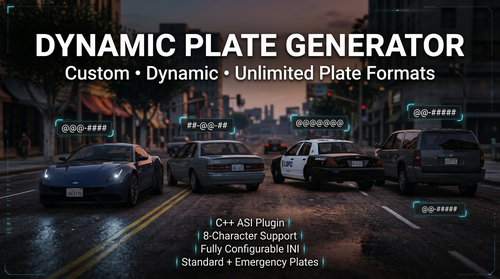
Dynamic Plate Generator is a lightweight C++ ASI mod for Grand Theft Auto V / LSPDFR that dynamically generates license plates using customizable formats defined in an .ini configuration file. Unlike mods that rely on a fixed set of predefined plate styles, Dynamic Plate Generator allows you to create as many custom plate formats as you want, with a maximum plate length of 8 characters. Whether you want realistic American-style plates, fictional state plates, European-inspired formats, police/government plates, or completely custom designs, you can define them yourself. Features🚗 Dynamic License Plate Generation 🔧 Fully configurable through an .ini file ♾️ Unlimited custom plate formats 🔤 Supports letters and numbers 🔢 Supports multiple custom combinations 🚓 Separate formats for Standard and Emergency / Government vehicles ⚡ Written in C++ as an ASI plugin 🪶 Lightweight and designed to run in the background 🎮 Designed for GTA V / LSPDFR environments 📄 No need to modify game files manually 🛠️ Easy-to-understand configuration How It WorksDynamic Plate Generator uses simple pattern characters to determine how license plates are generated. Each format is defined using: Character | Meaning @ | Random letter # | Random number - | Literal separator ExampleFormat_1 = @@@-#### This can generate plates such as: ABC-4821 KTR-9037 XPM-1745 The letters represented by @ and numbers represented by # are generated dynamically. ConfigurationThe configuration file contains separate sections for different vehicle categories. [Formats_Standard] ; Merged Standard & Vanity formats Format_1 = @@@-#### Format_2 = ##-@@-## Format_3 = @@@@@@@ Format_4 = #@@@### [Formats_Regional] ; Dedicated Emergency / Govt formats Format_1 = @@-##### Format_2 = ###-@@@@ Format_3 = @@-###-@ Format_4 = ####-@@@ Format Characters@ — LetterEach @ represents one randomly generated letter. Example: Format_1 = @@@ Possible results: ABC KPX MTR ZQW # — NumberEach # represents one randomly generated number. Example: Format_1 = #### Possible results: 4821 9037 1745 6208 - — SeparatorThe - character is treated as a literal separator. Example: Format_1 = ABC-#### Possible result: ABC 4821 You can use separators wherever you want, provided the resulting plate stays within GTA V's character limit. Creating Your Own FormatsYou are not limited to the four formats included in the default configuration. You can add as many formats as you want. For example: [Formats_Standard] Format_1 = @@@-#### Format_2 = ##-@@-## Format_3 = @@@@@@@ Format_4 = #@@@### Format_5 = @@-##### Format_6 = ####-@@ Format_7 = @#@-###@ Format_8 = ###-@@@ Format_9 = @@@@-## Format_10 = ##@-#### The mod will read the available formats from the configuration and use them accordingly. You can continue adding: Format_11 Format_12 Format_13 Format_14 ... There is no requirement to stop at four formats. InstallationRequirementsGrand Theft Auto V Script Hook V ASI Loader LSPDFR (Optional) Installation StepsDownload the latest release of Dynamic Plate Generator. Extract the downloaded archive. Copy the mod files (DynamicPlateGenerator.asi & DynamicPlateGenerator.ini) into your GTA V main directory. Make sure the .asi file is located in the GTA V root directory alongside your other ASI plugins. Launch GTA V. The mod will automatically load through the ASI loader. Open the included .ini file to customize your license plate formats. CreditsDynamic Plate Generator Developed by Admirable C++ ASI Plugin for Grand Theft Auto V. Special thanks to the GTA V and LSPDFR modding communities for their continued work, tools, documentation, testing, and support. Download & UpdatesThe latest versions and updates will be available through: LSPDFR: https://www.lcpdfr.com/profile/364065-admirable/ Patreon: https://www.patreon.com/cw/admirable The Patreon release is free. Supporting the project is completely optional but greatly appreciated. ChangelogVersion 1.0.0Initial release Dynamic license plate generation Configurable standard plate formats Configurable emergency/government plate formats Support for custom plate patterns Unlimited user-defined formats @ character support for letters character support for numbersMaximum 8-character GTA V plate format support LicenseThis mod is provided for use with Grand Theft Auto V. Please do not redistribute, re-upload, modify, or claim this mod as your own without permission from the original author. For permissions regarding modification, redistribution, or inclusion in mod packs, please contact the author. Enjoy Dynamic Plate Generator! Create your own plates. Build your own regions. Make your GTA V world more dynamic.
-
 Seems like, callout can't be accepted.
 -
-
-
-
-
I saw there was a update by JonJon for NexusMDT Lite version but now I can't find it on here. Is it taken down or some glitch?
-
You missed the contexts, since NPCAI is compatible with PR, you won't need to go through menu, just verbal conversation will pop suspect ID, License etc, so those random voice narration from character won't play.
-
NPCAI changed everything, you don't need to open menu to ask for ID or Koflem etc. Now it's more like talk with Microphone and get response from NPC with AI.
-
-
Should hyperlink the mods url on each header. Just a friendly suggestions so users can jump into those mods with ease.
-
I guess, STP had the ability for Partner to drive their own car and follow you while patrolling, I understand it wasn't perfect. But the suggestions are cool. I will defintely think about it in my future projects.
-
 Fantastic replacement for STP and UB. Finally switched into PR once for all.
- 743 comments
- 58 reviews
-
-