


***UPDATE 11/22/16: Sheriff lighting completely redone! Happy thanksgiving!***
***UPDATE 10/6/16: Multi-livery support added, various bug fixes***
***UPDATE 9/19/16: Functional Spotlights, New Flash Patterns, Coronas, Separate DLC Packs!***
***UPDATE 9/6/16: Rambars and Antennas added to all vehicles!***
New Video (does not showcase new lighting patterns):
Installation has been completely redone and simplified - you can now install all vehicles as standalone DLC packs. All installation is done with a few clicks of your mouse using OpenIV Installation Packages. No more editing of files necessary!
-------------------------------------------------------------------------
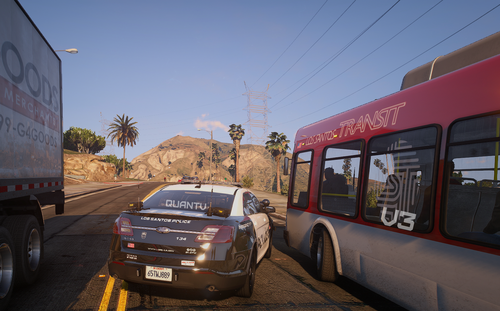
I am proud to finally present my LSSD Pack featuring a 2011 Crown Victoria, 2013 Tahoe (Marked and Unmarked), and 2013 Charger (Marked and Unmarked)! All vehicles feature ELS-inspired lighting setups (complete with environmental lighting) all accomplished without the use of any scripts or plugins. The lighting setup features all Federal Signal equipment and is complimentary to the other vehicles. The vehicles also feature the following extras:
- Extra 1: Spotlight up (Sheriff Units)
- Extra 2: Spotlight down (Sheriff Units)
- Extra 7: Setina Rambar
- Extra 10: Panasonic Arbitrator Dashcam
- Extra 12: Stalker Radar Unit
Thanks to @FirstThirtyMinutes for featuring one of the vehicles and including an installation guide!
Installation uses OIV packages and is as simple as can be. To install the vehicle, just follow the directions in the readme or watch FirstThirtyMinutes's video above.
**If you experience your game crashing on start-up after installation, please download and install this gameconfig.xml to fix the problem: https://www.gta5-mods.com/misc/add-on-car-crash-fix
Terms of Use: This file is not to be uploaded, in whole or in part, to any other site than LCPDFR.com. All files included in this download are not to be modified, ripped, or redistributed in any way, shape, or form. If you create a texture for these vehicles, please upload only the texture and provide a link to the original vehicle download.
Credits:
- 2007 Tahoe by unknown author, modified into 2013 Tahoe and converted to GTA V by OfficerUnderwood
- Tahoe parts by Orex429/Shady
- Tahoe interior parts by Ubisoft, edited by OfficerUnderwood
- Tahoe wheels by GTAxBOSS
- Charger model ripped by DMN, converted and modified to 2013 Charger by Codex12
- Charger seats from The Crew, modified by Codex12
- Charger steering wheel from Simraceway, modified by Codex12
- Charger interior texture by Carper
- 2013 Charger Hubcaps by Fartknockr, converted to IV by Bxbugs123, converted to V by Fartknockr
- 2013 Charger rim by GerryStudio, edited and converted to IV by Bxbugs123, converted to V by Fartknockr
- 2013 Charger rim and hubcap textures by Bxbugs123, color editing for V by Fartknockr
- CVPI Model from Driver SF, converted to IV by F5544, modified by KevinDV, CJ24, and OfficerUnderwood
- CVPI Wheels from NFS:MW, converted yb trewq34, textures by GreenAid
- CVPI Interior parts by Ubisoft, modified by OfficerUnderwood
- CVPI door handles by Lundy
- CVPI Hubcaps by Bueno
- Federal Signal Micropulse by DannyBoy1909, converted to IV by Him1250, converted to V by Captain14
- Federal Signal Valor by RoegonTV, converted to V by Captain14, configured by Captain14
- Federal Signal Arjent by OfficerFive0, converted to V by OfficerFive0
- Federal Signal Impaxx by OfficerFive0, converted to V by OfficerFive0
- Federal Signal Solaris ILS by M67v, converted to V by Captain14, lights configured by Captain14
- Federal Signal Latitude Signalmaster by DannyBoy1909, converted to IV by Him1250, converted to V by Captain14
- Console by 0taku
- Panasonic Toughbook CF-31 by RidgeRunner Designs
- Panasonic Arbitrator by johnclark1102
- Stalker Radar by jasonct203
- Whelen PAR46 Spotlight by EVI
- Unity Spotlight by Cyrax of gamemodels.ru, converted and edited by Black Jesus
- Antennas by PriMan, converted by Captain14
- Setina PB400 by Kygo, converted by Captain14
- Charger Setina Rambar by Vertex3D
- Tahoe Setina Rambar by NickieB
The Charger/Tahoe in the FIB/FIB2 slots currently don't support multiple liveries (just one) and I'm not quite sure why. I have the vehicles.meta set up properly. They do accept a single livery however, and their marked counterparts accept multiple liveries.
One last note: the included textures were quickly tossed together by me and are vanilla style. They aren't the best, so I apologize for that. If you would like to change them, templates are included. If you make a good quality black/white sheriff skin and would like me to use it as the default for my pack please message me!
Enjoy!
What's New in Version 6.0.0
Released
- Completely redid lighting for all sheriff vehicles!
- Brand-new Arjent lightbar for CVPI by OfficerFive0
- Mirror lights (FedSig Impaxx) added to Charger, Tahoe, and CVPI
- Revamped carcols.meta for better lighting effects
- Added rear bar to Tahoe/Charger (FedSig Latitude SignalMaster)
- Fixed lots of bugs with CVPI and minor bugfixes for other vehicles
-Tahoe parts by Orex429/Shady
-Tahoe interior parts by Ubisoft, edited by OfficerUnderwood
-Tahoe wheels by GTAxBOSS
-Charger model ripped by DMN, converted and modified to 2013 Charger by Codex12
-Charger seats from The Crew, modified by Codex12
-Charger steering wheel from Simraceway, modified by Codex12
-Charger interior texture by Carper
-2013 Charger Hubcaps by Fartknockr, converted to IV by Bxbugs123, converted to V by Fartknockr
-2013 Charger rim by GerryStudio, edited and converted to IV by Bxbugs123, converted to V by Fartknockr
-2013 Charger rim and hubcap textures by Bxbugs123, color editing for V by Fartknockr
-CVPI Model from Driver SF, converted to IV by F5544, modified by KevinDV, CJ24, and OfficerUnderwood
-CVPI Wheels from NFS:MW, converted yb trewq34, textures by GreenAid
-CVPI Interior parts by Ubisoft, modified by OfficerUnderwood
-CVPI door handles by Lundy
-CVPI Hubcaps by Bueno
-Federal Signal Micropulse by DannyBoy1909, converted to IV by Him1250, converted to V by Captain14
-Federal Signal Valor by RoegonTV, converted to V by F5544, configured by Captain14
-Federal Signal Arjent by OfficerFive0
-Federal Signal Impaxx by OfficerFive0
-Federal Signal Solaris ILS by M67v, converted to V by Captain14, lights configured by Captain14
-Federal Signal Latitude Signalmaster by DannyBoy1909, converted to IV by Him1250, converted to V by Captain14
-Console by 0taku
-Panasonic Toughbook CF-31 by RidgeRunner Designs
-Panasonic Arbitrator by johnclark1102
-Stalker Radar by jasonct203
-Whelen PAR46 Spotlight by EVI
-Unity Spotlight by Cyrax of gamemodels.ru, converted and edited by Black Jesus
-Antennas by PriMan, converted by Captain14
-Setina PB400 by Kygo, converted by Captain14
-Charger Setina Rambar by Vertex3D
-Tahoe Setina Rambar by NickieB
















Recommended Comments
Create an account or sign in to comment