Skip to content
View in the app

A better way to browse. Learn more.

LCPDFR.com

A full-screen app on your home screen with push notifications, badges and more.

To install this app on iOS and iPadOS
  1. Tap the Share icon in Safari
  2. Scroll the menu and tap Add to Home Screen.
  3. Tap Add in the top-right corner.
To install this app on Android
  1. Tap the 3-dot menu (⋮) in the top-right corner of the browser.
  2. Tap Add to Home screen or Install app.
  3. Confirm by tapping Install.

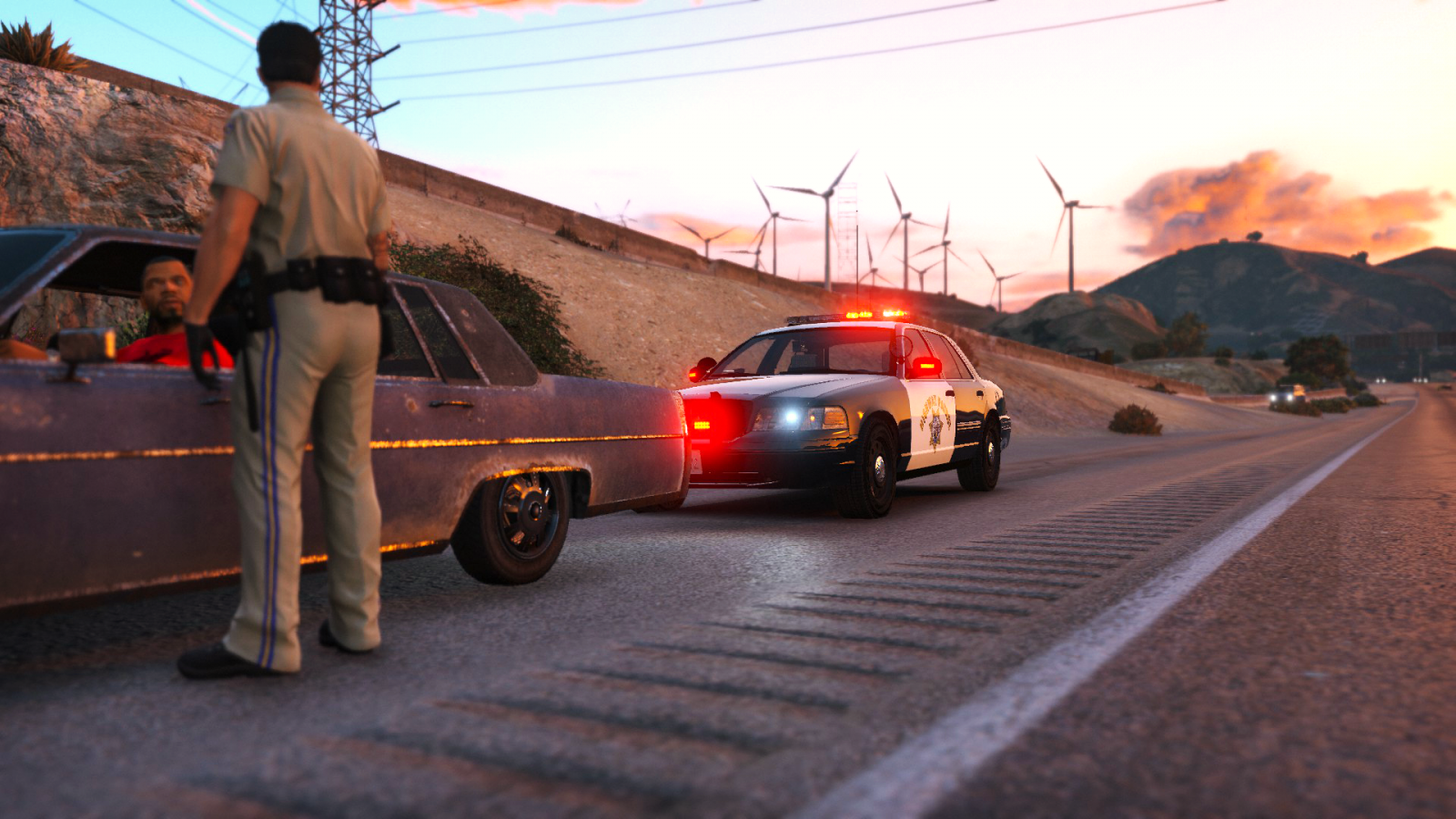
California Highway Patrol CVPI 1.5

(29 reviews)

6 Screenshots

Information

Introducing the California Highway Patrol CVPI. It is not an exact and has a lot of work to be an authentic replica. I have spent a good amount of time on this file so please leave feedback below. The car must be an addon vehicle for now until worked on further!

Any issues with the credits may be addressed my sending me a message and will be fixed :)

For any questions or concerns use the comments not the reviews!


Installation and Usage

Installation for these vehicles is very simple! No need to worry about a difficult process! Installation was made easy with a folder path! 

When you download the modification simply follow the path of each folder in OpenIV to successfully replace the vehicles. Make sure to install everything included! Those who don't will not be given support!


Planned Features

  • Make it a more authentic CHP CVPI


Miscellaneous

Please, PM me any bug or crash reports. I'll try my best to fix any unseen issues that might happen. Thanks.

What's New in Version 1.5

Released

• Fixed headlights

• Fixed missing polygons in doors

• Added a second flipped up spotlight

• Fixed transparent spotlight

• Added CHP texture

• Added an option for a SAHP texture 

• Misc edits and fixes

User Feedback

Recommended Comments

Dbeehler73

Members

im having problems like @MikoFiticus with the car slpiting up when recked

PgUp

Members

Am I missing something, do I need another mod to get this working?..

Installed all files you provided in right place, tried spawning through trainer using specific name, says car spawned but nothing there. SOS.

Martin Larsson

Members

Nice car :)

How do I change so that the car looks like your pictures? I though it was in the "Livery" menu, but nothing changes...

trollface

Members

@Virzza Is there a slick top livery yet? Absolute amazing work btw :)

OfficerSweiss

Members

If i want it to put it as police4.yft/ytf/hi.yft/hi.ytd what DLC pack should i go to in order to see the texture for it in the game??

TomCode99

Members

(edited)

How do i get it because its not in the police garage when i go there?I have installed it in the right folder

Edited by TomCode99

I figured out that it doesn't have to be an addon, I put it in Police4 and it works great.

thediamondmine

Members

I have this problem where i have put all of the stuff in the mpchristmas same with vehicle.meta and carvariations.meta but its not showing up when i goto the police station anyone know why?

thediamondmine

Members

On 6/13/2016 at 1:14 PM, lspdofficerinnewyork said:

I figured out that it doesn't have to be an addon, I put it in Police4 and it works great.

How did you replace it with police4?

1 hour ago, thediamondmine said:

How did you replace it with police4?

rename the CHPCVPI files to Police4 and put them into x64e

thediamondmine

Members

(edited)

6 minutes ago, lspdofficerinnewyork said:

rename the CHPCVPI files to Police4 and put them into x64e

What about the carvariations.meta and vehicle.meta what do i do with those?

Edited by thediamondmine

seve

Members

Im sorry to tell you this, but, the car works fine as police4 and no need to copy meta files. I just renamed the files to police4 and put them into a patchday and got into gta5 and spawned with no bugs and put all lights to blue blue :D for my own use.

Yankee6

Members

Wait so if i just rename the files to police and then follow the x64e path will my car work or do i have to put it into a certain patchday folder if so which patchday? and then after all of that what happens to the meta and the variations i am really new to this folder path instalation so any help would be much appreciated!!

SwiggityStag

Members

My lightbar doesnt seem to work. It doesnt have the brightness sorround it with RadianceV installed. did I just mis install or something because I put all the files in correctly Im fairly certain. If I may have done it wrong which item would I need to put in again?

SwiggityStag

Members

I cant seem to get the lightbar to work with radianceV any suggestions? Im having problems with two of my other modded cop cars so is it the vehicles or RadianceV? Any help would be appreciated. I do have shaders and PostFX on High...

badass22

Members

Where did you pick that uniform?

luisit094

Members

my front strobes (the ones on the ram bar) aren't working. Any tips on how to fix this?

GiveIt110Percnt

Members

Pls give template....

luiscarrera2002

Members

what´s the name of the car so i can spwan it with a trainer??


Great by the way!


OfficerAndreas

Members

(edited)

After installing the model when entering the game, my Rage Plugin Hook 
crashes. I guess it's the vehicle.meta from
Grand Theft Auto V\mods\update\x64\dlcpacks\mpchristmas2\dlc.rpf\common\data\levels\gta5 
Can you give me the default version of this file or tell me how can i solve it?

Edited by OfficerAndreas

Create an account or sign in to comment

Latest Mods

Account

Navigation

Search

Search

Configure browser push notifications

Chrome (Android)
  1. Tap the lock icon next to the address bar.
  2. Tap Permissions → Notifications.
  3. Adjust your preference.
Chrome (Desktop)
  1. Click the padlock icon in the address bar.
  2. Select Site settings.
  3. Find Notifications and adjust your preference.












