Skip to content
View in the app

A better way to browse. Learn more.

LCPDFR.com

A full-screen app on your home screen with push notifications, badges and more.

To install this app on iOS and iPadOS
  1. Tap the Share icon in Safari
  2. Scroll the menu and tap Add to Home Screen.
  3. Tap Add in the top-right corner.
To install this app on Android
  1. Tap the 3-dot menu (⋮) in the top-right corner of the browser.
  2. Tap Add to Home screen or Install app.
  3. Confirm by tapping Install.

Traffic Control 1.1.1

(46 reviews)

4 Screenshots

Traffic Control for GTA V
Copyright (C) 2018 Stealth22. All rights reserved.

Any unauthorized modification, reverse engineering, or distribution (including re-uploading of any kind) is strictly prohibited.


Requirements
You must have version 0.63 (or newer) of RAGE Plugin Hook. You must have a fully legal, non-pirated version of GTA V.


Automatic Installation
- Extract the ZIP archive; ensure that setup.exe and Traffic Control.msi are both in the same folder
- DON'T run Traffic Control.msi unless you know what you're doing
- Run setup.exe, and ensure that the installation directory detected matches the main/root folder of your GTA V install directory
- If setup.exe is unable to detect your GTA V directory, or fails in some other fashion, start Traffic Control.msi, AND SELECT YOUR GTA V PATH AS THE INSTALL DIRECTORY


Manual Installation
- Copy the TrafficControl.dll and TrafficControl.ini files into the Plugins folder of your GTA V directory.
- Copy the Stealth.Common.dll and RAGENativeUI.dll files into your main/root GTA V directory.


Features
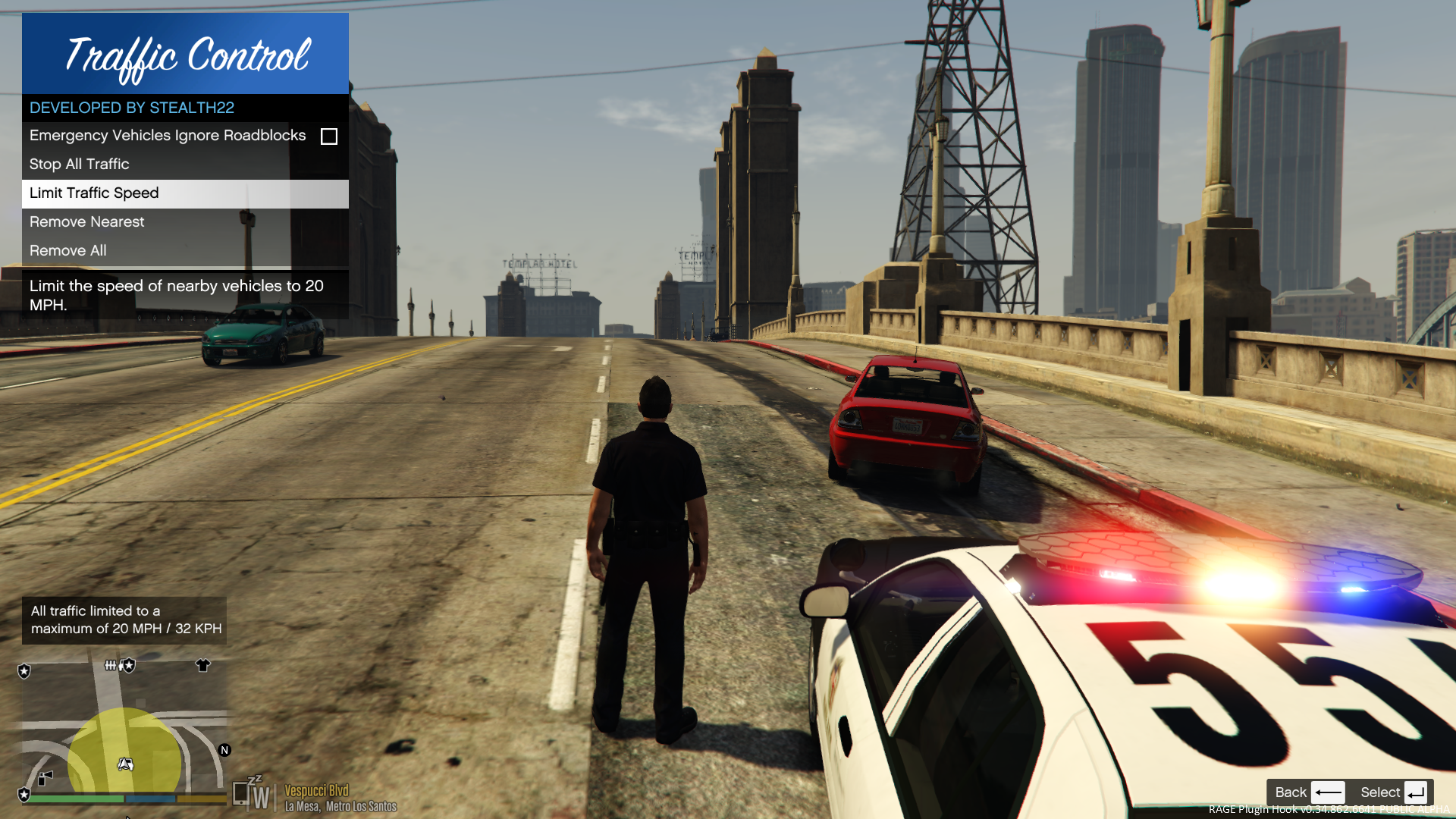
- Stop or slow down all traffic within a certain radius of the player, in order to close a road for investigative purposes, or for safety reasons during a traffic stop
- Multiple "roadblocks" or "speed zones" can be placed
- Roadblocks will remain in place until removed by the player
- A (beta) setting to allow any emergency vehicles to drive through "roadblocks"/"stop zones" can be enabled in the INI file ("Stop Traffic" orders only; speed restrictions are not affected)
- The above setting can also be changed on-demand through the new in-game menu
[NEW!] - Traffic Control now includes a new in-game menu, powered by RAGENativeUI!
[NEW!] - Keyboard shortcuts can now be changed in the INI file!
[NEW!] - Keyboard shortcuts can be disabled, if desired (to use the in-game menu exclusively)

[NEW!] - Integration with Police SmartRadio!


Usage
- Press the menu keybind (CTRL + F10 by default) to open the Traffic Control menu; use the menu options to place/remove roadblocks
- Alternatively, you can use the shortcut keys (see the INI file) to place/remove roadblocks
- Keyboard shortcuts can be disabled through the INI file, if you wish to only use the in-game menu


Forum Thread

http://www.lcpdfr.com/forums/topic/51961-rel-traffic-control-beta-close-off-the-road-while-you-investigate-and-clear-a-scene/ 

What's New in Version 1.1.1

Released

VERSION 1.1.1

  • Added missing Police SmartRadio files; fixed directory structure
  • Had some issues building the auto installer; this version will be manual drag and drop only
     

VERSION 1.1.0

  • This version requires RPH 0.62+, as well as RAGENativeUI v.1.6.3.0
  • This version also requires Stealth.Common v2.0+ (included; older versions will not work)
  • Brought this plugin into the 21st century, and best of all...
  • Integration with Police SmartRadio, built by our very own @Albo1125!!

User Feedback

Recommended Comments

InfamousNathan

Members

@Stealth22 I'm having an issue with the Traffic Control plugin which is essentially whenever I use my trainer to teleport somewhere in game for any reason, Traffic Control crashes, and that in turn crashes LSPDFR.


I have uploaded two screenshots of the Rage console directly after the crash, and from what I can see, it was Traffic Control that crashed, and then caused LSPDFR to crash as well. I could be wrong here, so please forgive me if I have made a mistake, but I was just wondering if you have any idea how to fix this issue. Obviously I know someone will probably say "don't teleport then", but occasionally it is necessary for me to do so, and if Traffic Control crashes every time I teleport, I can no longer use the plugin unless I can fix the issue.

Screenshot 1.jpg

Screenshot 2.jpg

Deactivated Member

Deactivated

(edited)

9 hours ago, Nathan3998 said:

if Traffic Control crashes every time I teleport, I can no longer use the plugin unless I can fix the issue.

Please provide more information. What were you doing before the crash? Does this happen every time you teleport? What trainer are you using? Did you have any active barriers placed (Road slowed down, Traffic stopped) before you teleported?

Edited by Mauvzel

InfamousNathan

Members

On 8/6/2018 at 7:51 AM, Mauvzel said:

Please provide more information. What were you doing before the crash? Does this happen every time you teleport? What trainer are you using? Did you have any active barriers placed (Road slowed down, Traffic stopped) before you teleported?

This only happens every time I've teleported. I'm not doing anything else apart from that.

Lopan

Members

Stealth22,


It appears that the stealth.commom.dll (v2.0) used for traffic Control is not compatible with ALPR+ (sensors do not detect anything). These are mods authored by you, do know of any workaround so they can both work? They are awesome mods, just trying to use both of them. Other than that it works fine so far.


Respectfully,

Lopan

Imasquidx

Members

On 8/16/2018 at 3:30 PM, Lopan said:

Stealth22,


It appears that the stealth.commom.dll (v2.0) used for traffic Control is not compatible with ALPR+ (sensors do not detect anything). These are mods authored by you, do know of any workaround so they can both work? They are awesome mods, just trying to use both of them. Other than that it works fine so far.


Respectfully,

Lopan

This mod is currently completely broken. We have to hope that stealth will come back one day.

Winterphunk

Members

(edited)

I loved this mod cause it was useful but i started crashing and would receive this error:


[8/31/2018 4:04:06 PM.058] LSPD First Response: Creating motorcyclist event
[8/31/2018 4:04:06 PM.177] LSPD First Response: 
[8/31/2018 4:04:06 PM.178] LSPD First Response: ==============================
[8/31/2018 4:04:06 PM.178] LSPD First Response: UNHANDLED EXCEPTION DURING GAME FIBER TICK
[8/31/2018 4:04:06 PM.178] LSPD First Response: ------------------------------
[8/31/2018 4:04:06 PM.178] LSPD First Response: Origin: Game fiber "<UNNAMED THREAD>".
[8/31/2018 4:04:06 PM.179] LSPD First Response: ------------------------------
[8/31/2018 4:04:06 PM.179] LSPD First Response: Exception type: System.NullReferenceException
[8/31/2018 4:04:06 PM.179] LSPD First Response: Exception message: Object reference not set to an instance of an object.
[8/31/2018 4:04:06 PM.179] LSPD First Response: ------------------------------
[8/31/2018 4:04:06 PM.179] LSPD First Response: Inner exceptions:
[8/31/2018 4:04:06 PM.180] LSPD First Response: ------------------------------
[8/31/2018 4:04:06 PM.180] LSPD First Response: Stack trace:
[8/31/2018 4:04:06 PM.180] LSPD First Response: at ?????????????????????????????????????????..ctor(Boolean createBlip, Boolean displayMessage)
[8/31/2018 4:04:06 PM.180] at ?????????????????????????????????????????.?????????????????????????????????????????.?????????????????????????????????????????()
[8/31/2018 4:04:06 PM.181] at Rage.GameFiber.Main()
[8/31/2018 4:04:06 PM.181] LSPD First Response: ==============================
[8/31/2018 4:04:06 PM.181] LSPD First Response: 
[8/31/2018 4:04:08 PM.185] LSPD First Response: [Traffic Control] Error encountered in process thread -- Thread was being aborted.
[8/31/2018 4:04:08 PM.187] LSPD First Response: [Traffic Control] System.Threading.ThreadAbortException: Thread was being aborted.
[8/31/2018 4:04:08 PM.188] at Rage.GameFiber.SleepThis(Int32 duration)
[8/31/2018 4:04:08 PM.188] at Rage.GameFiber.Yield()
[8/31/2018 4:04:08 PM.189] at ?????????????????????????????????????????.?????????????????????????????????????????()
[8/31/2018 4:04:08 PM.190] LSPD First Response: [Traffic Control] Stopping process thread...
[8/31/2018 4:04:08 PM.196] LSPD First Response: All signs removed

Edited by Winterphunk

Officer Kerem

Members

May i go dutty, my game is going down

tonegtv

Members

CAN YOU PLEASE FOR THE LOVE OF GOD UPDATE ALPR+ TO WORK WITH YOUR LATEST STEALTHCOMMON.DLL

Winterphunk

Members

Okay, so i decided to bring this back into my LSPDFR and i forgot how useful it was so far i'm no longer crashing so that's a plus.

Ocean25

Members

can someone help i've installed this plugin but its still not working in game then i tried re installing it but it's still not working

HazyTube

Members

3 hours ago, Ocean25 said:

can someone help i've installed this plugin but its still not working in game then i tried re installing it but it's still not working

This plugin is outdated

SuperbJim

Members

It is sad to say though this plugin at some p[oint ios outdated. Because up until some other new mods everything works fine

But it has to be the dll thing. Either Rage or stealth so 

🙂 

Atlas315

Members

Anyone else have a bug where they can't remove roadblocks after creating one? I've tried re-binding the keys, updating the necessary plugins, etc, nothing seems to work. I can still place down a roadblock, just can't remove it.

Marquess

Members

(edited)

"Any unauthorized modification (...) is strictly prohibited"


Says who? I have changed some parameters for my game. Sue me.^^

Edited by Marquess

HazyTube

Members

On 11/9/2018 at 5:25 PM, Marquess said:

"Any unauthorized modification (...) is strictly prohibited"


Says who? I have changed some parameters for my game. Sue me.^^

Why so salty? He just doesn't wan't people to change his script and publish it, wich is totally understandable. Making some minor changes for your personal game is ok if you don't publish it.

Marquess

Members

(edited)

36 minutes ago, HazyTube said:

He just doesn't wan't people to change his script and publish it


Nope, he says clearly: "Any unauthorized modification (...) or distribution (...) is strictly prohibited." 

I broke that "rule" by modifiyng it for my game.

I'm being salty because all those people who most complain about generall copyrights, those people are the first who take advantage of those right themselves by making such statements as "do not modify my mod because bla bla" - and they often put that line on the top of the description in big red letters. So the first thing you read is a warning which in some cases is written in a rude, arrogant way. When you haven't done anything but the modder is b***ng right away. HE wants us to download his mod, therefor HE should be friendlier. HE wants something from US - not vice versa. That's why I'm being salty about those things. Because when you read it in every second file, it gets annoying.

Edited by Marquess

Gino Frozen

Members

crash for at the lspdfr at a startup

Manike

Members

Makes my game crash after going on-duty

Stealth22

Friends of LSPDFR Author

Please be advised, this plugin is now open source.


Digital HD

Members

On 12/7/2018 at 6:41 PM, Stealth22 said:

Please be advised, this plugin is now open source.


I can not get this to work at all, please help. Every time I load the game, albo.common tells me that PoliceRadio can not load because I am missing the following files in path plugins/LSPDFR/traffic control.dll...however I have the files in there.

Digital HD

Members

Question for anyone who can answer. Why is it when I have traffic stopped, when I'm not looking at them they continue to drive but as soon as I look they stop. I couldn't tell, I'll test it, but I'm sure it has to do something with having the setting of "emergency vehicles ignore road blocks".

XtremeJewTunnel

Members

When WIll this be updates to support 0.4

HazyTube

Members

10 hours ago, XtremeJewTunnel said:

When WIll this be updates to support 0.4

It will not, stealth stopped developing plugins

XtremeJewTunnel

Members

is there another plugin that i can use instead of this?

HazyTube

Members

6 minutes ago, XtremeJewTunnel said:

is there another plugin that i can use instead of this?

StopThePed has a stop traffic and slow down traffic feature

Create an account or sign in to comment

Account

Navigation

Search

Search

Configure browser push notifications

Chrome (Android)
  1. Tap the lock icon next to the address bar.
  2. Tap Permissions → Notifications.
  3. Adjust your preference.
Chrome (Desktop)
  1. Click the padlock icon in the address bar.
  2. Select Site settings.
  3. Find Notifications and adjust your preference.