Skip to content
View in the app

A better way to browse. Learn more.

LCPDFR.com

A full-screen app on your home screen with push notifications, badges and more.

To install this app on iOS and iPadOS
  1. Tap the Share icon in Safari
  2. Scroll the menu and tap Add to Home Screen.
  3. Tap Add in the top-right corner.
To install this app on Android
  1. Tap the 3-dot menu (⋮) in the top-right corner of the browser.
  2. Tap Add to Home screen or Install app.
  3. Confirm by tapping Install.

Callout Interface 1.4.1

(46 reviews)

7 Screenshots


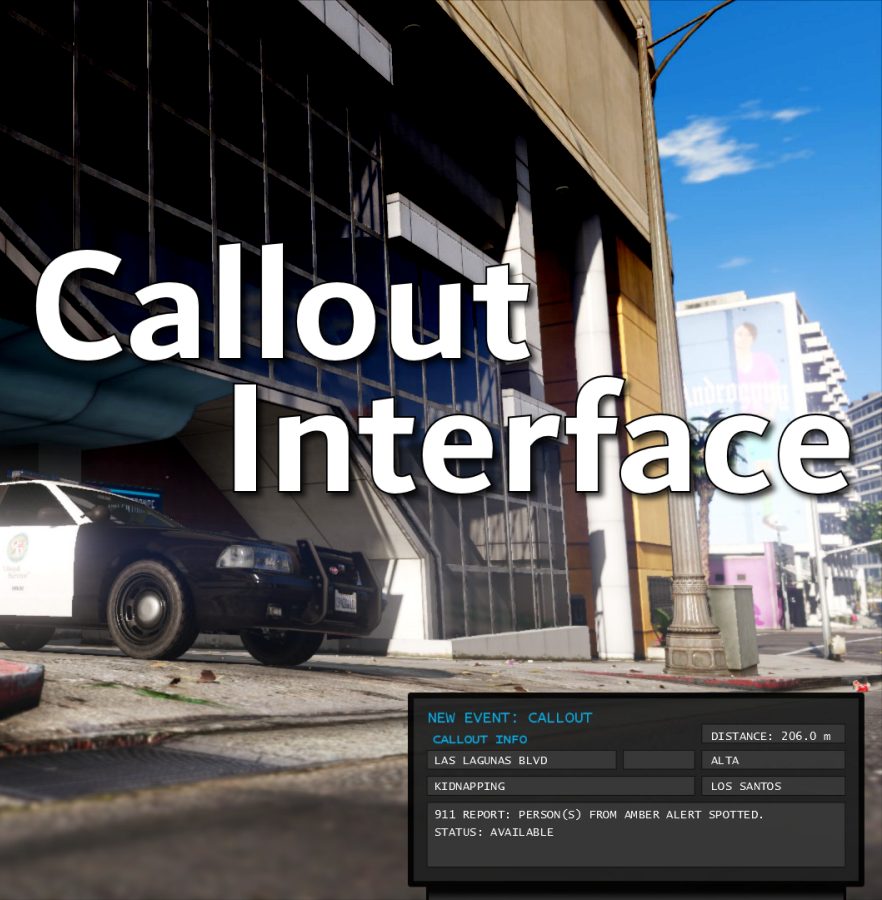
Callout Interface
A new way to interact with callouts.
 

Features:

  • RAGENativeUI menu front-end to start a callout
  • Force a random callout via keybind
  • Advanced MDT with multiple status buttons and tabs
  • Callouts can be sent to the MDT while you're on another callout
  • A fully functioning ALPR system with advanced camera layouts
  • External license plate display


Support:
Discord Serverhttps://discord.gg/AuJCUag

Developer API https://github.com/Immersive-Plugins-Team/CalloutInterfaceAPI


Recommended Callout Packs:

686 Callouts  link
Chaos Calloutslink
Super Calloutslink


New in Version 1.4.1


Edited by opus49
added latest dev diary and some new screenshots

What's New in Version 1.4.1

Released

New in Version 1.4.1

Added

  • Dependency checker
  • Hot key for toggling ALPR key on/off
  • Automatic tab switching (when enabled)
  • Automatic blips for ALPR
     

Changed

  • Toggling off MDT will exit interactive mode
  • Delayed and put checks around camera object creation


Fixed

  • Fixed a bug with ALPR debug mode where the graphics would get stuck


New in Version 1.4

Added

  • Realistic multi-camera ALPR system
  • Dynamic traffic stop that nobody someone likes
  • External license plate display widget
  • Silent callout system and log

Changed

  • Completely overhauled the MDT
  • Migrated graphics handling to RawCanvasUI

Short Description

Interface with callouts.

User Feedback

Recommended Comments

opus49

Insiders Author

6 minutes ago, no29rules said:

Love the plug in. Is it possible to add an on/off selector for the callouts. What I mean is say I have five callout packs installed but I only want to work with one callout pack I can turn the other ones off


Short answer: no.


Long answer - the way callouts work is that the callout plugins register them with LSPDFR, which in turn spawns callouts based on probability characteristics of the callout.  There's no way to control how LSPDFR handles this process.  When you have a callout pack that allows you to disable certain callouts, it is using that boolean at load time to determine whether or not to register that callout with LSPDFR.

Corey6501

Members

I believe this is crashing my game, i have fully up to date everything and use only plugins supported by yours and now i keep getting crashes and this shows in the logs


[2/2/2022 6:27:55 PM.732] at CalloutInterface.API.Functions.GetDateTime()
[2/2/2022 6:27:55 PM.733] LSPD First Response: CalloutInterface: [ERROR] There is something wrong with your RAGE World Datetime
[2/2/2022 6:27:55 PM.733] LSPD First Response: CalloutInterface: [ERROR] Month must be between one and twelve.
[2/2/2022 6:27:55 PM.733] Parameter name: month
[2/2/2022 6:27:55 PM.733] LSPD First Response: CalloutInterface: [DEBUG]    at System.DateTime.DaysInMonth(Int32 year, Int32 month)
[2/2/2022 6:27:55 PM.733] at Rage.World.get_DateTime()
[2/2/2022 6:27:55 PM.733] at CalloutInterface.API.Functions.GetDateTime()


Maybe its not this crashing the game but that ^ still shouldn't happen right?

opus49

Insiders Author

26 minutes ago, Corey6501 said:

I believe this is crashing my game, i have fully up to date everything and use only plugins supported by yours and now i keep getting crashes and this shows in the logs


[2/2/2022 6:27:55 PM.732] at CalloutInterface.API.Functions.GetDateTime()
[2/2/2022 6:27:55 PM.733] LSPD First Response: CalloutInterface: [ERROR] There is something wrong with your RAGE World Datetime
[2/2/2022 6:27:55 PM.733] LSPD First Response: CalloutInterface: [ERROR] Month must be between one and twelve.
[2/2/2022 6:27:55 PM.733] Parameter name: month
[2/2/2022 6:27:55 PM.733] LSPD First Response: CalloutInterface: [DEBUG]    at System.DateTime.DaysInMonth(Int32 year, Int32 month)
[2/2/2022 6:27:55 PM.733] at Rage.World.get_DateTime()
[2/2/2022 6:27:55 PM.733] at CalloutInterface.API.Functions.GetDateTime()


Maybe its not this crashing the game but that ^ still shouldn't happen right?


It's not crashing your game - it's just being logged.  

opus49

Insiders Author

On 1/22/2022 at 7:15 PM, jacalapar said:

If that's not what you want, I can offer a "InitialToggledOn" flag that you could enable such that you start the game with it toggled on and as long as you don't manually toggle it off, it will show whenever you get in a car.  But I need clarification on which option you're looking for.


THIS IS BINGO!! SPOT ON!! Please add it that way i never have to press that terminal key anymore and it will be on in the first place when starting my game lmao


This will be in the next release.

jacalapar

Members

On 1/12/2022 at 3:25 PM, ThoroughbredGaming said:

For anyone who is wanting the default callout notifications to no longer show up (the ones that appear above the minimap when you receive a callout from LSPDFR). Launch the game, then, hit the pause button, navigate to "Settings", then go down to "Notifications", from the "Notifications" tab, you will see at the top "Phone Alerts", toggle that to off. From there, you can play the game as normal and you will no longer get notifications appearing above the minimap, it will only appear through this amazing plugin. Hope this helps some people 🙂

but the issue here is when you get results from using Stop the Ped and find drugs or breathalyze and get the results, or maybe get ID's from anyone, you wont be seeing any of that. I DO NOT recommend turning those notifications off on the left hand side of the screen because of this matter.

JosephM

Members

crashes when interacting with Yobbin callouts

opus49

Insiders Author

27 minutes ago, JosephM said:
crashes when interacting with Yobbin callouts


Do you have a log or anything helpful?

I just tested it with no issues.

SlimInAZ

Insiders

Do you have a link to solid instructions for installing the virus_city map into LSPDFR (for use with Callout Interface)? I see CI supports that map but so far no luck finding instructions for installing that map into LSPDFR. I'm hoping you tested with that map since it's supported and can point me in the right direction. Thanks.

HaDoCk987

Members

(edited)

Excuse me, I have two problems.

One is that the address couldn't display properly. (My language is Mandarin)

The other is that even though the distance of a case from me is beyond 3000 meters (I set MaxDistance=3000), the callout still won't be ignored.


Sorry for bothering.

10.png

Edited by HaDoCk987

opus49

Insiders Author

2 hours ago, HaDoCk987 said:

Excuse me, I have two problems.

One is that the address couldn't display properly. (My language is Mandarin)

The other is that even though the distance of a case from me is beyond 3000 meters (I set MaxDistance=3000), the callout still won't be ignored.


Sorry for bothering.

10.png

Ignored just means it will attach another unit to the call.  Make sure you have this enabled.


As for the street name, I pull this directly from Rage's World.GetStreetName method.  If that comes back scrambled, there's not much I can do about it.

BlindGaming

Members

On 1/5/2022 at 8:01 PM, opus49 said:

Very interesting idea.  Thank you!

Brilliant plugin! 

I also love this idea, was also going to suggest a description of some sort, because personally I don't like the description's of callouts being on the top left of the screen so for them to be implemented into this script would be awesome. 

Another great idea, not sure if it's do-able, if you were able to use the MDT for searching names and plates, writing tickets and arrest reports. That ones probably too hard, not sure.

But other than that, amazing plugin, and if your wondering how to remove the lspdfr notifications on the left and just use the MDT, I'm pretty sure you can disable them in the games settings menu in notifications. 

opus49

Insiders Author

10 minutes ago, BlindGaming said:

Brilliant plugin! 

I also love this idea, was also going to suggest a description of some sort, because personally I don't like the description's of callouts being on the top left of the screen so for them to be implemented into this script would be awesome. 

Another great idea, not sure if it's do-able, if you were able to use the MDT for searching names and plates, writing tickets and arrest reports. That ones probably too hard, not sure.

But other than that, amazing plugin, and if your wondering how to remove the lspdfr notifications on the left and just use the MDT, I'm pretty sure you can disable them in the games settings menu in notifications. 


Thank you 🙂

I am looking at expanding the MDT for more stuff as you suggest.  I talk about it in my most recent dev diary and show a license plate request from grammar police being written to the MDT.  It feels like some sort of computer aided dispatch is inevitable, but little by little...


BlindGaming

Members

15 hours ago, opus49 said:


Thank you 🙂

I am looking at expanding the MDT for more stuff as you suggest.  I talk about it in my most recent dev diary and show a license plate request from grammar police being written to the MDT.  It feels like some sort of computer aided dispatch is inevitable, but little by little...


OMG you sound so familiar but I don't think it's you lol!

Anyway, Oh cool! Brilliantly well crafted plugin, excited for the future for this plugin! 

adam enforcers

Members

@opus49 is your latest update a replacement of player location display on gta5 mods? 🙂

opus49

Insiders Author

23 minutes ago, adam enforcers said:

@opus49 is your latest update a replacement of player location display on gta5 mods? 🙂

No. It's just the postal codes line.

acedecepticon

Members

Can u add an option to except call outs or to stop call outs from pouring in so we can conduct speed checks and other duty’s without call outs pouring in? There was an older plugin called forcecallout which had an option like that .

opus49

Insiders Author

12 minutes ago, acedecepticon said:

Can u add an option to except call outs or to stop call outs from pouring in so we can conduct speed checks and other duty’s without call outs pouring in? There was an older plugin called forcecallout which had an option like that .


Grammar Police already handles that.  (you don't have to use voice)

vnord

Members

Can you add a ability to be able to change the name of the agency 

opus49

Insiders Author

30 minutes ago, EmberEquinox said:

Hey @opus49, you sneaky penguin, what is the "Dynamic Traffic Stop" callout?


Just a little something I'm working on.  You can get an idea of what it's about here:
https://youtu.be/dGM9V6GbduI?t=260


HazyTube

Members

Thanks for including me in the credits, much appreciated! 🙂

TheGaminWolf

Members

Could you do a tell me how you get the nearest postal thing to show up or do a video on how to do it would appreciate it

opus49

Insiders Author

10 minutes ago, ShaynePlayz said:

Could you do a tell me how you get the nearest postal thing to show up or do a video on how to do it would appreciate it

Answered via Benzos discord 🙂

Create an account or sign in to comment

Latest Mods

Account

Navigation

Search

Search

Configure browser push notifications

Chrome (Android)
  1. Tap the lock icon next to the address bar.
  2. Tap Permissions → Notifications.
  3. Adjust your preference.
Chrome (Desktop)
  1. Click the padlock icon in the address bar.
  2. Select Site settings.
  3. Find Notifications and adjust your preference.