




ineseri
Friends of LSPDFR
-
Joined
Everything posted by ineseri
-
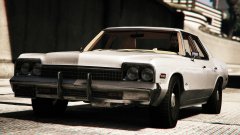 "This was a bargain. I picked it up at the Mount Prospect City police auction last spring. It's an old Mount Prospect police car. They were practically giving them away! It's got a cop motor, a four hundred and forty cubic inch plant. It's got cop tires, cop suspensions, cop shocks. It's a model made before catalytic converters, so it'll run good on regular gas."
 -
Please review the pinned topics here (same section you posted in) http://www.lcpdfr.com/forums/forum/894-api-development/
-
There's no issue with using the RPH whilst taking screenshots, what are you on about?
-
Well you'll need to compile it. Look in the API section for help. I've moved your topic there because it was placed in the wrong section.
-
Excuse me? This section is for GTA IV (LCPDFR) - Are you talking about LSPDFR?
-
Hello there -- welcome to LCPDFR.com and thanks for trying out LCPDFR! Please do the following: Make sure you aren't using a crack - We don't support cracks or people using pirated softwareUpdate GTA IV to 1.0.7.0 (the latest version of the game, or 1.1.2.0 for EFLC) - These patches are needed. Make sure that you run the game as an administrator.Make sure that your GTA IV root folder (and every subdirectory) is not set to "read-only"Ensure that AdvancedHook.dll, ScriptHook.dll, ScriptHookDotNet.asi and Dsound.dll OR Xlive.dll are in the GTA IV ROOT folderEnsure that there is a folder titled 'LCPDFR' in the ROOT GTA IV folder.Check that all the above files exist, if they do not, reinstall LCPDFR with the MANUAL installation.Ensure that you are using up to date versions of every LCPDFR dependency and LCPDFR itself.Install these: https://www.microsoft.com/en-us/download/details.aspx?id=30653 , https://www.microsoft.com/en-us/download/details.aspx?id=30679 In some cases, your issue is resolved after following the above steps. If it did help, please let everyone know in the topic that your issue is resolved. If you do have to post a topic, do the following; Give a clear, detailed description of the problem.Explain any circumstances surrounding the problem.State what solutions you have tried.Post ALL relevant logs (LCPDFR.log, Scripthook.log, ScriptHookDotNet.log, AdvancedHook.log).Include as much information as possible.Post your system specifications.Post what other mods you are using. This includes car and script mods.Post a screenshot of your GTA IV or EFLC game directory. Please note that failure to follow these instructions may cause this thread to be closed.
-
This topic has been closed by G17 Media Community Team Staff as it is a topic regarding support for the RAGE Plugin Hook. We are unable to provide support for the RAGE Plugin Hook (RPH), and require all support topics pertaining to this be posted over on the official RAGE Plugin Hook forums: http://forums.ragepluginhook.net/ If you feel this topic has been closed in error, please report this post.
-
Hello there -- welcome to LCPDFR.com and thanks for trying out LCPDFR! Please do the following: Make sure you aren't using a crack - We don't support cracks or people using pirated softwareUpdate GTA IV to 1.0.7.0 (the latest version of the game, or 1.1.2.0 for EFLC) - These patches are needed. Make sure that you run the game as an administrator.Make sure that your GTA IV root folder (and every subdirectory) is not set to "read-only"Ensure that AdvancedHook.dll, ScriptHook.dll, ScriptHookDotNet.asi and Dsound.dll OR Xlive.dll are in the GTA IV ROOT folderEnsure that there is a folder titled 'LCPDFR' in the ROOT GTA IV folder.Check that all the above files exist, if they do not, reinstall LCPDFR with the MANUAL installation.Ensure that you are using up to date versions of every LCPDFR dependency and LCPDFR itself.Install these: https://www.microsoft.com/en-us/download/details.aspx?id=30653 , https://www.microsoft.com/en-us/download/details.aspx?id=30679 In some cases, your issue is resolved after following the above steps. If it did help, please let everyone know in the topic that your issue is resolved. If you do have to post a topic, do the following; Give a clear, detailed description of the problem.Explain any circumstances surrounding the problem.State what solutions you have tried.Post ALL relevant logs (LCPDFR.log, Scripthook.log, ScriptHookDotNet.log, AdvancedHook.log).Include as much information as possible.Post your system specifications.Post what other mods you are using. This includes car and script mods.Post a screenshot of your GTA IV or EFLC game directory. Please note that failure to follow these instructions may cause this thread to be closed.
-
Remove your car mods and try again, one of them is most likely causing it.
-
There's no money to be made from GTA Online that way - Moddable multiplayer won't happen until GTA 6 is released (when Rockstar stops caring about GTA 5).
-
Then you should've backed the files up, sorry.
-
Look over here; http://www.systemrequirementslab.com/cyri
-
You've posted this in the LSPDFR Discussion section, so I will assume you're talking about LSPDFR. As long as your PC can run GTA V, you can probably run LSPDFR.
-
-
Then you'll have to wait til the RPH is up-to-date. Same as every other time :)
-
Nonsense for you maybe, but you're downloading an executable file over the internet from an unknown source. I'd be more wary of doing so. In any case, we do not allow it. If you already own the game, you own the files so there would be no need to download them from a third-party source.
-
No one would be allowed to upload it anywhere, as that'd be the same as piracy.
-
This topic has been closed by LCPDFR.com staff as it is a support topic concerning an unsupported version of LCPDFR. We do not support old versions of LCPDFR, and recommend you use and download the latest version (http://www.lcpdfr.com/files/file/4607-lcpd-first-response/) If you feel that this topic has been closed in error, please report this post.
-
http://www.lcpdfr.com/search/?&q=roadblock&type=forums_topic This topic has been closed, as it has been previously answered on LCPDFR.com - We require all members to thoroughly investigate whatever question they might have before posting. You can find the search function here: http://www.lcpdfr.com/search/ If you feel this topic has been closed in error, please report this post.
-
Did you load the plugin? Did you read the instructions?
-
The more mods you add, the more issues you might encounter. But generally speaking, it should work.
-
This topic has been closed, as it has been previously answered on LCPDFR.com - We require all members to thoroughly investigate whatever question they might have before posting. You can find the search function here: http://www.lcpdfr.com/search/ If you feel this topic has been closed in error, please report this post.
-
 No need for you to make a shitty reply yourself. If you don't have anything nice to say, don't say it. This is your first, and final, warning.
- 379 comments
- 113 reviews
-
-

- 3
-
-
That'd be the GTA V section then, moved it for you.
-
Which game are you talking about? This section is for general discussion.

