




ineseri
Friends of LSPDFR
-
Joined
Everything posted by ineseri
-
Yes, use DSOUND.dll instead if possible.
-
Hello :) Glad to hear from you. Could you post a screenshot of your GTA IV directory?
-
Keep them coming, thanks for posting all :) Feeling nostalgic here!
-
Let us know how that works out :)
-
If you saved while using mods, it's not really recommended to keep them. But anyway: The save files are located in 2 different places. X:Users%username%AppDataLocalRockstar GamesGTA IVsavegames X:Users%username%DocumentsRockstar GamesGTA IVsavegamesNote: The AppData-folder is usually hidden, make sure that you can see hidden files.Note 2: “X” is the drive where you have installed GTA IV, and %username% is replaced by your username
-
Hi! First off, I love your topic title. Gave me a good laugh. Thanks for the provided information as well, makes it a lot easier! Let's start this off: Are you running the game as administrator? Running the game as administrator: Go to the GTA IV folder, right click on GTAIV.exe, Properties, Compatibility and select 'Run this program as administrator', do the same exact thing to the LaunchGTAIV.exe. I'd also recommend you to use another software than Vehicle installer. I recommend you to use OpenIV. EDIT: Hi Luke.
-
Hello. I recommend you to create a filed called commandline.txt in your root GTA IV directory and entering the following text: -renderquality 0 -shadowdensity 0 -texturequality 0 -viewdistance 0 -detailquality 0 -novblank -norestrictions -percentvidmem 100 -minspecaudio -novsync -renderquality 0 -frameLimit 0 -nomemrestrict If you feel that helped, you can switch out to this: -novblank -norestrictions -percentvidmem 100 -novsync -frameLimit 0 -nomemrestrict If that didn't help, switch back to the first one. Let me know how that goes.
-
That's great that you're trying to help :) I'll be waiting :)
-
Is this a new member on this forum? If so, it would be better if he/she could post a topic instead or reply here.
-
Hi. Could you try to install LCPDFR 1.0 manually, with the manual installation package? (http://www.lcpdfr.com/files/getdownload/66380-lcpd-first-response/) Follow the attached guide to the letter.
-
Try to install this: (http://www.microsoft.com/en-us/download/details.aspx?id=5549)
-
Change to these settings in the "Events"-section of PoliceHelper.ini, found in your scripts folder: [ EVENTS ] TrafficEventsTimeout = 0 // Set timeout for creating traffic events (speeders will be created 2x more often). // Set it to 0 to turn off traffic events. WorldEventsTimeout = 0 // Set timeout for creating world events. Set it to 0 to turn off world events. EnableOtherEvents = False // Enable casual events like tourists asking for directions etc.If that doesn't work, try running the game without mods completely.
-
Please install these http://www.microsoft.com/en-us/download/details.aspx?id=30679 http://www.microsoft.com/en-us/download/details.aspx?id=30653 http://www.microsoft.com/en-us/download/details.aspx?id=35 http://www.microsoft.com/en-us/download/details.aspx?id=5549 (If you haven’t updated GFWL, use this). Also: Running the game as administrator: Go to the GTA IV folder, right click on GTAIV.exe, Properties, Compatibility and select 'Run this program as administrator', do the same exact thing to the LaunchGTAIV.exe.
-
Thanks. Remove either xlive.dll or dsound.dll. The game will crash with both of these in your directory as they cancel each other out.
-
Hello. Could you post a screenshot of your GTA IV directory?
-
Are you running the game as administrator? Running the game as administrator: Go to the GTA IV folder, right click on GTAIV.exe, Properties, Compatibility and select 'Run this program as administrator', do the same exact thing to the LaunchGTAIV.exe.
-
You need to delete xlive.dll and then start the game again :)
-
Sounds good, let us know how that goes :)
-
Did it start crashing when you added the skin?
-
Not for other mods no.
-
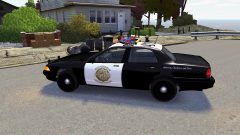 Remind me which city GTA IV is set in again? Just kidding, awesome work dude :D
 -
Remember to eat that drive with some cheese. Mmmm cheese toast. *cough* Anyway, glad you 'solved' it :p
-
You need only one of them. I recommend you to use dsound.dll. Where did you put the file?
-
Some people like to roleplay to the fullest, and as such the policehelper/towing scripts is really useful for that.
-
Do you have xlive.dll in your game directory? It's needed to launch ELS (and LCPDFR). Dsound.dll works too and is preffered, but I couldn't see that.

