




ineseri
Friends of LSPDFR
-
Joined
Everything posted by ineseri
-
Happy Birthday Ben! Hope you have a nice day! Nothing to see here, it's just Ben's birthday! This topic has been closed, stabbed, violated and trashed by LCPDFR.com staff. Ben If you feel that this topic has been closed, stabbed, violated and trashed in error, please run as far away as you can.
-
-
-
Trainer will work with the provided version of the ASI loader. But good it works!
-
You can remove whichever one you want to remove. If you are using a 100% save game, you might want to remove Dsound. I am not sure what the error is, but restarting the game should help.
-
MODERATOR NOTICE Moving to GTA IV Development Tutorials and Questions. The General & Miscellaneous Discussion section is a general purpose forum for all forms of miscellaneous discussion not catered for by any subject-specific forum.
-
Trainer should work just fine, but you should not use both Dsound or Xlive, only one of them. Vdh police helper was made for a different version of LCPDFR and LCPDFR 1.0 is not supported with third-party mods.
-
You're not a bother :P So are you saying it works now?
-
Hm, It never posted... Dang. Anyway: Please do the following: Make sure you aren't using a crack - We don't support cracks Update GTA IV to 1.0.7.0 (the latest version of the game, or 1.1.2.0 for EFLC) - This sometimes fixes a wide variety of issues Make sure that you run the game as an administrator. Make sure that your GTA IV root folder (and every subdirectory) is not set to "read-only" Ensure that ScriptHook.dll, ScriptHookDotNet.asi and Dsound.dll OR Xlive.dll are in the GTA IV ROOT folder Ensure that there is a folder titled 'LCPDFR' in the ROOT GTA IV folder. Check that all the above files exist, if they do not, reinstall LCPDFR with the MANUAL installation. Ensure that you are using up to date versions of every LCPDFR dependency and LCPDFR itself. Install these: .Net Framework 4.5, Microsoft Visual C++ Redist 2012
-
The spotlight mod is no longer available on LCPDFR.com due to the author wanting it to be taken down. This was done because of a few abusive comments.
-
MODERATOR NOTICE Please don't tell members where to post. This topic is not posted in the wrong section as it is more of a general discussion about GTA IV modding as a whole. I'm not using that many mods myself, but I can recommend to use pretty much any mod made by Olanov and Custo. If you want to add extra vanilla stuff I can recommend Yard1 and DLer. And as has been said above, a simple search on Google or similar will get you far!
-
Hello there -- welcome to LCPDFR.com and thanks for trying out LCPDFR. You failed to read the instructions before posting in this forum. So we'll remind you of them. Please do the following: Make sure you aren't using a crack - We don't support cracks Update GTA IV to 1.0.7.0 (the latest version of the game, or 1.1.2.0 for EFLC) - This sometimes fixes a wide variety of issues Make sure that you run the game as an administrator. Make sure that your GTA IV root folder (and every subdirectory) is not set to "read-only" Ensure that ScriptHook.dll, ScriptHookDotNet.asi and Dsound.dll OR Xlive.dll are in the GTA IV ROOT folder Ensure that there is a folder titled 'LCPDFR' in the ROOT GTA IV folder. Check that all the above files exist, if they do not, reinstall LCPDFR with the MANUAL installation. Ensure that you are using up to date versions of every LCPDFR dependency and LCPDFR itself. Install these: .Net Framework 4.5, Microsoft Visual C++ Redist 2012 If your problem has been solved after following these basic instructions, hit 'Mark Solved' next to this post. If not, please now reply to this thread, and make sure that you do the following: Give a clear, detailed description of the problem. Explain any circumstances surrounding the problem. State what solutions you have tried. Post ALL relevant logs (LCPDFR.log, Scripthook.log, ScriptHookDotNet.log, AdvancedHook.log). Include as much information as possible. Post your system specifications. Post what other mods you are using. This includes car and script mods. Please note that failure to follow these instructions may cause this thread to be closed.
-
You could always open up cmd and type (when there is a line break, press enter); ipconfig /flushdns ipconfig /release ipconfig /renew It will flush your name resolver cache and give you a new IP adress. Might help.
-
Both GTA IV and LaunchGTAIV?
-
You can use the trainer to fix your car, you can keep the trainer. Just make sure to follow the instructions in my post and it should fix it!
-
Your electricity bill will go up since it draws power. Case closed :)
-
MODERATOR NOTICE Moving to GTA IV Discussion You should restore your backups or reinstall your game. Or use a search engine to find what you need. Nothing to see here! This topic has been closed by LCPDFR.com staff. If you feel that this topic has been closed in error, please report this post.
-
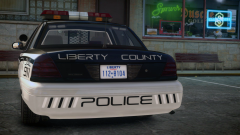 Nice side mirror.
 -
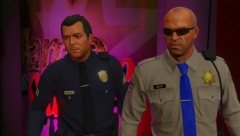 Use the report button if you feel that content violates the Community Guidelines. The 5 images per 30 minutes rule DOES NOT apply to the GTA V galleries. Further posts about this WILL result in sanctions. '?do=embed' frameborder='0' data-embedContent>>
 -
-
Well. Bottom of the page might have some clues. Idk.
-
Please reply to all fixes in my post.
-
I'd say it's Vdh PoliceHelper. Consider removing it.
-
Hello there -- welcome to LCPDFR.com and thanks for trying out LCPDFR. You failed to read the instructions before posting in this forum. So we'll remind you of them. Please do the following: Make sure you aren't using a crack - We don't support cracks Update GTA IV to 1.0.7.0 (the latest version of the game, or 1.1.2.0 for EFLC) - This sometimes fixes a wide variety of issues Make sure that you run the game as an administrator. Make sure that your GTA IV root folder (and every subdirectory) is not set to "read-only" Ensure that ScriptHook.dll, ScriptHookDotNet.asi and Dsound.dll OR Xlive.dll are in the GTA IV ROOT folder Ensure that there is a folder titled 'LCPDFR' in the ROOT GTA IV folder. Check that all the above files exist, if they do not, reinstall LCPDFR with the MANUAL installation. Ensure that you are using up to date versions of every LCPDFR dependency and LCPDFR itself. Install these: .Net Framework 4.5, Microsoft Visual C++ Redist 2012 If your problem has been solved after following these basic instructions, hit 'Mark Solved' next to this post. If not, please now reply to this thread, and make sure that you do the following: Give a clear, detailed description of the problem. Explain any circumstances surrounding the problem. State what solutions you have tried. Post ALL relevant logs (LCPDFR.log, Scripthook.log, ScriptHookDotNet.log, AdvancedHook.log). Include as much information as possible. Post your system specifications. Post what other mods you are using. This includes car and script mods. Please note that failure to follow these instructions may cause this thread to be closed.
-
Hello there -- welcome to LCPDFR.com and thanks for trying out LCPDFR. You failed to read the instructions before posting in this forum. So we'll remind you of them. Please do the following: Make sure you aren't using a crack - We don't support cracks Update GTA IV to 1.0.7.0 (the latest version of the game, or 1.1.2.0 for EFLC) - This sometimes fixes a wide variety of issues Make sure that you run the game as an administrator. Make sure that your GTA IV root folder (and every subdirectory) is not set to "read-only" Ensure that ScriptHook.dll, ScriptHookDotNet.asi and Dsound.dll OR Xlive.dll are in the GTA IV ROOT folder Ensure that there is a folder titled 'LCPDFR' in the ROOT GTA IV folder. Check that all the above files exist, if they do not, reinstall LCPDFR with the MANUAL installation. Ensure that you are using up to date versions of every LCPDFR dependency and LCPDFR itself. Install these: .Net Framework 4.5, Microsoft Visual C++ Redist 2012 If your problem has been solved after following these basic instructions, hit 'Mark Solved' next to this post. If not, please now reply to this thread, and make sure that you do the following: Give a clear, detailed description of the problem. Explain any circumstances surrounding the problem. State what solutions you have tried. Post ALL relevant logs (LCPDFR.log, Scripthook.log, ScriptHookDotNet.log, AdvancedHook.log). Include as much information as possible. Post your system specifications. Post what other mods you are using. This includes car and script mods. Please note that failure to follow these instructions may cause this thread to be closed.


