


NickieB
Members
-
Joined
-
Last visited
Everything posted by NickieB
-
Hes talking about the adding the lights to the CV like the Taurus has on the rambar correct? The 8-10 lights that run across the top of the rambar...
-
Taurus Police Interceptor v1.1 by NickieB v1.1 - Added LED spotlight and correct center caps. See pictures. Spotlight coordinates have changed for v1.1 [Police] spot-x=-0.8 spot-y=+1.0 spot-z=+0.6 ~ Credits for v1.1 LED Spotlight - TheThinBlueLine Center Caps/Spotlight - BxBugs123 Taurus Police Interceptor v1.0 by NickieB Thanks for downloading. Other versions coming soon with prisoner bars, Code 3 x2100, and more. *** Any issues, concerns, questions, bugs, please PM or Comment below. Please no PMs requesting changes to the car *** The whelen siren/lights controller lights up inside when ELS is active. Just a little touch of realism. ** CREDITS ** - Model is original Ford Taurus by Driver San Francisco, modified for and converted to GTAIV and marked to Police version by F5544. Modified further by NickieB - Main textures are made by F5544. Edited/Re-mapped by NickieB - Inside police equipment, siren speaker, lightbar, laptop, police partition by BxBugs123 - Whelen siren control box by PFCBarefoot - Wheels by Lt.Caine - Soundoff Ultralite by Unknown. No credits with the original file. Edited by NickieB - CVPI Rambar by BxBugs123, edited heavily by NickieB - Textures by Republic21, SharpCommand, diablozer0d617. - Wisconsin State Patrol texture by NickieB - Spotlight by Cj24 - Special thanks to all my BETA testers - Nutt, Dhruv, Tzr2, The State Trooper, Efox, SharpCommand, FireSheriff343 I beleive thats everything, if I missed something or someone PM me. You do NOT have permission to upload or distribute this vehicle without my written consent. ** Spotlight Coordinates ** [Police] spot-x=-0.8 spot-y=+0.9 spot-z=+0.6 WFT = 1.5MB WTD = 1.8MB
- 13 comments
- 6 reviews
-
Aww, I typed all that for nothing lol. I couldn't imagine LCPDFR without ELS
-
Honestly it depends on how the creator mapped the ELS. For example from passanger to driver it would be default L(1)Red L(2)Red R(3)blue R(4)Blue, "L" being Left and "R" being Right. And each one of those numbers corresponds to the ELS.ini The reason there are 4 choices for colors is because thats how many extras make up the primary ELS. The secondary is extras 7/8/9 and there can be no more than nine since thats the maximum number of extras GTA IV allows. Extras 5/6 are the takedowns/wig-wags. Now if the creator maps the ELS differently, then the colors might not match up to the .ini like normal and you would have to figure out how its mapped by watching the flashing. For example I might map a lightbar from left to right extra 1/3/2/4. The reason for this is so different flash patterns car be obtained(patterns explained below). If I mapped it 1/3/2/4 and it was a normal red/blue split lightbar, This is how the ini would look for the colors to show correctly on the environment in game L1=Red, L2=,Blue, L3=Red, L4=Blue Option "A" is 1/2 flashing together and 3/4 together "B" is 1/4 and 2/3 "C" is 1/3 and 2/4 "D" is 1/2/3/4 mostly all together "E" is the Right Left or Center direction "X" is random Within each option are the sub-patterns like A-1, A-2, B-1, C-4, etc. and each sub-pattern has a slight difference in flashing. I hope that helps you understand it, its kind of hard to explain in-depth. I probably confused you went way deeper than you wanted to know anyway. I didn't even talk about the secondary lol
-
I second that. It doesn't seen like a project bugs would do. Its a tour bus....not a command center. and you need a lot more than lights to make a command center like James said
-
BETA Files went out a few minutes ago to some of you. I'll start reviewing the skins now for the final release. Like I said in the preview thread a problem arose last minute with the Code 3 so the justice will come first. Will be released as soon as I get good feedback from my testers.
-
You use open iv the same way you would use sparkiv. Navigate to the file location(componentpeds.img) and import the new model (M_Y_COPTRAFFIC.WFT/WTD) and then swap around any textures if you want to. Same thing for the hat except that goes under PEDPROPS.img
- 35 comments
- 19 reviews
-
Don't hold your breath for someone to make it either. 99% possibility it will be a long long time before its made and there will probably be a civilian version before a police one
-
I'm not sure, I'm confused by the question. Are you asking me if there will be a b/w skin in the release? ATTENTION everyone. I didn't notice it until now but photobucket scaled down the template to 1024x1024 when it was suppose to be the normal 2048x2048. I apologize for not catching it sooner. I've fixed the link in the original post to the correct size. I'm sorry to those of you who already took the time to make skins. Link to correct template: http://www.4shared.c...E/template.html
-
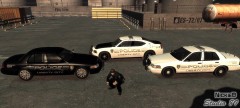 Are you serious? Everything you see in that picture was created by me. The cars I made and the skins I made also. If anyone wants to question it I have the photoshop .psd files of the skins to prove it and the zmod files for the cars. I don't know if your trying to start something but don't
 -
There not bad for quick skins. The ESPD one the dark blue might be kind of hard to see in-game but I'll check them out tomorrow when I'm testing. Thanks
-
:facepalm: sorry, I complelty missed that in the original post. .....of course it crashed his game. Why can't I get it right....
-
Is that created off the bxbugs taurus template? If it is it wont work, the templates are slightly different
-
Just as the title said I'm looking for skins for my upcoming Taurus release. You have the freedom to create whatever you want. You don't have to ask me if its okay, just do whatever you want, I don't care if you make 1 or 10. PM me whatever you come up with and I will pick 4 to include in the .wtd at the release. You will be fully credited. Link to the template is below. If I don't get anything then it will just delay the release longer because I will have to make 4 skins. I'm hoping to release in the next few days. Thanks a lot everyone!! Please title the PM's - "Taurus Skins" IMPORTANT: The link to the first template was wrong. Photobucket scaled down the template to 1024x1024 when it was suppose to be the normal 2048x2048. I'm sorry I didn't catch it sooner and I apologize to those of you who already made skins. The link has been fixed with the correct template. Sorry again http://www.4shared.com/photo/fullsize/quhAM7mE/template.html
-
Join the club buddy, those are cars we all want to see. The caprice is in progress by some people on here and I'm not sure about a durango but a explorer is in progress i believe over on gpm.
-
Cmon Nutt, I thought you would of at least thought of the car we created...lol Slicktop charger with text adviser:
-
I understand your a newbie and policeman already called you out on it but don't double thread or double post. Its frowned upon. Anyway - that skin is fairly simple so he shouldn't have any problem making it. If you have any views from the rear that helps a lot when making skins....
-
I think hes talking about the .NET framework. link: http://lmgtfy.com/?q...net framework 3 for some reason the download for v3 was removed by microsoft. It may still be around but I've had no luck finding it so you'll have to use 3.5 if you absolutely need 3.5 but otherwise download the most recent and current build which is 4 I think. 3.5 can be found in the list of results and if you want v4 just change the search to 4
-
 lol, it worked out perfectly, you relesed them just as I was working on this car. Those are parts I've been drooling and waiting for. Thanks so much!
 -
New low poly driver sf taurus. Code 3 x2100, soundoff ultralite, grill lights. File size = 1.6MB
-
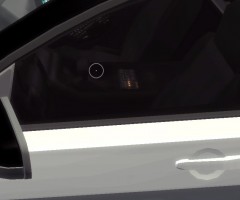
From the album: Taurus WIP
siren/light control box lights up when active. -
From the album: Taurus WIP
-
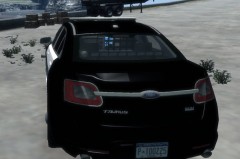
From the album: Taurus WIP
-
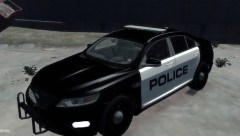
From the album: Taurus WIP
-
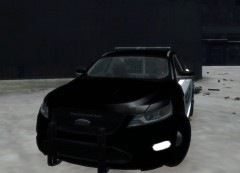
From the album: Taurus WIP


