NickieB
Members
-
Joined
-
Last visited
Everything posted by NickieB
-
Lol exactly, he got his answer and that's all he cares about. Seems like a lot of that lately, register, ask, get answer, disappear. Everyone just wants their game to work and their gone until they have another problem
-
-
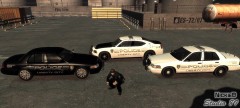
From the album: NEW SKINS
Just some new skins I made that I've been using for awhile. Let me know if you guys want the pack and I'll upload it! Shown are all 3 styles. The charger has an all black and all white skin just like the CVPI's -
Where he lives its like 2 or 3 in the morning - he isn't up. Be patient by friend.
-
=== Police Hat by NickieB === Simple model and texture mesh from the FBI ped from GTA IV. It doesn't work on all peds but works quite well on the cop model as you can see. Also works with the FBI ped from IV but does not work on the EFLC FBI ped with the vest. Included in the texture folder is two textures, one for white text and the other for orange(pictured) If a way is figured out to change the position of the hats/glasses I will re-release with better placement for the other peds it doesn't fit so well on. The files replace M_Y_COP_P in the PEDPROPS.IMG archive NOT the component peds archive. ALWAYS back up before installing in case it doesn't fit correctly on the ped your trying. Credits: NickieB for the pedmesh edit and texture edit R* for the FBI Hat model. This mod is quite simple so no problems should arise. If you find anything or have a concern PM me on the forum. THANKS FOR THE DOWNLOAD!!! This Mod is Exclusive to LCPD:FR
- 16 comments
- 6 reviews
-
--- Police Vest Ped V1.1 --- UPDATE V1.1: Fixed the hat bug, police and sheriff hat textures in white/orange included. v1.0 - This is a ped-mesh of the bottom half of policeman456 cop model combined with the top half of the FBI ped from EFLC. It can replace any ped you choose it does not have to be the traffic cop. Other textures I have made for the vest/jacket are included. The skins for the cars are available if you want them I can release them. The vehicles pictured are all my unreleased vehicles. Feel free to PM me if you find any issues. CREDITS: NickieB Credits from policemans456's readme DeltaHawk of Arma for the belt model Maze426 for the help with 3ds max policeman456 for putting it all together Used with permission from policeman456 This Mod is Exclusive to LCPDFR.com Thanks for the download!
- 35 comments
- 19 reviews
-
-

- 2
-
-
epic, that had to take a lot of time...
-
Yeah, thats what I thought. Have you tried reinstalling the game? Not IV but just FR?
-
I do know what that is
-
I thought of this same thing but if he is launching the game again it shouldn't keep happening every single time. I can go days sometimes with out having to reload the scripts. Its worth a try though guys. Like he said hit ~ type reloadscripts no space, just like that and ALT+P to start game and CTRL+P to force duty to make things quicker
-
Thats the most lights I've ever seen, I've been wanting to do something similar but it would be awhile before its out. Other projects to finish first.
-
I wouldn't suggest a laptop, get a desktop, a PC, not a mac. Most mid-level computers now are capable of running IV at decent settings. My PC I got a over year ago, it was $900/$1000ish I think. Its a HP pavilion Elite HPE and I can run IV on full 1080 resolution but the frame rate is kind of bad so I run the settings a little lower than that. I'm not that good with specs and all that stuff but someone else will be able to tell you more
-
Hmmm, does the file have size to it now that there are no more errors? Should be around 3.5MB? Did you create your .wtd correctly? adding all the textures you used in zmodeler, no need to add vehshare files though. I have to go for awhile, feel free to PM me if you want to, otherwise I'll check the thread when I come back on
-
Are you getting RC20 errors and it crashes to desktop or the game runs fine and it just wont' spawn?
-
take a look at the image I posted ^^^^ up there. Put the quadraflaere extra_1 in the extra_1 you have under lightbar and then attach it to the other extra_1 lights. I have to go for a while. Feel free to PM me if you want.... I see some things with that hierarchy that might cause you issues that we could take care of
-
yea, the quadraflare.wft is just a folder, you should be able to pull out the misc_c, which is the housing and extra_1, which is the ELS light and erase the "qyadraflare.wft" Then pull out the extra_1 so it isnt under the misc_c anymore and put misc_c in the "pushbar" folder and attach it to the pushbar after you have it placed where you want it. The extra_1 goes in the folder of whatever ELS light you want it to flash with and then gets attached to those lights. I hope you can understand that and its not to confusing. Let me know if it is... Example:
-
Glad you like the CVPI, its mine You saw a video of it? I'd like to see it.... My charger is a xmas tree also there is a video to so you can see it Just a heads up, there is another CVPI coming very very soon....
-
I do have some ideas. Take a look at the photo below, The duplicates of the "chassis are probably going to be located where the red arrow is at the bottom of the hierarchy. Delete any duplicates down there until only the ones by the blue arrow and brackets remain. You want chassis_L0, chassis_L1 and chassis_L2 to stay. Don't delete the chassis[COL] at the bottom, you need that its the collision for the car. now for the "scene not found" when you hit export and the window pops up you need to type in the name exactly as it is by the green arrow on the left. That way it exports everything in that folder. As you can see i've typed it in exactly by the purple arrow. Make sure "collision" and sliced model are ticked and store textures is not. Hit export and this should solve your issue. It may give you another error about duplicates and if it does just find them and delete them. If this helps I would appreciate a !
-
Are they named correctly in zmodeler? Extra_1 2 3 etc? Another thing - make sure the light housing itself is attached to the pushbar but the ELS texture has to be attached to the other ELS lights.
-
Oh I know she would have. I didn't see that he said that. No guarantees that this will work but hey its worth a try right? This is something I have to do to edit read only files and thought it might help you...
-
No big deal Tom, its all good!
-
I'll ask him for you. Thats good it only took 9 mins. I couldn't remember so I said 20 just to be safe. Now go to bed
-
hehe, the quote of the day....then there isn't much you can do buddy and if you have to ask your mom maybe your not old enough to be playing this game in the first place. MAC will NOT run this mod and parralles..well like asuna said "PARRALLES!?!? You mean that shit program that corrupted my macbook to the point where tech support had no idea what to do? pfftt...get a PC " I need not say more - Get a PC
-
You were quoting me when you said that so i thought you were talking to me. Maybe you were just re-posting what I said, honest mistake my bad
-
It doesn't take an hour, maybe 20-30 minutes tops. That's what I do, is back up my entire IV folder. Glad you got your ELS figured out and sorry it took us so long to get it solved, lol. One more thing, its bothering me. "cirous" or cirus" is spelled curious. Thanks :)