


NickieB
Members
-
Joined
-
Last visited
Everything posted by NickieB
-
Did you, you personally, give the zmod people a credit car number/paypal and did they give you a reg. code? Even a cracked version will display a reg code. Just come out and say if its cracked or not. By the thing you said "do you mean that some one payed for it? then yes" it sounds cracked. Plus the build you said you initially had 959 is cracked out there somewhere(I won't say where) but I've seen it. If you paid for it you should have the most recent build 992 or whatever it is.
-
Crazy, gives me that "feeling" when watching it. I can't believe he climbs with no safety lines attached but I can understand why..How much would I charge?(If I could even get myself to do it)...Lets just say I better make enough a year to own a very very nice house and a ferrari. I should have no worries about paying bills or being able to eat.
-
I have a open mind to any new lightbar someone wants to show me. Its just that I don't care for that lightbar, someone else might agree with you that its great. I was just giving you a hard time...
-
Logo Blip Mod by NickieB v1.1 This mod replaces the police station blip that comes up when LCPDFR is activated with any logo of you choice. I myself prefer the LCPD logo, I think it shows up best in-game. Thanks for downloading! Comments/feedback is greatly appreciated. I don't have time to test each one individually so if something doesn't look right in game, PM or comment and I'll check it out. There is a key in the readme as to the file names of the logos - I will add more after a few are requested. Its to much updating to do it every time someone asks ** V1.2 - Alaska State Troopers Badge - Alaska State Troopers Logo - Alderney State Police Logo ** Added V1.1 - Royal Canadian Mounted Police - Vancouver(BC) PD - Michican State Police - Wisconsin State Patrol - New Jersey State Patrol - London Police - NYPD - US Border Patrol - Initial Release (v1.0) - LAPD Badge - Florida Sheriff Badge - Sheriff Style Badge - LCPD Logo - US Marshals Badge - ATF Badge - DEA Badge - ICE Badge ***INSTALL INSTRUCTIONS*** Unzip the folder and find the blip you want to use in the "LOGOS" folder and rename it radar_police Using OpenIV or Spark IV go into the textures folder. Its on the left side near the bottom. 2nd from the bottom for OpenIV and for SparkIV its the folder right above RGSC Find "blips.wtd" and export the entine folder to make a backup. <<<DONT SKIP THIS STEP Click and open "blips.wtd", once open look for "radar_police.dds". Its the fourth from the top. Click on it and hit "Replace"(OpenIV) or "Import"(SparkIV) Find the blip you renamed radar_police and hit open Your new logo should now be imported and you should see it in the viewer Hit SAVE and enjoy your new blip in-game. ~~~ If you want a different one, you can PM me a picture of whatever you want and I'll create it for you. Its very simple to do so if you yourself wish to make your own, instructions are included in the ReadMe. If your PMing me please title it "Blip Mod" and include the logo you want. **Credits** - NickieB - The respective departments/agencies who's logos I used I'm not responsible for any problems if you fail to backup your blips.wtd folder
- 13 comments
- 10 reviews
-
More like an acquired taste for crap. lol jkjk :biggrin:
-
Ew is right, sorry slimory but I think its ugly
-
Then the only other option is xliveless....
-
No problems with spark for me either. I use OpenIV for everything except sirens. OpenIv is so much better....
-
Run installer as administrator... see if that helps. Right click>run as admin
-
Thanks Kubeanie I'm glad you like it. It looks good in game! Yea the reason I didn't use it was because I had just finished making the skin when I saw your release plus like you said the templates are different.
- 13 comments
- 6 reviews
-
Yes bu depends on what you consider recent, its been around for years now. I believe it was only available on police cars but obviously you can buy old police cars if you want it. The last question I'm not sure
- 17 comments
- 8 reviews
-
Are you using ELS enabled cars or the normal default police cars? The tazer not being added is a common problem, there is a pinned articles about it in the support section I believe
-
You can make the slimlighter a misc, just make sure its in the hierarchy when you export. If you talking about mapping skins, well the cvpi is already mapped. Just import the skins into the wtd. If your talking about getting them to show up in zmodeler, only 1 will, whichever one is named police_sign_1 and you would add that along with the other textures to the materials before you import the model.
-
-
I agree, Its nice what your doing but just post it in the already existing threads
-
Wouldn't let me edit ^^^ but thanks everyone. As for no rambar versions and slicktop versions. I'm not sure, If I did every modification everyone wanted there would be 10 versions of one car and I would spend tons of time doing it
- 13 comments
- 6 reviews
-
-

- 1
-
-
-
I was in 6th grade so I would have been 12 or 13 when it happened. Teacher had it on TV and I remember coming home from school and playing with legos in the living room and mom was watching it on TV and crying. We had it on all the time on the TV. I'm sure 99% of Americans had it on their TVs to. I can tell you everything about that day, what I was doing when I found out and what I did after. Just like everyone else who has shared their story on here. Its something you won't ever forget....
-
Its nice to hear people from other countries say these things. Nice topic Tom. Not sure if you saw it already but the memorial they made I think is wonderful. Heres a album: http://news.yahoo.co...1315766923.html Pic at night, I think it looks really good at night: http://p.twimg.com/AW-rSISCAAEvy3F.jpg:large Day: http://www.glenwoodnyc.com/manhattan-living/wp-content/uploads/2011/09/11-memorial-world-trade-center-biggest-manmade-waterfalls.jpg
-
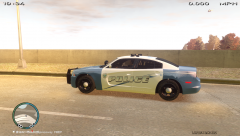 Looks like a nice high quality skin!
 -
I happened upon this channel earlier. I laughed my ass off at some of the games they play
-
haha, thanks. Glad to hear your enjoying it. Everything looked good in-game? No problems?
- 13 comments
- 6 reviews
-
So your saying that it happens on a vanilla install? Like if you just bought the game and installed it and then installed FR and it still does that? Try uninstalling the game, and re-installing and then install just FR. Like the others said, it sounds like you installed a map mod(I know you said you didn't though) Not sure if this would be relevant but do you have a legal purchased copy of the game? Or is it a torrent If you really don't have ANY mods installed the problem doesn't make any sense
-
Yeah, to each his own. They both have there pros and cons. We can agree to disagree lol
-
Are you running the installer as administrator? I'm a little confused, you do or don't have FR installed? You said you were able to play and found the captain fornicating but then you said if gave you that error when installing....

