


NickieB
Members
-
Joined
-
Last visited
Everything posted by NickieB
-
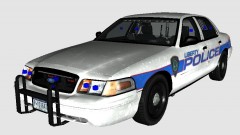
From the album: WIP
This is a update to my Slicktop CVPI v1.1 that I'm working on. No release date at this time. This version will have steel wheels since that was a frequent request and hubcaps like the original. I don't know which rambar will be used or if there will be a spotlight or not. So feel free to post feedback -
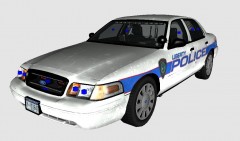
From the album: WIP
This is a update to my Slicktop CVPI v1.1 that I'm working on. No release date at this time. This version will have steel wheels since that was a frequent request and hubcaps like the original. I don't know which rambar will be used or if there will be a spotlight or not. So feel free to post feedback -
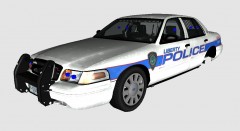
From the album: WIP
This is a update to my Slicktop CVPI v1.1 that I'm working on. No release date at this time. This version will have steel wheels since that was a frequent request and hubcaps like the original. I don't know which rambar will be used or if there will be a spotlight or not. So feel free to post feedback -
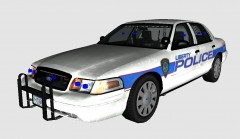
From the album: WIP
This is a update to my Slicktop CVPI v1.1 that I'm working on. No release date at this time. This version will have steel wheels since that was a frequent request and hubcaps like the original. I don't know which rambar will be used or if there will be a spotlight or not. So feel free to post feedback -
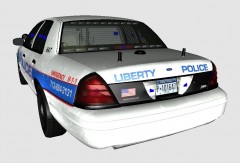
From the album: WIP
This is a update to my Slicktop CVPI v1.1 that I'm working on. No release date at this time. This version will have steel wheels since that was a frequent request and hubcaps like the original. I don't know which rambar will be used or if there will be a spotlight or not. So feel free to post feedback -
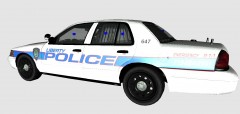
From the album: WIP
This is a update to my Slicktop CVPI v1.1 that I'm working on. No release date at this time. This version will have steel wheels since that was a frequent request and hubcaps like the original. I don't know which rambar will be used or if there will be a spotlight or not. So feel free to post feedback -
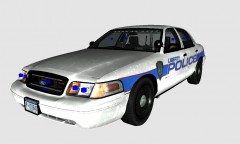
From the album: WIP
This is a update to my Slicktop CVPI v1.1 that I'm working on. No release date at this time. This version will have steel wheels since that was a frequent request and hubcaps like the original. I don't know which rambar will be used or if there will be a spotlight or not. So feel free to post feedback. -
ive had this for a very long time already too. I think I got it off of GPM though so its possible he's just uploading it here.
- 15 comments
- 8 reviews
-
Oh, well its super easy to add those in zmodeler. It doesn't require a whole separate pushbar to be made
-
I'm confused, that has a Go-Rhino rambar on it. Bxbugs released that rambar for the charger. http://gtapolicemods.com/downloads.php?do=file&id=1243 The pictures don't work and I even tried navigating to the site to look at them and they don't even work on the site. From what I can see in those small pictures though its the same bar as the link I posted. Or are you talking about one with the spotlights added?
-
Thanks for fixing it, sorry I was angry because you were like the 3rd person to upload a skin like that in 10 minutes.
- 6 comments
- 1 review
-
Zmodeler and unlocked parts. But the Mustang needs to be unlocked for you to modify it. Its not as simple as 5 clicks and voila you have a police car. It takes hours and hours, if you've never used zmodeler before which I'm assuming you haven't, it will take you days just to figure out zmodeler. I'm not trying to discourage you from trying but I'm giving you a heads up that its extremely difficult at first until you figure it out. I'm still learning every time I work on my projects
-
-
Don't worry, no one will upload it anywhere because no one will download it in the first place. You obviously never tested this because if you did you would have seen that you need to remove the template. PLEASE do a little reading about making skins and remove the template so its either 1) The background is transparent or 2) you add a layer of color underneath all the graphics
- 6 comments
- 1 review
-
Geez, do you read any of the comments we post? YOU NEED TO REMOVE THE TEMPLATE
- 12 comments
- 2 reviews
-
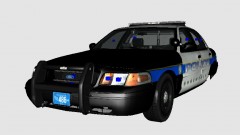 The car is very very close to being done but I just released my two chargers so I want to give it a little while before I release another car. The version you see here is a private request, I plan on adding more lights to a second version
 -
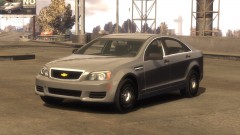 Absolutely beautiful
 -
Not a bad idea at all but when it comes to playing a game that uses two hands that might be a little hard sometimes. Just a thought....
-
Yeah you need to make a layer underneath all of the graphics and get rid of the template. Did you even test them in game? if you did you would have realized it isn't correct. Also the lines aren't even the same size...?
- 5 comments
- 1 review
-
-
-
The video was made by a buddy of mine, you'll have to ask him. Here is his profile, http://www.lcpdfr.com/user/16132-efox/
- 18 comments
- 5 reviews
-
-
-
I made a full tutorial that would allow you to pretty much make the car you wanted. It takes hours to make a full model, now I'm not saying someone wont make it for you but chances are more on the side of no one making it. I wasn't trying to be a "smart ass" I was simply pointing you in the direction of the unlocked parts that you would need to complete the car. By following a combination of the tutorials on this site you would be able to make the car you want. I'm not saying you'll get it right the first try, in fact you probably wont because modeling takes time and patience. I didn't get it right the first 20 times I tried but I kept trying and trying and eventually I figured it out. The only way to learn is to attempt it, trial and error. I'll let you in on a secret reason why we don't do a lot of requests. Its because so many people want a slight variation of a car that already exists. No modder is going to create a car 10 times 10 slightly different ways. Example, this request - there are already CVPI's with Arjents out there that have 98% - 99% of the setup you requested. *Please don't think I'm mad at you or anything like that, I'm not. You have the right to post as many requests as you wish. I don't want to get into an argument either. My original post wasn't meant the way you took it, I'm sorry


