


NickieB
Members
-
Joined
-
Last visited
Everything posted by NickieB
-
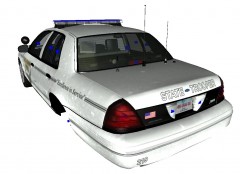
From the album: NickieB Upcoming Releases
Nearing completion -
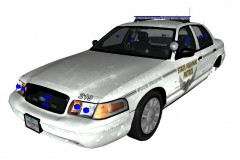
From the album: NickieB Upcoming Releases
Nearing completion -
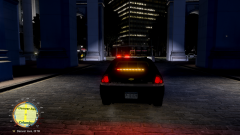
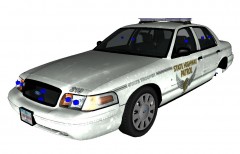 The car will be setup like a real OSP cruiser with the red lights in the grill, blue in the back and one red at the top rear window. It will have a full setup of police equipment, this photo was just a WIP shot, so there has already been progress made since the time of this photo
 -
Install everything he said but BEFORE you install LCPD:FR, start GTA and make sure it works and that your computer will run it. Then after you've tested it and know the game runs on your machine then you can make a backup of the GTA IV folder and then install LCPD:FR and whatever else you want. I say test the game prior to installing LCPD:FR because if the game doesn't run after FR is installed then you know where your issue is. Making a backup will take a few minutes but it will save you a lot of time when you don't have to re-install the game if you screw something up. Worry about car mods, script mods, player mods, etc after you have everything running smoothly and test the game after installing something. Its hard to troubleshoot when you install 15 mods at once and the game doesn't work
-
-
CVPI with Code 3 x2100 by NickieB Thanks for downloading! The file so many of you have been asking about for a long time! Any comments, concerns, or issues please comment below. Special thanks to Makinith29 for all his LCPD:FR Patrol/Bait Car videos on YouTube, he is the one who designed this car. Thanks to strikeeagle345 for the screenshots **There are 2 files available for download** A rambar and no rambar file. CVPI_X2100_v1.0_NickieB - No pushbar CVPI_X2100PB_v1.0_NickieB - Pushbar CREDITS - Model is original Ford Crown Victoria by Schaefft, modified for and converted to GTAIV by Chasez. - This version of the CVPI model has been modified by Bxbugs123 & Lt.Caine with permission by Schaefft and Chasez. - Rims By Bxbugs123, Textures By Lt.Caine - Code 3 x2100 Lightbar made by Bxbugs123 and penguin2254, modified and converted by gfxle. Edited by NickieB - 2009 CVPI wheels by Chasez - Spotlight arm, Garmin GPS, Pushbar, Interior Equipment, Prisoner Partition, misc lighting by BxBugs123 - LED Spotlight, Hotfoot Modules, Antennas by EVI. Edited by NickieB - Toughbook C19, Police Console by PFCBarefoot. Edited by NickieB - Whelen Avenger Deck Lights by NickieB - Skins by NickieB - Screenshots by Strikeeagle345 **By downloading this model you are agreeing not to rip this model or its parts** **Please do not upload or distribute this model without my (NickieB) written consent** **Please do not ask for changes to this vehicle** TO CHANGE LIGHTBAR COLOR Open the WTD with SparkIV or OpenIV and find the texture named "emerglights_clr". Click "import" or "replace" and navigate to the "light bar color options" folder and replace the teture with your desired color choice. You can edit the color yourself with a editing program such as Photoshop. CVPI_X2100_v1.0 by NickieB UPDATE - Steel Rim Version has been released - http://www.lcpdfr.com/files/file/2123-cvpi-x2100-s/
- 33 comments
- 15 reviews
-
Its probably something else that caused your crash. Skins usually don't crash games. You would need to have a 2012
- 7 comments
- 3 reviews
-
Is it a rotator or LED bar? It looks similiar to this, http://www.code3pse.com/products/product_info/Police/Lightbars/C_10 a Code 3 Code 360
-
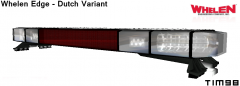 Judging by the looks of it I'd say it was edited from a existing lightbar but I can't say for sure
 -
Not initially but this is a very early picture. So a lot more will be added. The initial release will be setup like a OSP cruiser but like I said its possible for a rambar after that. They are super easy to add
-
 Some asshole I play with online all the time ;)
 -
Okay so a few weeks ago I had the issue of a texture not showing up in-game and when it was exported it said that it couldn't find/use the shader config. Now I got it fixed to where that error doesn't display anymore but when I load it in game, it doesn't show up, its just a black box. A solid black box you can't see through. You can see in the photo below, any suggestions as to how to fix this? http://i161.photobucket.com/albums/t205/Natedogg8922/prev1-7_zpsc1518bd2.jpg
-
I like that you like it
-
From the album: NickieB Upcoming Releases
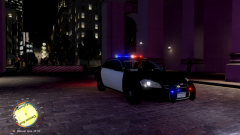
Testing the new patrol Impala with the Code 3 21TR. Photo courtesy of Strikeeagle345. Release coming soon! -
From the album: NickieB Upcoming Releases
Testing the new patrol Impala with the Code 3 21TR. Photo courtesy of Strikeeagle345. Release coming soon! -
I use to have problems with OpenIV and it would always want to run updates or it would need to download the same update 5+ times. So I blocked it with my firewall and zero problems since. Just use Spark for certain things like sirens/sounds
-
I have to many other projects going on right now to do that. Its quite simple, he should be able to do it. Its the basics of mapping ELS. Tell him to map one light to either Extra 1 or 3 and the other one to Extra 2 or 4. but if he maps one to 1 then the other has to be mapped to 3 OR if he maps one to 2 then the other needs to be mapped to 4. He should be able to do that, you told him you wanted them to flash back and forth and use pattern set A and C so they should be mapped like I said above
-
From the album: NickieB Upcoming Releases
Started this project back up again. Will be a little while before its publicly released. -
 Thanks bud
 -
"Alright, you've got a lot of guts Oscar" LOL, that was great Nutt
-
If they are mapped as wig-wags then they will steady burn when the takedowns are turned on. Just map them to 1/3 or 2/4 and you won't have any issues.. They will flash how he wants, one and then the other. The only flash pattern he wont be able to use is any of the B's. Or map them to the secondary
-
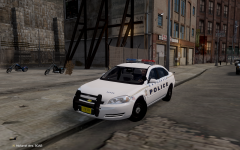 Pushbar needs to be edited to fit the impala. I am working on an impala and just finished editing the cvpi rambar to fit the impala. It took a bit of editing. I can see your using the CVPI one. The car looks good otherwise.
 -
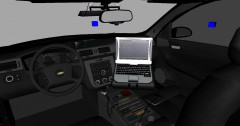 Thanks for cleaning the posts. I'll try to keep the number of photos of a particular car to a minimum or just create a thread
 -
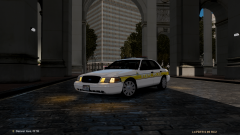 Man that car is sexy? Who is the professional who made that for you? :)
 -
From the album: NickieB Upcoming Releases
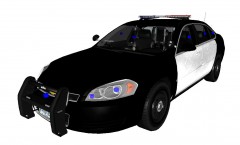
[WIP] 2010 Impala - Narcotics/Gang/Vice. Unknown release date. This will probably be released before the patrol version.


