


NickieB
Members
-
Joined
-
Last visited
Everything posted by NickieB
-
From all of the problems I've seen you post it sounds like you need a new computer. I just bought EFLC from the steam sale also, can't go wrong for 5 bux and what map are you talking about? The game world itself or the pause menu map? If its the game world try turning down the graphics settings to the lowest you can. It sounds like your computer might not be able to handle the game
-
Do you have a full legit copy of zmodeler? and the wft files you are trying to import are unlocked? adn your importing with "sliced model" checked
-
Don't hi-jack threads. This question has been answer over 100 times, search the LCPD:FR support forum. You can't have 5000 events so I'm not surprised that didn't work. You wouldn't have any different events, it woulds till just be the suspect on foot or a in progress pursuit. Try a reasonable number if you really want more. You can choose whatever script mods you want, look in the downloads section. The tow truck mod, radar mod, policehelper are all script mods. It completely up to you what you want to use it your choice
-
That largely depends on what your doing and I still don't agree with you. If you release a car model for use in GTA, you need to export it in a WFT anyway. If your going to release a full model unlocked then I would want to export it to WFT for the users so that I knew there were no errors. I wouldn't give them something that wasn't correct. If you did release it as a Z3D there would be no need for a WTD anyway, all you would need to include is the textures. Idk, it really doesn't matter, we all have our own way of doing things and it works good for each of us.
-
This is a better answer to your question OP. He explained exactly what you need to do. The only other thing you might need to do is remove the "read only" from the vehicle.ide so that you can save it again after you add the +livery. You would right click on vehicle.ide and uncheck the box next to "read only". I wouldn't recommend what the other guy said about copying a included vehicle.ide into your folder. This will overwrite any changes you may have made to other vehicles so I would say just make the individual changes yourself within the file.
-
Said that I tried that in the OP. Didn't fix anything. Thats strange, I don't know how it got like that but it has to be from something that was changed incorrectly. Well if I restore everything that has to do with polpatriot, that should be like re-installing the game right? Since all the files concerning polpatriot are returned to their original state. I just don't want to go through a entire install again and then try and get everything just how I had it. Hopefully someone else knows something...
-
So this glitch started a few weeks ago, I tried spawning my polpatriot one day which at the time was a Tahoe. It spawned just like you see in the picture(I have EVI's explorer PI installed now) but it still does the same thing no matter what car is in the slot. The car spawns fine but as you can see there are no wheels, it spawns higher off the ground than it should. Also if you try and enter or get close to the car its like there is a invisible fence around the car holding you in around the perimeter of the car. You can move around/jump and you can get out of this "fence". I tried restoring all of the files like the handling, vehicle.ide, etc. Anything I ever edited for the polpatriot is currently default, still the same problem. Any ideas?
-
Thanks, I didn't know that. I always thought it was more of a pain to deal with z3d because like you said Bollocks, you have to go through and find everything and apply it.. I always wondered why you released unlocked stuff in z3d only, EVI. I also still prefer the wft method. Maybe there is some benefit we don't know about to using a z3d oppose to a wft
-
This provides no help at all. Explain yourself more..... What he was trying to say is that SMPA60 errors are related to modded cars being saved in garage stalls and then the model is changed. For example, you installed a Dodge Viper in the Banshee spot, saved it in Bohan and then replaced the Dodge Viper model with a Corvette. This causes the game to crash because it thinks that the dodge viper model is suppose to be there in bohan but you replaced it with something else. So you either need to re-install the car or cars that are saved in those positions and move them out of the save stalls. Or get a new game save. I don't keep any cars in any spots in my game for this very reason. I know you said you didn't install any car mods but I believe this is what this error corresponds to. Try a new game save or just start a new game and see if that fixes the problem...
-
Exactly, you don't need to turn it into a z3d file. A z3d file is what zmodeler reads for progress saves. It has nothing to do with GTA. When you save your work, its a z3d, when you export it, its a WFT. Its actually better if the unlocked models come as a .wft and not a z3d. Since z3d files are mostly for your computer and read textures from your locations. If you give that z3d to someone else, the textures won't show up since they aren't in the correct place. Where if you give them a wft then they just add the textures before importing the wft model. You can't turn a wtd and a wft into a z3d. The textures come from the WTD and get imported into zmod prior to importing the model(the wft). Then when you save your progress it saves as a Z3D(zmods save format). When your finished and export it(a wft) you take all the textures you used and create a WTD to go with the WFT. Hope thats not to confusing and it answers your question
-
I meant nothing bad by it at all. I was just saying. Its perfectly fine, doesn't matter to me if 10 more people make the same mod
- 13 comments
- 3 reviews
-
![[WIP] Charger](//s3-gallery.int-cdn.lcpdfrusercontent.com/gallery/album_432/sml_gallery_9139_432_52186.jpg) Thanks! I'm still working on your car too so don't think I forgot about you lol
Thanks! I'm still working on your car too so don't think I forgot about you lol -
There are a lot of Touchmaster Deltas out there already but it sounds pretty good to me
- 13 comments
- 3 reviews
-
-

- 1
-
-
From the album: WIP
Nearing completion, just needs ELS mapped and then BETA testing. Bottom bar is traffic adviser -
![[WIP] Charger](//s3-gallery.int-cdn.lcpdfrusercontent.com/gallery/album_432/sml_gallery_9139_432_49980.jpg)
From the album: WIP
Nearing completion, just needs ELS mapped and then BETA testing -
![[WIP] Charger](//s3-gallery.int-cdn.lcpdfrusercontent.com/gallery/album_432/sml_gallery_9139_432_63610.jpg)
From the album: WIP
Nearing completion, just needs ELS mapped and then BETA testing. Now sure how these will be mapped yet. So many options... -
![[WIP] Charger](//s3-gallery.int-cdn.lcpdfrusercontent.com/gallery/album_432/sml_gallery_9139_432_28105.jpg)
From the album: WIP
Nearing completion, just needs ELS mapped and then BETA testing -
@Anchorman - LOL @bonehead - I wasn't trying to kiss anyone's a**, its clear what you wanted and trying to cover it up with a "poll" is ridiculous. ** I'm motioning for this thread to be closed on the grounds of a pointless "poll" that since this is a GTA IV forum every member will answer yes, arguing, and clear violation of forum rules/policy. Anyone want to second this? All in favor say, I
-
Here are my thoughts.... You were asking for someone to give you the files you wanted, when you were called out for asking for something against forum guidelines you tried to cover yourself and say its just a "poll". The only reason I think your now asking for "poll" answers is so when someone says yes they have them (which you already know we all do since this is a GTA IV forum) you can PM them, and since they probably don't know the rules they will send you the files. Plus there would be absolutly NO need for a poll like this....This thread is the precise reason you always backup your files before doing anything!! I have multiple copies of my GTA IV folder, one original un-modded copy, one from awhile ago, and a recently updated one. It takes less than 10 minutes to backup the entire folder. Oh and by the way, to answer your "poll", yes I do have the original file
-
The font these skins is called "Euro Caps", don't ask me where I got it but it was from one of the free font sites. http://www.lcpdfr.com/index.php?app=downloads&module=display§ion=screenshot&record=16691&id=1527&full=1
- 14 comments
- 2 reviews
-
Yes, thank you, I appreciate it. I wasn't mad I was just letting you know what was mine. Don't worry about it
- 14 comments
- 2 reviews
-
Exactly, The 5th picture those skins are mine, the black car and the white car. You just changed the bottom to "State Trooper" also the ones you tinted to blue are mine also(6th/8th pic). Like strike said, you need to credit the original author especially since you just made the tiniest alterations and claimed it yours. I never gave permission for you to release them either
- 14 comments
- 2 reviews
-
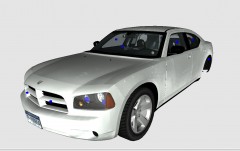 Nope, made them myself
 -
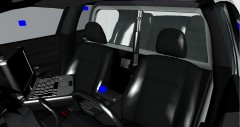
From the album: WIP
Interior shot -
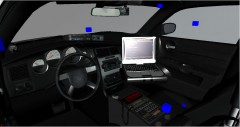
From the album: WIP
Interior shot

![[WIP] Charger](http://s3-gallery.int-cdn.lcpdfrusercontent.com/gallery/album_432/sml_gallery_9139_432_52186.jpg)
![[WIP] Charger](http://s3-gallery.int-cdn.lcpdfrusercontent.com/gallery/album_432/sml_gallery_9139_432_49980.jpg)
![[WIP] Charger](http://s3-gallery.int-cdn.lcpdfrusercontent.com/gallery/album_432/sml_gallery_9139_432_63610.jpg)
![[WIP] Charger](http://s3-gallery.int-cdn.lcpdfrusercontent.com/gallery/album_432/sml_gallery_9139_432_28105.jpg)
