


NickieB
Members
-
Joined
-
Last visited
Everything posted by NickieB
-
you probably need to find some sort of a mapping program that allows you to map the GTA IV buttons you want to the controller. I don't have any links for you since I dont use anything like that but try searching google. Maybe you've tried this already but did you go into the controller/keyboard mapping options section of the GTA pause menu and see if you can map it that way?
-
What? Your asking for a template? Mostly every car comes with a template or you can locate one by a little searching. You didn't even say what template you were looking for
-
You could be a big help and save me the time of trying to locate the "lights on/off" sound by telling me what the file is named. I'd appreciate it
-
Yeah Thats what I figured you meant. I looked through the ELS code and found some sound files but nothing yet that matched the sound your talking about. I'll keep looking into it, I like the idea. The only problem is since it uses game sounds and not its own unique sound, if you replace it then the sound in game is now a beep. For example if the sound els uses was a car door closing and you replace it then every time you open a door it will beep. I'm still going to keep looking though since it may use a sound that isn't common in the game.
-
The sound file would have to be located somewhere, the problem is finding it. LtCaine would know best or maybe one of the mods/admins on GPM that have been around awhile. Are you talking about the sound when you activate the lights or the optional ticking sound when they are active? I use V6 so maybe its a little different then what your using. Its a cool idea, never thought about it. I'll look into the files and see if I can come up with anything
-
This site, although its down right now is a excellent site to look at for skin ideas/graphics/layouts, etc. I use it for car model ideas. http://policecarwebsite.net/main.html Like the others said, use more graphics, license plates, different fonts. Anything you add is a good thing because now its kind of basic. And go easy on the word "yield" lol. If you don't use it already I would
- 5 comments
- 6 reviews
-
Yeah I made that for our role play group as seen in that video. I'm planning on releasing it publicly at some point. Things are just to busy at the moment and a family member is in the hospital so all my projects are on hold.
-
Should be located here: C:Program Files (x86)SteamsteamappscommonGrand Theft Auto IVGTA IV Or something pretty close to that. You should be able to figure it out once you locate the steam folder EDIT: beat me to it Justin!
-
There really isn't a guide to making the actual uniforms themselves. AussieMerc posted the steps on how to export/edit/import the skins you make. But the actual design and program you use is up to you. There really isn't a need for a tutorial since you just take the original and that gives you a good idea of where things are already located, badge, logo, etc. and then you edit it and you wish. Make your changes and check it in the OpenIV viewer or if you really want you can launch the game to test it. Launching takes a lot longer but you get a better idea of how it will look.
-
You get an error when downloading? Try downloading in another browser? Or you get an error when you try to install/spawn the car. Any file we give you would be the same thing you would get from GPM, so if the game gives you a error the error would still exist regardless of who gave you the file. I know 100% sure that that car works because I used it for a little while a long time ago.
-
Did you buy the game brand new or secondhand? Like Ebay or something?
-
Check out the tutorials section of the site
-
Okay, It was just a thought. He got it working anyway
-
The key you have set to "talk" in teamspeak isn't conflicting with something in GTA is it? I would cross reference the keys you use in GTA to the key you have mapped for "talk" in TS.
-
So use a shorter name for the material? like guard_mesh or is that still to long? And then your saying to export it then re add the materials and re import the car? UPDATE: So I just tried that, renaming it to something shorter and I didn't get the shader config error anymore and it works in game. Thanks a lot for the help even though it was something so simple! +1
-
So I'm trying to apply window mesh to the rear windows of a project charger. Everything is setup correctly, the mesh is attached to the rear doors respectively and then when I try and export it says this: "Missing shader configuration for shader "gta_vehicle_guard" in material "rear window guard". Reverting to "gta_default"." Rear window guard is what I named the material. It exports fine though and it looks how it should in OpenIV, it shows the mesh being on the windows but when you spawn it in game it doesn't show up. Any ideas for why this would be? Same thing for the mesh I added to the prisoner divider, it doesn't show up in game. When I say mesh I mean this, http://sudservice.files.wordpress.com/2012/08/cv-window-mesh.jpg I took the window and made a copy, re-textured it to the prisoner mesh guard and moved the mesh slightly to the inside of the car. Then attached it to the door itself so it would open correctly. I did everything right as far as the modeling goes but I must have made a mistake with the texturing which is something I'm still trying to learn.
-
Okay, one or more of those cars is your problem then. Either its a problem with the car or you installed something wrong. Try again or do one car at a time and then you'll have an idea of what car is the problem
-
Did you just install a new car mod? An RC-20 error is related to cars
-
Can I still enter or are you guys not accepting submissions anymore? Holidays were way to busy to try and finish/submit for the contest. If I can't, its not a big deal. Just wondering
-
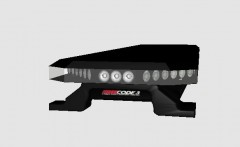
From the album: Random
Just a little something I'm working on for some future releases. LED Takedowns/LED Alley Lights -

From the album: Random
Just a little something I'm working on for some future releases. LED Takedowns/LED Alley Lights -
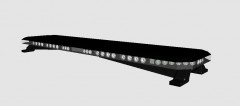
From the album: Random
Just a little something I'm working on for some future releases. LED Takedowns/LED Alley Lights -
How terrible, on Christmas too.
-
![[WIP] 2007 Alaska State Troopers Slicktop Crown Victoria Police Interceptor](//s3-gallery.int-cdn.lcpdfrusercontent.com/gallery/album_628/sml_gallery_2982_628_54825.jpg) The texture for the prisoner divider glass isn't mapped correctly, ie. you can't see through it.
The texture for the prisoner divider glass isn't mapped correctly, ie. you can't see through it. -
Thank you very much and no problem. Figured I would save the time and post them right away
- 13 comments
- 5 reviews


![[WIP] 2007 Alaska State Troopers Slicktop Crown Victoria Police Interceptor](http://s3-gallery.int-cdn.lcpdfrusercontent.com/gallery/album_628/sml_gallery_2982_628_54825.jpg)