


1997chevyboy
Members
-
Joined
-
Last visited
Everything posted by 1997chevyboy
-
![[WIP] Slicktop Explorer - FINAL](//s3-gallery.int-cdn.lcpdfrusercontent.com/gallery/album_1177/sml_gallery_9139_1177_113289.jpg) Awesome Awesome job, you always do make A++++++++++++ class models. Wish there were alot more modders like you! The others just make really nice cars and post pictures for us to drool over, but never release them.
Awesome Awesome job, you always do make A++++++++++++ class models. Wish there were alot more modders like you! The others just make really nice cars and post pictures for us to drool over, but never release them. -
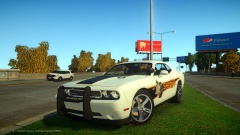 Looks really nice but the pushbar throws it off, will look much better without it as an unmarked like here
 -
-
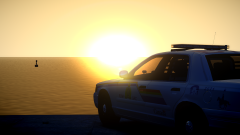 Awesome pic and sunset, may i ask what ENB or timecycle you have?
 -
Just go into the trafficflow.ini and change which 20 vehicles spawn, to the ones you have changed or that are modded!!! Very easy!!
-
Really, i have an intel quad core that runs gta at 60 to 55 FPS with mods, then my friend has an AMD 8 core and he runs gta at 100 to 120 FPS with the same mods!! I dont know where you read that but its deff not true!!!
-
You should be fine if you get a desktop, even if you dont know how to change any parts or build a computer. If and when you get a desktop and need to change or upgrade parts, just look up a youtube video or two, its very easy just unplug the old parts and plug in the new one. Simple as that to upgrade a desktop!
-
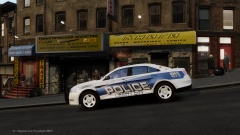 I like the white rims! Good job!
 -
No way in hell a dual core will run all these mods, Quad core or better for shure!
-
Try this, its much better than fraps http://www.bandicam.com/
-
Yeah you should be ok, what recording program do you have?
-
K well here you go http://www.alienware.com/Landings/laptops.aspx
-
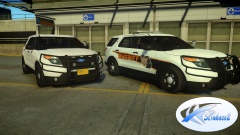 Really nice once again, the police equipment in the back is just awesome as well!!
 -
You need to find something with 6 to 8 GB of RAM ,a Quad Core Processor, atleast a 1 GB to a 2GB graphics card, look for the bit of the card looks like this - 2048MB GDDR5 256bit Memory, the higher the bit the better the card. Also if you get a bigger graphics card you will prolly need a power supply as well, it makes a huge differance. Gta iv is a memory hog and so is LCPDFR 1.0. Laptops are not a good way to make a gaming computer, you are better off just buying a desktop tower with the processor and motherboard you want, and just upgrade the graphics and ram! Hope this helps you. - 1997chevyboy
-
that would help but you should be fine with an intel i5 2400 3.10 ghz, what kind of graphics card do you have, might help if you upgraded that. Also im guessing you have 8gbs of ram also!
-
Kool deal.
-
K well if you could show me what they look like at night now and then a pic of what you would like them to look like, i can prolly get you what you want, doesnt matter what kind of pc you have!
-
K well try and use these timecycles, you can install the whole thing its not an ENB. http://www.gta4-mods.com/misc/realityiv-162-timecycle-mod-f7929 Then you can add my settings # Other emissive lights car.defaultlight.emissive.on 40.00 car.defaultlight.emissive.off 0.05 car.brakelight.emissive.on 15.00 car.brakelight.emissive.off 0.05 car.middlebrakelight.emissive.on 15.00 car.middlebrakelight.emissive.off 0.05 car.reversinglight.emissive.on 15.00 car.reversinglight.emissive.off 0.10 car.extralight.emissive.on 40.00 car.extralight.emissive.off 0.05 Then do the same for your ELS.ini and add this [ ENV LIGHTING ] Range_PRML = 45 Inten_PRML = 35 Range_SECL = 25 Inten_SECL =10 Range_WRNL =25 Inten_WRNL =2 EnvMult_Morning = 0.4 EnvMult_Evening = 0.4 EnvMult_Night = 0.4
-
Is it only like that in your safehouse?
-
So the hud on the left hand side has no map its just black? What about when you press Esc and look at the big map?
-
Yes all 5 timecycles
-
No dont put the visual settings from ENB use the one you already have and add this to it # Other emissive lights car.defaultlight.emissive.on 40.00 car.defaultlight.emissive.off 0.05 car.brakelight.emissive.on 15.00 car.brakelight.emissive.off 0.05 car.middlebrakelight.emissive.on 15.00 car.middlebrakelight.emissive.off 0.05 car.reversinglight.emissive.on 15.00 car.reversinglight.emissive.off 0.10 car.extralight.emissive.on 40.00 car.extralight.emissive.off 0.05 Then do the same for your ELS.ini and add this [ ENV LIGHTING ]Range_PRML = 45 Inten_PRML = 35 Range_SECL = 25 Inten_SECL =10 Range_WRNL =25 Inten_WRNL =2 EnvMult_Morning = 0.4 EnvMult_Evening = 0.4 EnvMult_Night = 0.4
-
IF you want nice ELS try only the timecycle files from this ENB if you cant run good with the whole ENB. Also in your visual settings try these setting i had without an ENB installed. # Other emissive lights car.defaultlight.emissive.on 40.00 car.defaultlight.emissive.off 0.05 car.brakelight.emissive.on 15.00 car.brakelight.emissive.off 0.05 car.middlebrakelight.emissive.on 15.00 car.middlebrakelight.emissive.off 0.05 car.reversinglight.emissive.on 15.00 car.reversinglight.emissive.off 0.10 car.extralight.emissive.on 40.00 car.extralight.emissive.off 0.05 You can also change these settings in your els.ini in your main gta, should look like this- [ ENV LIGHTING ] Range_PRML = 55 Inten_PRML = 40 Range_SECL = 25 Inten_SECL =10 Range_WRNL =25 Inten_WRNL =2 EnvMult_Morning = 0.4 EnvMult_Evening = 0.4 EnvMult_Night = 0.4 Should make them look like this video here- Then when you get a gaming computer we can talk really nice ELS at night or day or anytime you want!!!
-
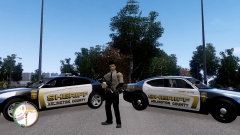
From the album: Random
{ WATCH IN 720P HD } -
On a normal day anywhere from 1hr to 2hrs with 1.0 and a few other mods.

![[WIP] Slicktop Explorer - FINAL](http://s3-gallery.int-cdn.lcpdfrusercontent.com/gallery/album_1177/sml_gallery_9139_1177_113289.jpg)
