



HBengtson
Members
-
Joined
-
Last visited
Everything posted by HBengtson
-
If you want the original, it's encrypted. There's no access to it as far as I know.
-
I'm honestly not sure. Trust me, I'm not an expert. I figured this out by accident really. If you can, you might want to reinstall and only install RAGE. Then, put in other mods one by one. If you have a mods folder, just drag it to your desktop before you reinstall.
-
I think it was crashing because it was loading the old version with other new content, when it should have been loading the new version of update.rpf with the new content...if that makes sense? I did it just by opening Open IV, and a message popped up saying "update.rpf is out of date. click here to update it." Make sure your scripthooks are up to date
-
I just had to update update.rpf in Open IV. Works perfectly now!
-
Yep everything was working fine in the last version
-
Exactly what I did. Starts loading plugins, and the CTD.
-
I've got pretty much the same error
-
Yeah I was just doing research and it's related to SweetFX. I'm gonna ditch that for now. Anyone know of alternatives?
-
So I've been getting a lot of crashes lately. I've been blaming it on plugins and cars, but even after removing them, I still get issues. I have narrowed the location of the answer to my problem down to the dxgi log, by I have no idea what any of it means. Here's the log: I have Radiance 1.6, Sweet FX, VisualV, and CryEngine settings. Any ideas or solutions will be greatly appreciated. Thanks in advance
-
 Sweet textures
 -
I wasn't aware there was a 2015 Tahoe...
-
-
-
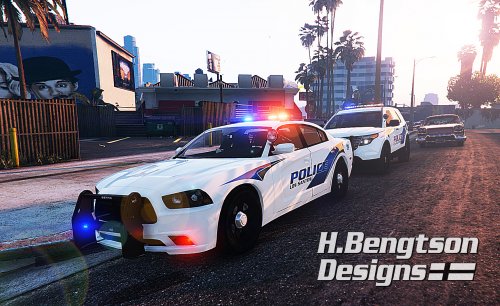 Sorry, but I think that the charger was removed by the owner. I will be making a version for Lundy's 2009 Dodge Charger soon.
- 42 comments
- 16 reviews
-
-
I believe its part of vehicles.meta for the car. The line is <audiohash>. Just find out what sound the vehicle you want policeOLD2 to sound like, and put that name in audiohash in vehicles.meta.
-
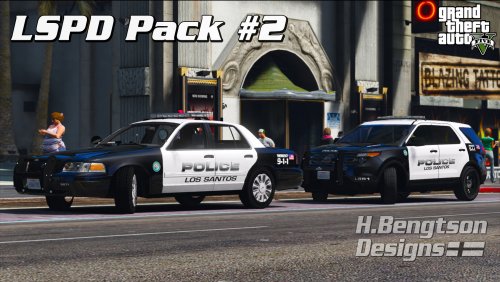 Los Santos Police Pack #2 by HBengtson and HBengtson Designs Skins based on the Smithfield, RI Police Department. This texture pack features textures for the following vehicles. Links to download the models used in the screenshots/testing are included: 2006-2011 Ford Crown Victoria Police Interceptor (DSF) - Download 2012 Ford Taurus Police Interceptor - Download 2013 Ford Taurus Police Interceptor by Thehurk - Download 2011-2013 Ford Police Interceptor Utility by Desmond98 - Download 2013-2015 Ford Police Interceptor Utility by Thehurk - Download 2016 Ford Police Interceptor Utility by Thehurk - Download 2014 Dodge Charger by Bxbugs123 - Download 2009-2010 Dodge Charger by PSource - Download 2008 Chevrolet Tahoe PPV by GlitchGamer - Download 2010 Chevrolet Tahoe PPV by Gump - Download 2010 Chevrolet Silverado by Canadapolice - Download All textures in this pack have multiple versions. They are listed below: 2006-2011 Ford Crown Victoria Police Interceptor (DSF) - Patrol, Traffic 2011 Ford Taurus Police Interceptor - Patrol, Traffic, Patrol Commander, Supervisor 2013 Ford Taurus Police Interceptor - Patrol, Traffic, Patrol Commander, Supervisor, Community Policing 2011-2013 Ford Police Interceptor Utility - Patrol, Traffic, Patrol Commander, Supervisor 2013-2015 Ford Police Interceptor Utility - Patrol, Traffic, Patrol Commander, Supervisor, Community Policing, Special Operations 2016 Ford Police Interceptor Utility - Patrol, Patrol Commander, Supervisor 2014 Dodge Charger - Patrol, Traffic, Supervisor 2009-2010 Dodge Charger - Patrol, Traffic, Supervisor 2008 Chevrolet Tahoe PPV - Patrol, Traffic, Patrol Commander, Supervisor 2010 Chevrolet Tahoe PPV - Patrol, Supervisor, Special Operations 2010 Chevrolet Silverado - Special Operations More variants of this skin will be released in the future. All textures are made from scratch using Photoshop CS6. INSTALLATION: Simply replace the texture in one of the models below with the textures in the download. If you need any help installing, you are welcome to PM me. Questions? Problems? Bugs? You are always welcome to PM me. I will respond within a day. Enjoy! TERMS: By downloading this file, you agree to the following terms: You WILL NOT reupload this skin without my permission. You WILL NOT edit this skin and then upload it without my permission. You WILL NOT claim this work to be your own. If you can not follow these terms, then do not download this file. Feel free to edit and use for personal use. Feel free to use with a model you release.
- 42 comments
- 14 reviews
-
-

- 8
-
-
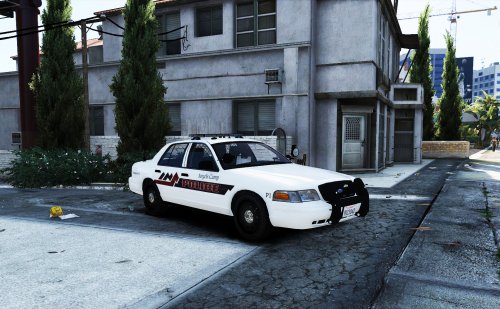 "Removed vehicle model from download because Virzza complained about it." It's his model, he has a right to ask people not to include it in their downloads.
- 4 comments
- 1 review
-
-
- 1
-
-
In the vehicles.meta file for the car, you can add a flag that allows for multiple liveries. Add this to the flags string: FLAG_HAS_LIVERY The police4.ytd file can also be determining how many liveries there are. You can add them by using Open IV, opening the .ytd file, clicking import, selecting the livery, and renaming it to whatever the .ytd uses for liveries. For example, cvpi_sign_2. I hope this helps
-
I believe it is stratum 2 https://www.myfonts.com/fonts/processtype/stratum2/
-
The "police" or the slogan?
-
-
-
Yeah thats perfect, thank you so much! The smithfield one is eurostile lt pro demi
-
That looks pretty good! Thanks a bunch


