



spreilly
Members
-
Joined
-
Last visited
Everything posted by spreilly
-
Let's say this... [ POLICE4 ] Status = on File = mnvn_vector ...is one of your entries. Copy + Paste + Rename POLICE4 -> the vehicle you want ELS-enabled (in this case, POLICE4 -> POLICEW) [ POLICEW ] Status = on File = mnvn_vector Now, if you want a different lighting pattern, you would have to create a new config file. It's the other .ini files in the folder. So in this case, you can duplicate the mnvn_vector and just rename it to something. We'll call it "spreilly_config" So now we have this: [ POLICEW ] Status = on File = spreilly_config If you want to actually change the patterns, you'd have to open your newly-created "spreilly_config.ini" file and edit the following: ^ This, going down the list, switches the vehicle to slicktop mode (less reflections), changes the lighting stage activation type, and enables the arrowboard to be hooked up to the trunk/hood. ^ This edits the settings for steady-burns you can toggle and, going down the list, cruise-enables AI cars, disables cruise mode at the 3rd stage, and determines what of the four main lights it uses. ^ This changes the sound settings. Determines what horn to use for the vehicle, and whether certain siren tones are enabled/disabled. ^ This enables/disables GTA vehicle light-based wig-wags and strobes and determines what pattern. ^ This changes the type of flashing that the warning lights will do (strobe, halogen, etc.), determines the pattern if desired and edits certain aspects of the way these lights will flash. ^ This changes the type of flashing that the primary lights will do (strobe, halogen, led, etc.), determines the pattern if desired and edits certain aspects of the way these lights will flash. ^ This changes the type of flashing that the secondary lights will do (strobe, halogen, led, etc.), determines the pattern if desired and edits certain aspects of the way these lights will flash. ^ This changes the color of the environmental reflections of the lights.
-
Assuming you're in EFLC: C:/Program Files (x86)/Rockstar Games/EFLC/ELS/_SLOTCONTROL.ini So basically in the folder named "ELS" in your EFLC directory.
-
In SP, you can have policew as a police vehicle simply by adding it to the slot control file. In MP, same applies except it won't have sirens. No fix for this unless Caine pulls something out of his fancy little hat.
-
In my opinion: 1) Vice City 2) San Fierro/Las Venturas 3) London 4) Carcer City Ranked by how much I think that these will be the setting of GTA VI
-
-
Swear to god...
-
Someone tell me how to change into the police skin.
-
Sam, pls. Tell us pls. CPD:FR is real after all...
-
Apologies for the GPM video, but I think that this fits: https://www.youtube.com/watch?v=-8QH0c2OnT8 Also, let's talk about the fact that the Cavale-based cruiser has a different lightbar than the rest. What gives?
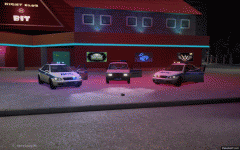 These lights (the way they flash with ELS) all flash at the same time, true to the Russian Police. In other words, all blues flash at once, then all reds flash at once.Collection of vehicles from Russia's DPS (ДПС = DPS)
From the album: ДПС Defaults
Karin Laek - Basically a Lada Riva, rebadged to fit in the GTA IV universe.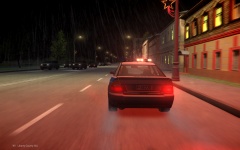
From the album: ДПС Defaults
Lt. Caine's ELS Sultan Texture by Spreilly Map: Criminal Russia Rage v1.4.1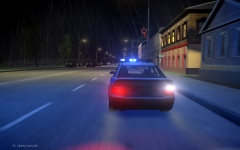
From the album: ДПС Defaults
Lt. Caine's ELS Sultan Texture by Spreilly Map: Criminal Russia Rage v1.4.1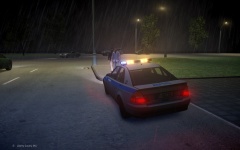
From the album: ДПС Defaults
Lt. Caine's ELS Sultan Texture by Spreilly Map: Criminal Russia Rage v1.4.1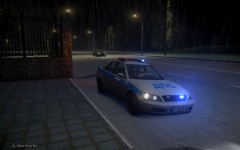
From the album: ДПС Defaults
Lt. Caine's ELS Sultan Texture by Spreilly Map: Criminal Russia Rage v1.4.1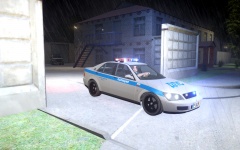
From the album: ДПС Defaults
Lt. Caine's ELS Sultan Texture by Spreilly Map: Criminal Russia Rage v1.4.1http://www.multiv-mod.com/ And this one's active, last update posted a week ago.This should be interesting...Reuploading video https://www.youtube.com/watch?v=DKhf4NRGCMg LCPD:FR 0.95 MP Patrol w/ ELS v8 In game: BxBugs123 PoliceWag spreilly481935 Bosco Bueno Mods: CryENB v1 ELS v8 BxBugs123's LCPD CVPI www.gta-modding-chest.com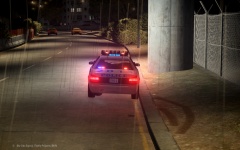
From the album: LCPD Defaults
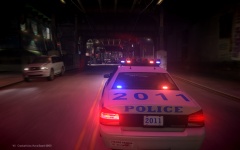
From the album: LCPD Defaults


Account
Navigation
Search
Configure browser push notifications
Chrome (Android)
- Tap the lock icon next to the address bar.
- Tap Permissions → Notifications.
- Adjust your preference.
Chrome (Desktop)
- Click the padlock icon in the address bar.
- Select Site settings.
- Find Notifications and adjust your preference.
Safari (iOS 16.4+)
- Ensure the site is installed via Add to Home Screen.
- Open Settings App → Notifications.
- Find your app name and adjust your preference.
Safari (macOS)
- Go to Safari → Preferences.
- Click the Websites tab.
- Select Notifications in the sidebar.
- Find this website and adjust your preference.
Edge (Android)
- Tap the lock icon next to the address bar.
- Tap Permissions.
- Find Notifications and adjust your preference.
Edge (Desktop)
- Click the padlock icon in the address bar.
- Click Permissions for this site.
- Find Notifications and adjust your preference.
Firefox (Android)
- Go to Settings → Site permissions.
- Tap Notifications.
- Find this site in the list and adjust your preference.
Firefox (Desktop)
- Open Firefox Settings.
- Search for Notifications.
- Find this site in the list and adjust your preference.