


mnbvm
Members
-
Joined
-
Last visited
Everything posted by mnbvm
-
 Same here! I thought it was my setup so I didn't bother reporting it 🙂 I'm in Brazil so DD/MM/YYYY here too.
 -
It could, that's probably what I would do. Maybe it's a previously installed mod that it's messing with it somehow, but it's hard to tell even with the logs.
-
This is a long shot, but have you installed VisualV, NVE or any other graphics mods? If so, you might want to unninstall them and test it out. I had the exact same problem and I fixed it by installing VisualV (previous) version 1.0.580.0.
-
 You've absolutely nailed it with the charges, search items, and now questions! This is a must have for my LSPDFR.
 -
 I've played a little bit more with it and I would like to give you some ideas that you probably already thought about 😄 - Audio cues are a big thing missing right now, it would be way more complete if you could add those in the next update; - Don't know if possible, but it would be cool to wait for the PIT timer notification to show up. Right now it shows up as soon as the pursuit starts and it's kind of a spoiler that the suspect will flee. Maybe it should show up only after we call the pursuit in?; - Auto disable it if the suspect is in a bike 😅 - Have a configuration to disable the persistant notification "PIT timer has expired", because it can get a little bit annoying at times. But other than those, I think it's a very cool script and I can't think going back to not using it. Great job!
- 6 comments
- 6 reviews
-
-

- 1
-
-
You can start your phrase with "be advised", "(Call-Sign) be advised" or "(Call-Sign) dispatch, be advised", it will always respond with "Copy" or "10-4".
-
I don't use any of your packs currently, but I wish you all the best as you focus on your personal life. Prioritizing it is the right decision. Hope to see you back soon.
-
This is caused due to the high value set in visualsettings.dat for the emissives (that also control police lights). I personally use Vanilla Vehicles Emissives Fix from Stryfaar and it works well. https://www.gta5-mods.com/misc/vanilla-vehicles-emissives-fix
-
Could you share a screenshot of the error and your RagePluginHook log? It's available in in the main gta folder, file called Ragepluginhook.log.
-
Works pretty well from what I've tested, excited for next updates. Great job!
- 6 comments
- 6 reviews
-
-

- 1
-
-
Coming back just to update if anyone else has the same issue - VisualV and NVE are crashing games that are not updated to latest version (like mine). I did a backup before the update and am still using the old version. The solution is to download a old version of VisualV or NVE - I'm personally using VisualV V1.0.580 and it is working well.
-
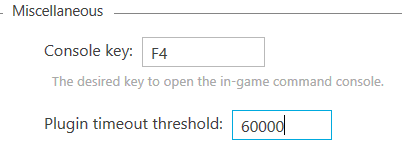
Hey there! Have you tried setting the Plugin timeout threshold to 60000? I see right now it's set to only 10000. You just need to open RAGEPluginHook.exe with shift pressed and change it here. This should prevent the game from freezing and fix the crash. Also, if you have ScriptHookVDotNet, try using the nightly version from their Github page. I had a lot of crashed when loading with the latest "stable" version and that fixed it. Hope it helps. https://github.com/scripthookvdotnet/scripthookvdotnet-nightly/releases
-
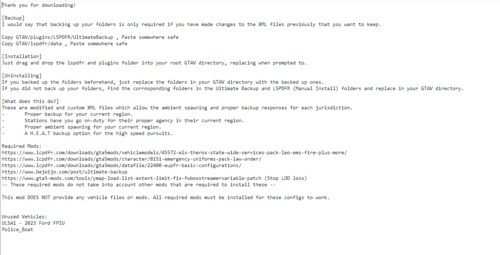 Not really, I think it's probably related to the XML files and they need to be updated. You can update the weapons your backup uses from plugins\LSPDFR\UltimateBackup and edit CustomRegions, DefaultRegions and SpecialUnits to have COMPONENT_AT_AR_FLSH (flashlight) instead of COMPONENT_ASSAULTRIFLE_CLIP_03. As for the uniforms, I didn't really check how I can edit those.
 -
I appreciate your help, but that's what I meant by reinstalling gameconfig, heapadjuster, etc 😅 started happening only after removing NVE Remastered, so I'm guessing it broke a random file or something like that...
-
I have error ERR_MEM_EMBEDDEDALLOC_ALLOC after uninstalling NaturalVision Remastered (not Evolved) and trying to install VisualV or NVE Evolved. I already did all steps for reinstalling gameconfig, heapadjuster, etc - nothing works and the game only boots when no graphics mods are installed, and I'm not sure what to try next. Does anybody have any ideas?
-
LSPD Coat on the Locker looks a bit bugged (maybe it's something from my end, not sure?) Also noticed that some backup units on bikes (SAHP) are not wearing helmets but hats. Some backup units also use the Drum Magazine attachment, is that expected? 😅
-
I installed it recently and it works flawless for me. Used this video for guidance to install additional barriers as well, as far as I could tell, the procedure is still the same.
-
I got one once I downloaded the STP and one when extracting it, same "Wacatac.B!ml" for both. Didn't happen for previous versions, just this new one.
-
Pretty sure it's just a false-positive in this case. Had the same warning from Windows Defender, but using paid Kaspersky and MalwareBytes didn't flag anything.
-
If you're using Menyoo, try to remove it and see if that helps. If not, take a look at your UB XML files CustomRegions, DefaultRegions and SpecialUnits located at plugins\LSPDFR\UltimateBackup. Make sure the models are valid and they can spawn in game (if they're addons, you can download Add-On Vehicle Spawner to check if they even show up at all in the spawn list). You can also try to reinstall the XML files for UltimateBackup and disable your mods folder by renaming it to _mods and see if that helps - since it will load only default models, it will probably work but you would need to redo all changes to those files.
-
Unfortunately, from what I can tell, this is something very hard for mods to fix. AI TRAFFIC Fluidity & Discipline and Improved Pursuit AI help a bit, but nothing that I could find is capable of totally fixing it. I use Delete Vehicle to despawn cars that are crashing into me/scene with a keybind and Clean World Menu if I want to clear a scene that is beyond "fixable". I'm also using the 0.5x traffic gameconfig to spawn less vehicles around me. Scene Manager helps a lot too if you have something big going on and want to make the AI go around the whole thing without causing a mess. Apart from that, I mostly learned to ignore it. Hope my suggestions help, and if you learn about something else that helps with this, feel free to share 😄
-
Sometimes, whenever I boot up LSPDFR, my keybinds become messed up. When I press F4 and the CalloutInterface menu opens and it automatically forces a callout, and when I open Steam Overlay (SHIFT + TAB) the Panic Button on UB activates. Thing is - both of these settings are set to none. Weirdly enough, I can restart my computer, power cycle, disconnect and connect keyboard, whatever - nothing fixes this and I just give up from playing at that day. Whenever I try to play another day, it works, but some days, Windows apparently recognizes that I'm pressing the "None" key (somehow?). A online Key Test website doesn't show me anything out of the extraordinary. Has anyone ever had this very specific bug? RagePluginHook.log
-
Yes, just add the field "extra_1="False" in CustomRegions.xml, DefaultRegions.xml and SpecialUnits.xml files - for example: You just need to change whatever extra number you want to disable. The files are located at plugins\LSPDFR\UltimateBackup.
-
Have you changed the timeout threshold in RagePluginHook yet? If not, increase Plugin Timeout Threshold to 60000 in the RAGE settings (launch it with Shift pressed). This fixed it for me when I had the same issue. Hope it helps you too.
-
I don't really use NVE but I would try downloading it and installing Reshade with the preset that comes in the NVE folder. You'll probably be able to tweak some visual settings there, including this motion blur. If that doesn't work, you can try to ask about it in his discord - a lot of people don't like it, so for sure someone knows how to fix it there 🙂

