
Mr.Quiggles
Members
-
Joined
-
Last visited
Everything posted by Mr.Quiggles
-
 OHHHHH burn.
 -
 Having cars exclusive to a clan would not be an incentive for me to join the clan, I'd join the clan based on the people and quality of the characters. I never got why people made cars specific for clans.
 -
Amazing, hooray for public releases!
-
-
I personally use the prefer the Federal Signal Smart Siren, http://www.fedsig.com/products/112/smartsiren
-
Indeed you could, but that's usually very problematic. You'd need to reinstall the operating system from scratch, it'd be quite a hassle. The bottlenecking won't be an extreme problem, I wouldn't really worry about it.
-
Well to be honest, any prebuilt desktop is going to be bottlenecked usually...especially from HP, Dell ect. In this case, that motherboard is a PCI Gen 2.0, so really there's not a whole lot you can do about that except build an entirely new computer.
-
1 TB of memory, I wish I had 1TB of RAM. Jokes aside, no, your other system parts may bottleneck the performance but you should notice a difference.
-
Who's means Who Is, I think you mean Whos. But that looks like an unreleased model by somebody.
-
Something new I have discovered, is when I highlight the folder properties, "read-only" is set to on. But when I uncheck it and it turns the files off for read only, it doesn't work because when I check the properties again, it's still checked.
-
I did a full test of my entire GTAIV system, and crashing really only occurs when the LCPDFR mod is active and does something. Usually shortly before or after arriving at a call the game crashes. LCPDFR Log Scripthookdotnet log I'm just so stuck on what it could be. Everything is updated, it worked well before, nothing should be interfering. Additionally, after I uninstall LCPDFR v1.0 and reinstall LCPDFR v0.95 RC2 the game functions perfectly. However, after a crash (2-5 minutes in) using v1.0 there is often no error message in the LCPDFR log. So I'm starting to think it might be an ASI script loader issue or something related.
-
I live in an extremely liberal part of the country, in a liberal part of the state (Double dose) and even though I am not personally a homosexual, I have so many friends who are and they're absolutely normal wonderful people. As a matter of fact, my two favorite teachers are two lesbians married together. Homosexuality has been a classic human tradition for some for almost as long as humans have been on the Earth, and I'm willing to make it legal for marriage purposes, as it really hurts nobody. Additionally, I think the era of traditional, conservative logic is gone (AKA Religion), and if humans are to work together then progressiveness is in. (Cannot figure out why the font suddenly gets a little bigger at the end, oh well).
-
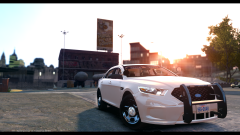 Two popular choices Sniper Rifle > Zoom in > Hide HUD + Radar and position yourself accordingly Or, Capture playback and then arrange the camera angle in the in-game editor.
 -
I'd really recommend ibuypower, cyberpower, or newegg for looking for prebuilts.
-
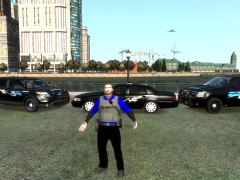 What do you have against him? He hasn't done anything to you. Stop trying to instigate something.
 -
Ok, thanks. I'm going to do some more definitive testing with and without the LCPDFR mod installed to see if it is the mod, as I feel it pretty much is that would cause it. There's nothing really else.
-
That did look like a high quality laptop, it would be nice to see where you'd get it from, the overall model. For example, Alienwares have good specs, but they're really shitty performance gaming computers.
-
Hmm, I actually did have the PreloadAllModels added to true and continues to crash. I set it to false and played the game with the limited mods, still crashing. This time the error was: [WARNING - 1:03:14 PM] [AudioDatabase] GetAudioFileForAction: No file found for: OBSIDIAN_ST [WARNING - 1:03:22 PM] [TaskBeingBusted] Process: HasVehicle is true but vehicle doesn't exist [WARNING - 1:03:22 PM] [TaskBeingBusted] Process: HasVehicle is true but vehicle doesn't exist [WARNING - 1:03:22 PM] [TaskBeingBusted] Process: HasVehicle is true but vehicle doesn't exist [WARNING - 1:03:22 PM] [TaskBeingBusted] Process: HasVehicle is true but vehicle doesn't exist [WARNING - 1:03:22 PM] [TaskBeingBusted] Process: HasVehicle is true but vehicle doesn't exist [WARNING - 1:03:22 PM] [TaskBeingBusted] Process: HasVehicle is true but vehicle doesn't exist [WARNING - 1:03:22 PM] [TaskBeingBusted] Process: HasVehicle is true but vehicle doesn't exist [WARNING - 1:03:22 PM] [TaskBeingBusted] Process: HasVehicle is true but vehicle doesn't exist [WARNING - 1:03:22 PM] [TaskBeingBusted] Process: HasVehicle is true but vehicle doesn't exist It seems it can't find an audio file, and crashes because of it. Weird. Well I completely reinstalled the game, updated to 1070, added ELSV7, LCPDFR, brought over old configs for those files. Then added trainer, vehicles.img + handling.dat and vehicles.ide and updated componentpeds and pedprops + Peds.ide and pedpersonality. That's about it at this point. Very clean refresh.
-
Here you go, sorry if it's a little low-res.
-
Hello all, Basically, I've been having consistent problems with crashing very early on in the game, like 5 minutes due to what I think is LCPDFR. I've uninstalled the game and been playing with just a trainer, ELSV7, vehicles.img + uniforms + weapon mods, and LCPDFR. Nothing else. From what I've seen, the LCPDFR seems to be constantly missing a street name, and that's what causes the crash. There's only 2 entries in the LCPDFR log because I had to clear it out since my last reinstall, but the errors remained consistent. Hopefully somebody can see something I cannot see, I'm stuck. Thanks.
-
CyberpowerPC, the other link the guy said, and newegg.com and are excellent websites for looking for prebuilt computers.
-
Indeed, this looks like a very low end gaming performance computer. CPU + GPU as SharpCommand mentioned are really lacking, as well as a vague HDD. Don't shop from walmart, if you must buy a prebuilt, buy it directly from the source.
-
Is your house wired with Ethernet in the walls? Check with your builder or just check for yourself. There's a nearly 90% chance you have Ethernet in your walls.
-
 When I think of Liberty City, I don't think of Moose but that's some good work you did! (Yes I know, the skin isn't based off LC, nor is supposed to)
 -
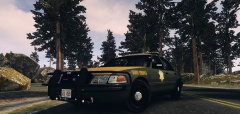 New Hampshire State?