



Mr.Quiggles
Members
-
Joined
-
Last visited
Everything posted by Mr.Quiggles
-
-
Nice! That's quite interesting to know actually. It'll be interesting to see where they turn to when the 07 Chargers and Crown Vics finally all get retired. With no current plans to implement 12' Chargers, Impalas, or Caprices it'll be interesting to see if they'll have a majority ford explorer fleet. They bought some Taurus's, but I haven't seen any. If so, they bought it just for field testing.
-
My apologies, I meant V1.0 to v1.0a. It's a longshot, but you could try a clean reinstall from V1.0 to V1.0A, I doubt it would work if you clearly deleted everything before and installed the new files manually however.
-
Hmm, well maybe ineseri can help you with that, that is quite odd. My only other suggestion would do a full backup and reinstall the game, because it's possible LCPDFR v.95 wasn't fully uninstalled or the game is getting hitched on something.
-
Ok, and what about the latest version of LCPDFR (v1.0A)? It was suppose to fix the issues you listed. I remember having those issues as well.
-
Bad boys, Bad boys...
-
DayZ is in Alpha stage right now, but I think it's fantastic. Far Cry 3 is a must have, that game is so freaking cool. Garry's Mod is a good game, along with other Valve Source Engine games like Half Life, Left 4 Dead, Team Fortress 2, and Portal.
-
Building my PC for me was an experience I'll never forget, as I learned so much. I don't know about people less tech savvy than me, but modular PCs sound blank, dark, and boring. There's nothing more thrilling to me than learning how a PC works. It's like my baby, I care for it dearly. Modular PCs aren't going to cut it for me, plugging in rectangles is just a turn off for me. But I'll at least say they are beautiful rectangles. ( Sorry if the image is big, I don't know how to resize :O )
-
Crashing while loading is common, just ignore and try again. However, after several attempts if it is still crashing on launch then there is a problem. I'd recommend trying to see if your buttons pressed that initiate the crash are binded to other scripts, if so, change it to separate keys. It doesn't seem like it's an Admin/Compatibility mode issue either. In addition, do you have the CD Retail Copy or the Steam version?
-
Nice, however, is an Ethernet (Wired) connection available to you? I highly recommend going wired over wireless if at all possible. I'm on the second floor and the router is in the basement, but fortunately my house was wired with Ethernet cables in the walls (Just the cables, no connectors, so I needed to do some minor electrical work and plug everything in the basement, buy face plates ect). Especially for gaming, you don't need a lot of bandwidth, but what it does it needs very fast which wireless often doesn't cut it. (Inform me if I used the word bandwidth wrong). Unless of course if you have super good internet then disregard all of this lol.
-
 Saw the video, really cool stuff!
 -
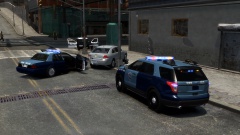
From the album: Mr.Quiggles's LCPDFR Gaming Commentaries
A tip submitted through the MA State Police C3 Policing program lead to a white Impala marked for possible drug delivery, units attempted to stop the vehicle and a pursuit began ending with an injured trooper and an injured suspect, no shots fired. Model ByBxBugs: -
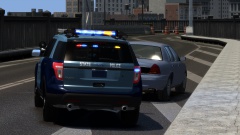
From the album: Mr.Quiggles's LCPDFR Gaming Commentaries
Model ByBxBugs: -
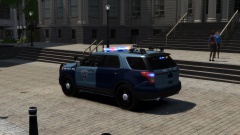
From the album: Mr.Quiggles's LCPDFR Gaming Commentaries
Model ByBxBugs: -
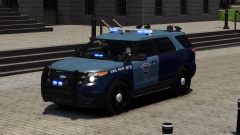
From the album: Mr.Quiggles's LCPDFR Gaming Commentaries
Model ByBxBugs: -
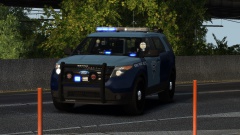
From the album: Mr.Quiggles's LCPDFR Gaming Commentaries
Model ByBxBugs: -
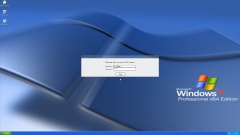 Good idea, I mean there's not a whole lot to release, just an image off google renamed to "mainmenu.png" and plopped into C:Program Files (x86)Rockstar GamesGrand Theft Auto IVLCPDFR and you're done. :D
 -
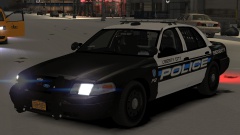 NickieB is correct, and the skin pack is here: '?do=embed' frameborder='0' data-embedContent>>
 -
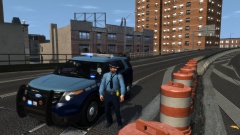 Well first you need to find what you want to change, I have many things changed on this vehicle. For example, on this model alone I've disabled the side lights, changed the lights from Red+Blue to all Blue and Red+Yellow to match the MSP colors, and changed the skin. but as I said, what skin do you want?
 -
Whelen Justice :) '>
-
At least in my town and others nearby I sometimes see the police programs they use for callouts and such minimized in their car, so it's just the desktop showing (Usually with the default XP backgrounds lol). Especially when they get out of the car they may not the information to be seen by others passing by so they just minimize it is my best guess. :)
-
Yeah, agreed. I personally like the liberties more. I just wanted to change the cars up and I thought this was a both high quality car and it had a good light setup, so I went with it. :)
-
Indeed it is, it is not my model, but here is the link to download it (In the description)
-
From the album: Mr.Quiggles's LCPDFR Gaming Commentaries
-
From the album: Mr.Quiggles's LCPDFR Gaming Commentaries


