



.png.21c42c10539be5c9a4695b9f1f08fd95.png)
cherryaerie
Members
-
Joined
Everything posted by cherryaerie
-
I had a relatively similar issue recently (apparently Steam users are having issues much more recently), anyways, I figured I would at least offer what I did to get my game working again. However, make sure you do not have any pending updates via Steam or the Rockstar Social Club before following this. Firstly, disable any 3rd party antivirus temporarily (windows should be the only active AV) and launch the game. If this works, you will need to whitelist the following pathways; C:\Program Files\Rockstar Games\Social Club C:\Program Files (x86)\Rockstar Games\Social Club C:\Users\~USERNAME~\Documents\Rockstar Games\GTAV C:\Program Files (x86)\Steam\steamapps\common\Grand Theft Auto V\ Launch the game before proceeding to test. If it does not work, try; Navigate to C:\Users\~USERNAME~\Documents\Rockstar Games\GTAV Find settings.xml and right-click to rename. Change the XML portion to old (should now be settings.old) If it asks you to confirm or gives a popup, click yes. Navigate to C:\Users\~USERNAME~\Documents\Rockstar Games\GTAV\Profiles\~PROFILEFOLDER~ Follow the same process for cfg.dat (should now be cfg.old) Ensure OneDrive does not have these files backed up. (Not sure if this is redundant, but OneDrive at the time was breaking things for me) Restart your PC and follow the steps provided to you by Bastion here The steps provided above will force the game to reset your settings, but you should be able to change them once you are in the game. TLDR... steam and Social Club are not happy.
-
.thumb.png.6a00de2b637a2c81ecf0f8ca9ab60387.png) This is a good part of the reason why I started converting FiveM vehicles and using Non-ELS, to get the best experience possible. Amazing work.
This is a good part of the reason why I started converting FiveM vehicles and using Non-ELS, to get the best experience possible. Amazing work. -
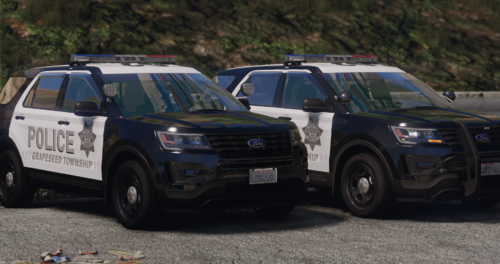 Simple and basic for a simple and basic (totally existent) department. Great job as always OJL ❤️
 -
 Scorpion never fails to impress, amazing job. Nothing else ti say 🙂
 -
GTA natively. It does this for belts (such as paramedic) for consoles as well for example.
-
Modding isn't exactly possible on consoles...
-
I prefer using this GTAV Asset Gallery as it will provide you with the DLC pack name, either in the name itself or in the photo. (Ex mp_m_freemode_01_head_044 -> Male Freemode head model, found in "MP FREEMODE" DLC. In regards to props, I unfortunately cannot be of much help there as I do not modify props, but if someone else knows, I am sure they will offer their knowledge in letting you know 🙂
-
You can either remove them entirely, which this post tells you how to do, or you can find a model you like, and rename it to replace those vanilla models you dislike. Otherwise, I am unsure of what you're asking, as this is sort of just run-on and doesn't exactly ask anything.
-
I should mention the fact that if you find something that you like that is an addon, you can take the vehicle files from it and convert them to a replacement by renaming the files to replace a slot. Where these files are located is usually dependent on the creator, but I can help you locate them if you would like, I just need the link to the vehicle.
-
I would love to offer testing and feedback! Looks like an interesting and favorable project. Let me know how I can help through site DM's, or if you prefer a Discord. 🙂
-
I've never attempted to have a K9 search a vehicle with a person inside it, therefore I cannot offer you a solution to that whether it is just conflicting with each other or not, or whether that's intended. Regardless, I would suggest that you to have all occupants leave the vehicle (even sit down for that matter via STP) and then initiate a K9 search.
-
A text document titled "install instructions" is provided in each and every one of the downloads from the link you provided. Read the instructions the author provides, as someone retyping them for you is redundant 🙂
-
Very basic troubleshooting here is to make sure you do not have time frozen via said trainers 🙂
-
It a lot of the time depends on the case, as sometimes it is really easy to tell what is wrong, other times, you have to do a little poking around or researching your problem. Oftentimes, there will be errors such as "UNHANDLED EXCEPTION DURING GAME FIBER TICK" and will directly tell you what the issue is (such as missing files, plugin issues, etc). Other times, all you will get is a line and all that it gives you is "Navigated away whilst loading" (or something similar) which is where, unless you can correlate that to a mod, you will probably need to do some researching if you are not someone that regularly reads logs. Loaded plugins will also provide you with information about outdated plugins, but you will need to find the plugins when they loaded. Regardless, there will likely be a few times that you need to Google something, which is fine because logs are not always direct when it comes to finding issues. All you might be able to do sometimes is temporarily remove files and reinstall them to find the issue. There might also sometimes be more than one crash warning or reason, so it might not always be towards the bottom. Likewise, there will be some cases (very small amount) where you cannot do anything except for removing the mod. (Such as "vector" errors) If you have other questions do let me know, can be a little confusing for first time readers, but eventually you should be able to do it confidently enough.
-
You should be able to do this in GTAV vanilla...
-
What is easier to install through OpenIV? The mods folder? Doing that is nearly the same way as doing it through file explorer.
-
Usually, it is a trainer that does something like that, what modification did you install by chance? If it was something in the mods folder, you can delete the modified files in the mods folder and copy it from outside the mods folder, and paste it to the mods folder.
-
 It was a pleasure being able to contribute to a large project, even if it was as simple as beta testing and creating translations. Charlie never fails to astonish me with his work, and this was truly a fun project to be a part of. As cliche as it is, I think I can speak for a lot of people when I say Charlie does truthfully tremendous work for us to enjoy. Hope you all are ready for the surprises 👀
- 311 comments
- 60 reviews
-
-

-

- 3
-
-
I am not quite sure about the gun not firing, but can you please send a screenshot of these 3 folders; Plugins Plugins/lspdfr Scripts Also, provide the RagePluginHook.log file in the main game directory folder.
-
You have provided the incorrect log. Please provide the RagePluginHook.log from your main game directory, not the logs folder.
-
I am not sure I can directly link it for you, but it shows up on the top left of their homepage titled "5MODS on Discord".
-
It will show on the main game directory. If you have not already you should open file explorer and create a new folder titled mods and install the OIV files to that folder. For everything not OIV, follow the pathway outside the mods, enable edit mod, and click the red banner that says "copy to mods folder".
-
EUP L&O + S&R are drag-and-drop files. Enable edit mode, drag and drop the OIV file, and follow the instructions to install it to your mods folder. EUP Menu goes into your plugins folder, and you will need the latest version of RageNativeUI inside your main game directory. EUP Backup Configurations are not exactly dependent on the ones you want, but the folders provided in the download are going to match the pathway that they need to be placed in.
-
Make sure you have RageNativeUI installed to the correct location, it seems like it could not find it. Make sure this is installed in the main game directory. https://github.com/alexguirre/RAGENativeUI/releases
-
Invalid models typically have to do with the model files themselves (yft or ytd) or the data files being invalid in some fashion, typically the metafile. I doubt it has something to do with conflicting vehicle models. The vehicle is likely an addon as pointed out already above.
.thumb.png.2dde6de0042b025b695ed82f6d2c1e50.png)
.thumb.png.6a00de2b637a2c81ecf0f8ca9ab60387.png)
