



.png.21c42c10539be5c9a4695b9f1f08fd95.png)
cherryaerie
Members
-
Joined
Everything posted by cherryaerie
-
Oh boy... Provide me your RagePluginHook.log that is found in your main game folder so I can have a look. Quote me when you do this please.
-
I have already provided a solution, thank you though.
-
Undo any recent changes you have made to the mods folder. It is next to impossible for anyone to tell what the issue is inside a mods folder.
-
Open OpenIV and enter edit mode Navigate to update\x64\dlcpacks\patchday4ng\dlc.rpf\ Click "copy to mods folder" in the red banner it gives you
-
Remove the "ExemptPlates" plugin.
-
Please add your RagePluginHook.log from your main game folder into a reply so I can help you further.
-
Allow RagePluginHook to unblock the files. If that does not work, whitelist your Grand Theft Auto V folder from any Antivirus software.
-
Exception message: Cannot load invalid model with hash 0x8fb95725 I for some reason cannot find this hash anywhere online to tell you what it is, if anyone happens to know please let me know. Anyways, since I don't know what it is, what changes have you recently made to your mods folder?
-
The model with the hash 0x79fbb0c5 ("police") is invalid. This is likely due to a meta error, or something with the model itself. Undo any recent changes you have made with this model and make sure there are no conflicting model or texture files.
-
Make sure LSPDFR is updated to its latest version, which can be found here. Make sure to install it via the manual download.
-
Plugins don't go into the main game directory. They either go in the plugins folder, or plugins/lspdfr depending on what type of plugin it is. (Refer to the plugins readme file, or the plugins description on the download page)
-
Remove "Epic Events"
-
Drag and drop your RagePluginHook.log from the main game directory into a reply.
-
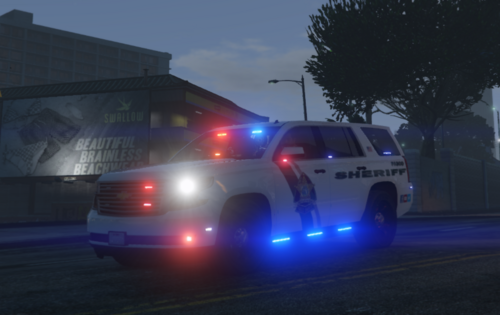 So I went to correct you on a lightbar choice and was going to provide you with a video anyways, but I am super smart and did not see all the screenshots, so that's fun. Anyway, now that I have no specific purpose in showing you this, I want to show it to you if there is something you want to add. This is their explorer unit Tahoe, but it's still the same lighting. In no way saying that anything is not accurate, just showing it to you anyways. Great vehicle so far though!
 -
Suggest giving this a read: https://www.lcpdfr.com/forums/topic/62579-guide-police-car-mods-the-whys-and-hows-and-troubleshooting/ This contains the vehicles that should have no issues if you attempt to replace them.
-
Based on what I have seen in recent years, it probably will never happen. Spotify and YouTube dislike people using their API as it means no revenue for their creators and likewise against (at least) YouTube's ToS to do so. In other words, copyright is a big no-no from Spotify and YouTube especially. You're better off playing it in the background while you're playing LSPDFR, nearly no point in considering such thing.
-
OBS https://obsproject.com/download
-
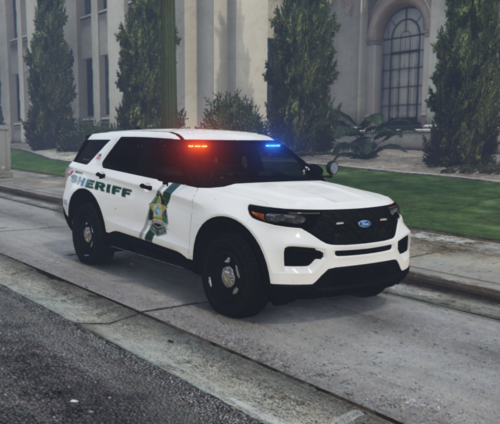 I am no vehicle developer, but apparently, at least the takedowns have to do with dummy size/placement on the model. I hope you know what to do from there lol.
 -
Now that I know that, it sort of helps me understand how to attempt to help you. I had a relatively similar issue on an older version of the game, where for some reason it would disconnect Rockstar Games services at any point RPH was launched, though error code 134 is new. Anyways, one thing you should attempt to do first is try this alternative launch method. Assuming it does what I think it is going to do, it might disconnect the services when you connect. but you can just hit cancel on the page it prompts and reject the prompt to exit the game. Theoretically, it should launch fine. If this does not work, do you happen to have any VPNs installed? If so try temporarily disabling your VPN to launch the game and let me know if that works. You can enable it once you test that. (Check any 3rd party AV software installed on your computer, and navigate to Settings -> Network & Internet -> Advanced Network Settings and disable the VPN found there if any)
-
None of the trainers will work with spawning the new vehicles until they are updated, your easiest option is to spawn it using the Rage Console command spawn (vehicle name) or through the police garage.
-
There is no "police1" in the game, you must be mistaken for "police". Make sure those files are not named "police1" and they are rather named "police". If this is right, please attach your RagePluginHook.log in a reply.
-
No, I am not sure why their recommendation for nearly everything is to reinstall the game... Anyways, assuming you tried the other suggestion as well, try this; In File Explorer, navigate to Documents/Rockstar Games and delete the Social Club folder. In Task Manager, end any task from Epic Games / Steam by right-clicking on the task and clicking "end task". Make sure you end all the tasks, not just the active applications. (End the background tasks) Launch the Rockstar Games launcher and let it update if it prompts you. Sign into your social club account and launch GTA from the launcher. Do not launch RPH until you get the option to launch into story mode. From there ALT+TAB (or ALT+ESC) and launch RPH. Once it fully launches, hit play story mode.
-
Try this alternative launch method provided here. Apparently, this helped another person who was having the same issue earlier this morning. If this does not work, try following the steps provided here by Rockstar Games Support. If neither of these steps work, please let me know by quoting me so I see your reply.
-
Exception message: Cannot load invalid model with hash 0x8a63c7b9 The vehicle with the hash 0x8a63c7b9 (police4) cannot be loaded. Usually, this indicates that there is an improper meta configuration for the car, however, I cannot tell you pinpoint of what it is as that is next to impossible... I would suggest undoing any recent changes you have made regarding police4 excluding the model itself.
-
MPClothes is an addon that adds more clothing slots to MP characters via a DLC addon. Cyan can correct me if I am wrong, but given that EUP supports MPClothes without needing modification to the mod and LSPDFR's character creation supports addon hairs from the mod, you should be able to add them. I recommend creating an outfit and using EUP to UB Converter, which will convert it into a copy+pastable line of code (in a text file) that you can place in your modified file.
.thumb.png.2dde6de0042b025b695ed82f6d2c1e50.png)
