


SergeantBlake
Insiders
-
Joined
-
Last visited
Everything posted by SergeantBlake
-
has it been fixed?
-
If you made a backup of your current GTAIV Installation, then please reinstall GTAIV. Do not do anything after the GTAIV Installation except for the steps below: If it does not work, then please download gta_registry_repair_2102.rar and follow the steps in the next spoiler. If the second set of instructions do not work, then we will have to try something else. Please note, G17 Media did not make the program, nor did I. We aren't responsible if anything messes up your computer.
-
[System dependencies] Failed to find MSVCP110.DLL (exists in game folder, but is expected to be in systems folder only) Ensure MSVCP110.dll exists in System32 and SysWOW64 then delete it from the GTAIV root folder. :)
-
Run another check and put the log in a spoiler.
-
Download this and this, put it into your GTAIV Root, then run the check again to make sure that no other dependencies are missing. If it says that something exists in the game folder, but expected to be in system folders, paste the DLL in question to System32 and SysWOW64, the common path for these folders is: C:\Windows\System32 and C:\Windows\SysWOW64, if it asks to overwrite, click yes. :)
-
Teehee, thanks to all for all the help. I thought to my self, "I wonder if I run XP3 compatibility, will it work?" Sure enough, it did.
-
I always crash when arriving on Shots Fired, maybe because a few units get called when it isn't isnt a prank is the reason why.
-
This error often just means GTAIV isn't gonna work for you today, and the easiest method is to reboot your PC. Have you tried that?
-
Thanks, but I wont risk it now that the system restore finished. I fixed up a few dependencies and the diagnostics had shown all clear except for the log file, so i'll chuck it in a spoiler. LCPDFR Diagnostics Logs: ScriptHookDotNet logs:
-
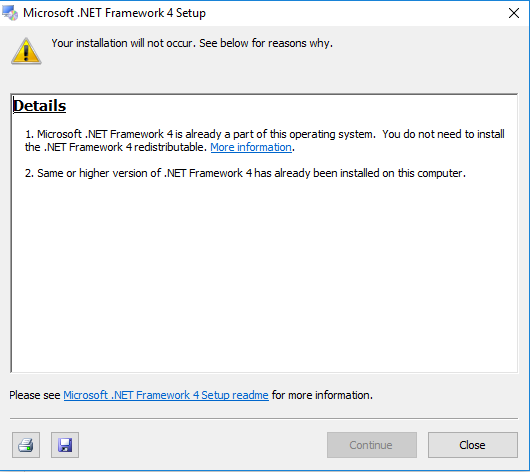
No joy. The only thing thats different is that it no longer says 'Click here to see more info about blocked .Net installations, it now says 'Please see Microsoft .NET Framework 4 Setup readme for more information.' I'm gonna try a system restore to hopefully a point before I messed around with the .NET Framework stuff, hopefully that'll fix it and this will just become an issue of the logfile in the op.
-
Millions of times, but I'll try again and get back to you.
-
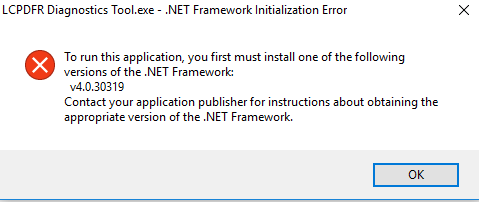
Hi, I had several issues, some fixed on their own, some are not, My main issue was that .Net had some issues with LCPD:FR. I ended up managing to uninstall .Net, but when I go to reinstall it comes up with the image attached. The way I uninstalled .Net was I went to microsoft.net and I deleted Framework and Framework64. I'm trying to run LCPDFR diagnostics but it comes up with the second picture attached: This is my last set of diagnostics recorded before .Net was deleted. I think it's quite stupid that we don't have the option to uninstall .Net through the usual Control Panel stuff Welp.
-
Awesome, glad it works now.
-
Hey, claw106 here. I just finished skimming the GTAPoliceMods forums, back when popular LCPD:FR dev's use to post there. I see GTAV and all this amazing stuff, but I get so jelly. I don't have the money nor the specs for anything.
-
Do you have an error code? I did not see this before.
-
The game still thinks that it's in 1.0.8.0.
-
I wonder if, with the new title update, Rockstar is behind this? Think about it, they tried their best to stop LCPD:FR and things working with V, so it makes sense.
-
Hi! Please note, before we get into this, there could be a million reasons as to why your GTAIV is not working. This only applies to people who have recently reinstalled or installed GTAIV. If your not sure, right-click on GTAIV.EXE and go to Details, if it says 1.0.0.8 then this is for you. You should also try looking at this The fix date of LCPD:FR for the new patch update is unknown. -------------------------------------------------------- Rockstar games have released a new title update for GTAIV without any warning, so no one expected it. No mods as of right now currently work. The solution for this is to down-grade to Patch #7, here's how: 1. Make a backup of your current GTAIV Installation on an External Hard-drive or your main Hard-drive if you have space for it. 2. Uninstall GTAIV 3. Reinstall GTAIV 4. Download Patch #7 5. Ensure the patch has worked by going to your GTAIV root folder, right-clicking on GTAIV.exe and then going to Details. Respond if it worked, :) -------------------------------------------------------- The LCPDFR Servers are currently down, please be patient!
-
Try uninstalling all mods, scripthook's, etc and see if that works. If so, then the problem is that your current title update (1.0.0.8) doesn't support the current mods.
-
Which mods? I'd be happy to help.
-
Hi, Please make sure your not using a crack, as cracks do not currently support the new update. PLEASE MAKE A BACK UP OF YOUR FULL GRAND THEFT AUTO INSTALLATION! ------------------------------------------------- This method has worked for me, it may not for you. 1. Uninstall GTAIV, make sure all traces are gone and the GTAIV install folder is completely empty or has been deleted. 2. Reinstall GTAIV, 3. Download the 1.0.7.0 title update 4. Extract and run UpdateTitle.exe 5. Ensure GTA has been successfully downgraded by right clicking on GTAIV.EXE, going to properties and clicking on Details. ------------------------------------------------- Please respond if this worked for you, and avoid downloading anything at the moment as the servers are glitched. :)
-
Hi, before I show you how, PLEASE MAKE A BACK UP OF YOUR FULL GRAND THEFT AUTO INSTALLATION! I my self at the time did not know about the new patch until I checked my game version for something else. I reinstalled GTAIV (steam version) and it had patch 1.8 but I ran patch 1.7 (download here) and it seems to have done the trick. Please avoid downloading LCPDFR or other modifcations, as the there is a problem with downloading them!
-
Hi, before I show you how, PLEASE MAKE A BACK UP OF YOUR FULL GRAND THEFT AUTO INSTALLATION! I my self at the time did not know about the new patch until I checked my game version for something else. I reinstalled GTAIV (steam version) and it had patch 1.8 but I ran patch 1.7 (download here) and it seems to have done the trick. Please avoid downloading LCPDFR or other modifcations, as the there is a problem with downloading them!
-
Oh good, I was starting to question if i'm really human or if I'm a robot that has human-like traits.
-
Did you run as admin?

