
JM Modifications
Members
-
Joined
-
Last visited
Everything posted by JM Modifications
-
-
 I have removed Blueline Dispatch support temporarily. Join my Discord for support. Support will not be given here.
- 352 comments
- 25 reviews
-
-
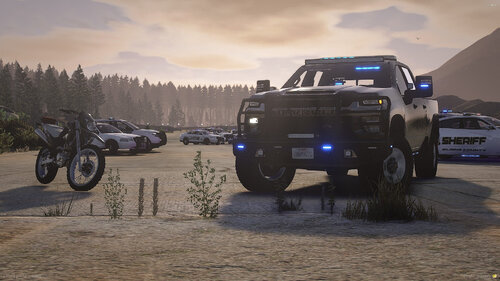 you have a carcol id conflict. You can use this:
 -
 You can use this with Policing Redefined. But you cant use STP and UB with Policing Redefined Yes from others. But Reports+ or EPC is a better alternative
- 707 comments
- 33 reviews
-
-

- 1
-
-
-
 This has to get rewritten from scratch. So this will likely not happen. unless someone can rewrite it.
- 1,743 comments
- 172 reviews
-
There are some new callouts being developed but I just got to brainstorm on how I want the callout to be performed.
- 352 comments
- 25 reviews
-
-
 Clearly states in description: Disclaimer, Please Read. First, this will be completely incompatible with Stop The Ped, Ultimate Backup, and Compulite, it is recommended you remove them for the smoothest experience.
- 654 comments
- 48 reviews
-
 10/10. Must have. Great work.
 -
I am working on the AI voices. This will take a while for me to do. I have to do thorough testing to make sure it works. v5.1 is in the works. I'm doing my best to work on it. I have a IRL job which it takes most of my free time. The subtitles, I know some peeople are deaf, but I will see if I can implement to where you can toggle the subtitles in the config.
- 352 comments
- 25 reviews
-
 What are you talking about? Send the log on my Discord.
 -
 The RageNativeUI.xml is not necessarily needed as it contains a bunch of dev comments. I will try this out later. 😉
- 42 comments
- 2 reviews
-
-

- 1
-
-
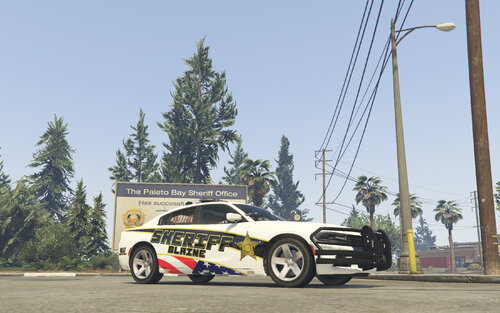 The stripes on the sides aren't accurate.
 -
 Looking into it. I can see what I can do
 -
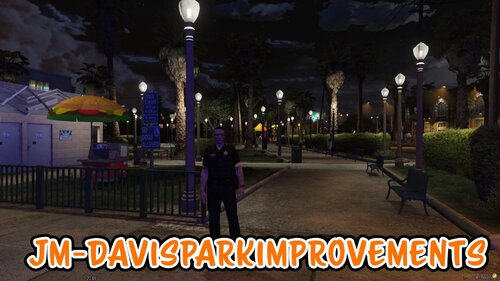
JM-DavisParkImprovements is a custom YMAP modification that enhances and revitalizes the Davis Park area, bringing new life and atmosphere to a location that often feels overlooked. This mod introduces detailed improvements to the park’s layout and surroundings, creating a more immersive and visually engaging environment for players. With added attention to detail, the area feels more active, realistic, and alive. As this is the first dedicated YMAP for Davis Park, it sets a new foundation for future creativity and development in the area. Install: Drag and Drop "davisparkimprovements" folder into your dlcpacks directory (mods/update/x64/dlcpacks Add this item line to your dlclist: <Item>dlcpacks:\davisparkimprovements\</Item> FeaturesRevitalized park layout with added details for improved immersion Enhanced atmosphere to make the area feel more alive and active Carefully placed objects to improve realism while maintaining performance Unique design approach, as no other YMAPs currently focus on Davis Park Optimized for smooth integration with existing maps and mods Community feedback is highly encouraged to help refine and expand this project further. My discord: https://discord.gg/N9KgZx4KUn version 1 Requirements: Map Builder: https://www.gta5-mods.com/tools/map-builder Tutorial:
-
 I keep getting this error "[9/6/2025 10:31:53 PM.177] LSPD First Response: SuspectSense ERROR: Error in search scenario monitoring: address cannot be zero."
- 38 comments
- 1 review
-
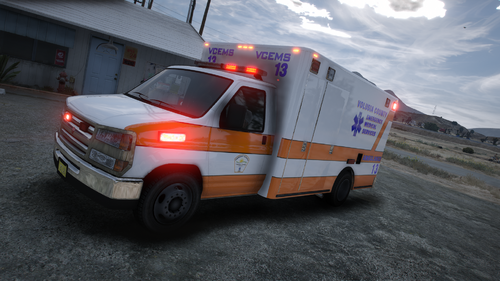 This was the best one I did.
 -
This is a livery inspired by Volusia County EMS in Volusia County, FL. This may not be 100% Accurate. I tried to be accurate as possible. Requirements: Monkeypolice188's Los Santos Fire Department Vehicle Pack (LSFD and LSIAFD) [Add-On | Liveries] https://www.gta5-mods.com/vehicles/los-santos-fire-department-vehicle-pack-lsfd-and-lsiafd-add-on-liveries This may or may not work on other modded vanilla ambulances. I can't guarantee that it'll work on other ambulance models. This livery was made specifically for this ambulance from Monkeypolice188. showcase:
-
-
-
 I'll give this a go.
 -
This fleet is a solid 10/10. Amazing work.
-
Click the discord banner in the description. The link should be a permanent link. I'll update the link.
- 352 comments
- 25 reviews