



Pipeline
Members
-
Joined
-
Last visited
Everything posted by Pipeline
-
Crap, I forgot about this thread because I don't have it set to automatically follow threads I create. Anyway, yeah, why hasn't anyone done that if it is possible? I think it'd be good.
-
Texture loss, buildings disappearing, roads becoming grey seas, game crashing. The works. What should I put in the commandline.txt?
-
Check out the ELS V video Prophet linked. It's in the reply above yours.
-
I could kiss you right now. Th-that sounded less creepy in my head...
-
*holds tyre iron threateningly* If you know what's good for you. Nah just kidding Prophet love ya really.
-
You need to put all the files and folders that you want in the download in a zip, rar, or 7zip archive. Then you upload that archive.
-
There's no need for that. I'm just making a joke. What else is there to do, anyway? There's no new information. We're allowed to continue talking even when there's not much to talk about, aren't we?
-
Then that's when it releases. And also coincidentally how long I continue to shiver in a corner holding a lightbar in my arms and repeating "My precious ELS... my precious ELS!".
-
We'll get an update when we get an update. GravelRoadCop said we wouldn't be getting any more on Halloween, so maybe the next time they post will be to say it's released. I'm guessing that'll be this month or next month. However... that's me being optimistic again.
-
 Thanks. I keep forgetting there are other GTA modding sites than LCPDFR.com...
 -
Will this be released sometime? Looking at it makes me want to try my hand at water patrol type stuff in GTA V.
-
I won't bother with skins, I don't have that kind of money. They're £34 for me on Amazon, I can barely afford that, which is why I'm asking if they're worth it. Don't want to spend my money and then realise the Xbox One controller works just about the same as my still perfectly fine 360 controllers
-
Do you have any opinion on the triggers? How easy is it to drive slowly in GTA V?
-
Hi all. So I have a few Xbox 360 controllers, left over from when I had an Xbox 360. They work just fine, no wear and tear despite the fact I've dropped the one I use on my PC the most many times. Should I get a wired Xbox One controller? I've heard that the triggers are better, and all that. I'm wondering if it'll make it easier for me to drive at slower speeds if that's the case. Does anyone have one and use it on GTA V? If you do, feel free to give me your opinion on this. I want to be able to justify the price, in my currency it'll cost me £34, and I'm rather poor right now.
-
Welp... I stand corrected. Brb guys. Jumping off nearest bridge.
-
It did, though, because GravelRoadCop mentioned it too. "Prophet will be doing a showcase on ELS sometimes this week."
-
Hey @Prophet is your video going to be up today? You said "this week" and that was on... Monday I think? So I'm hoping you can post it today.
-
Well, that's all we can do. Wait and hope. Just gotta try not to get too excited so it becomes "hope and shake violently every day it isn't released".
-
Despite the thumbnail, this video is related to GTA IV. I should know, because I made it.
-
That brings up a good question, though. Will ELS have a feature where, instead of using the texture dictionary which mutes itself if you exceed a hardcoded file limit, might we have some other way of adding custom sirens so that they can be a larger file size than they would be with vanilla GTA? Are you able to answer this question, @GravelRoadCop?
-
.jpg.cccf6aec6961384a88a5de16dce8791f.jpg) Oh no, DoctorGTA. Now I understand perfectly.
Oh no, DoctorGTA. Now I understand perfectly. -
I mean, it looks nice from this screenshot. Is there a problem with it?
-
Thank you. Oh god, that site is worrying. It redirected me when I clicked to download the file.
-
Would you mind linking it?
-
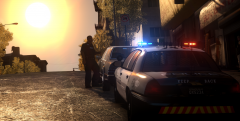 Could you link the model used (and textures if applicable)?


.jpg.cccf6aec6961384a88a5de16dce8791f.jpg)
