gnat326
Members
-
Joined
-
Last visited
Everything posted by gnat326
-
You mean EFLC (Episodes From Liberty City)? If so, then that will work. Make sure that you are running everything as an administrator (installer, game, diagnostic tool, etc.).
-
-
The issue with the callouts are being looked into last I knew. As MrDude said, you can hit Alt+F11 to force a random callout. The callout you get is also influenced by what your current location is.
-
Run both the Diagnostics Tool and the game itself as an administrator.
-
Both Stockades use one line if I remember right: Stockade. If not, then it would be NStockade and PStockade.
-
Oh no... I need to find more spaces to put these vehicles... lol
-
But the file itself was created by Rockstar, which cannot be redistributed by other users as per Copyright.
-
I am assuming that you are trying 'tilt' the words in one direction or another? If so, select the text (box select tool), then click the button on the top right of the Tools frame. Now right click (near the text), and drag in a direction. It is best to do this when the text (or other object) is in it's own layer, so it does not mess anything else up.
-
-
No problem. Enjoy!
-
Make sure that you are running the installer as an Administrator (right click, and click 'Run as Administrator'), and that your GTA IV folder isn't Read-Only. To do this, go to C:Program Files (x86)Rockstar Games, and right click the Grand Theft Auto IV folder, and make sure that neither of the two options at the bottom are checked.
-
Make sure you are running the LCPDFR installer as an Administrator (right click, and click 'Run as Administrator'). Also make sure that your GTA IV folder is not Read-Only. To do this, go to the GTA folder (C:Program Files (x86)Rockstar Games) and right click on the Grand Theft Auto IV folder. Click Properties. At the bottom of the dialog box, make sure that none of the two options are checked.
-
These are really very good. Not sure if the gold 'shield-style' badges are a little bit too big, but that's not a big issue. Keep up the good work!
- 18 comments
- 4 reviews
-
It reloads the model. The ELS lights are extras on the model itself, which are textured for the light color.
-
As to the people pulling over, and people ramming you, I think that is an AI thing and can't really be helped.
-
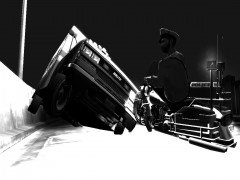 Better call up Fringe Division, if he can defy physics. :D
 -
This is a known issue, and last I knew it was being looked into. (The calls stopping after one or two). As to what call you get, it depends on where you are, as what you get is based on location. You can also hit Alt+F11 for force a callout.
-
Upgrade to the latest patch (1.0.7.0), and make sure you only have one ASI loader.
-
I'm not arguing with you dude. To the OP: Run the installer as an Administrator, and check to see if folders are Read-Only, as Tom stated, and Ekalb linked to.
-
Keep in mind that while it may seem like a joke to you, it may not seem that way to someone else. Anyway...
-
-
3.25. It is impossible to have 3,250GB of Ram.
-
Make sure that you are running the program as an Administrator (right click the file, and click "Run as Administrator"), and that your Grand Theft Auto IV folders are not read only (right click the Grand Theft Auto IV folder, click properties, and make sure that the box marked 'Read-only' is not filled in).
-
You said in the original post that the computer is making 'funky noises?' Could you describe them?
-
Those are not the only two options, actually... Just don't have your police and police2 cars ELS-enabled, and don't call for Noose backup. Works like a charm.