


Slimory
Members
-
Joined
-
Last visited
Everything posted by Slimory
-
 you know what.. i will just post a topic instead of blowing up his photo LOL
 -
Is that a real PD? i googled "Bikini Bottom Police Department" and got spongebob squarepant's.. dear lord
- 11 comments
- 6 reviews
-
-

- 1
-
-
is that what the program is called?..
-
may i ask what program you used? i would like to edit my own computer screen :)
-
How did you do that?
-
Just save the file to desktop without overwriting the original and untick the read only part, then your done, it does that to me sometimes. EDIT: also, what i would recommend is backing up the original instead of dragging edited one over the original label it "ORIGINAL VEHICLES.IDE DO NOT DELETE" in a new file folder, that's what i did to keep all my mods organized and with all my backups.
-
You made model's, i haven't seen before, i downloaded all the one's i could find :D, and you have a cadillac with a template :D
-
i hope you don't mind that i uploaded the link, awesome job on the model! btw james2012, i just went crazy downloading your models lol!
-
Well right now, with some great difficulty, i'm trying to edit the LAPD texture to the one i want, i didn't even know there was a british police mods btw +1 :)
-
that's the Escalade, i was hoping for a template but it never came with one, i found the yukon for anybody that want's it : however, it doesn't come with e template either :( is it possible to make a template? and the model the link: http://www.mediafire.com/?3b21u1dz7jhvax4
-
has anybody seen one? or know where i can get one?
-
your best bet is to ask him if it's alright
-
the title of your topic actually made me feel bad , eveyone is pretty good about lending a helping hand to fellow modder's, welcome to the forum's! First: Get SparkIV (the latest version) 2nd: find some car's you want 3rd:run SparkIV as administrator 4: Click "Open" program filesx86/rockstargames/Grand Theft Auto IV/pc/models/CDImages/vehicles.img. once open click import then import the model you downloaded (you can rename the model to whatever police vehicle you want) scroll down once imported and the model you imported is highlighted in blue, if you want to check out the textures, click the edit button in the upper right corner on the wtd. file, a page will open and that's all the textures, police sign 1,2,3 & 4 are the textures that are on the car, if you want some tips on how to install textures just ask. click rebuild and save and close the program (if you imported any textures) otherwise just hit the "X" then rebuile and save and your done, also, if your interested there are options for ELS (Emergency Light System) or non-ELS (uses the games default light's). EDIT: omg, so sorry for the triple post, no idea what happened :( MODERATOR NOTICE I fixed it for you. -JAM
-
I don't really understand polygon's at all, don't really know how they affect the vehicle, i'm just kinda skimming throught the forum'sto see if there is maybe in depth on how to put together a model, step by step that's how i learned how to make textures, i pretty much had a youtube window open while learning to create textures lol
-
the first time i tried, for some reason i couldn't re-open the model, i was pissed, had to start again.
-
@Sgt.Ace, i wish there was one, i've looked everywhere, EVI hasn't even made 1 , they are all slicktop, and probably all made by EVI and now taken down. would love 1 with a Liberty
-
Pretty sure i just nerdgasmed :D :D :D. your the man EVI, but, what kind of lightbar is that? you made it from scratch? :wub: :wub:
-
That's not the NYSP CVPI, it has a NYPD Pushrod on it. EDIT: the NYSP CVPI didn't have strobes in the corner light's, if i'm not mistaken, that's the "seacrest county police cvpi" on GTAinside, and that lightbar is a whelen liberty with edited lightbar glass. the vehicle you are looking for is on that page here is the link for the download page: http://www.gtainside.com/en/download.php?do=download&id=37118 if you want to look at the car first it is on page. 6 look for the one titled "Ford Crown Victoria Police Interceptor" in the pic's it's a seacrest county police car, enjoy :D i still use this one :D
-
i was wondering where you went, welcome back!
-
do i have hit the attach button on BEFORE i import anything? @ NicolaiB, i'm gonna give it a try, also, since i was having issue with the whelen liberty, i decided to give the whelen jusice a try, however, even after the textures are loaded and saved, the lightbar come's out either splotchy orange, red or solid orange.
-
I've always wondered what that car was like in action, +1 cp702
-
So, i'm STILL having trouble getting the police equipment attatched in-game, no idea why, i imported all the textures before i imported the model part's, but whenever i import the whelen liberty into Zmodeler, it end's up inside the car, or if i move it before i import the model, it screws the glass up, any ideas?, also do i need to import every light file (emissive emissive_n emerglight's) etc that comes with each light model
-
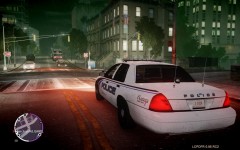 That's a pretty nice texture!
 -
would be a pretty sweet add-on for LCPDFR , however SNT is garbage, therefore i cannot use it :sleep:
-

