




Lennyy
Community Team
-
Joined
-
Last visited
Everything posted by Lennyy
-
Just go to the Download section -> scripts and plugins and sort by recently updated (default). Current userbase favourites replacing PoliceSmartRadio, Traffic Policer etc., are Stop the Ped and Ultimate Backup (can be downloaded on Bejoijos website) or Policing Redefined and GrammarPolice. Just take a look at what the download section offers and try them out. What you linked above is from 2017, which I'd say is outdated itself. Your topic has been moved to LSPDFR 0.4 Support. Please post in the correct location in the future.
-
Your topic has been moved to LSPDFR 0.4 Support. Please post in the correct location in the future.
-
XAudio2 is part of XScanner if I'm not mistaken. Your topic has been moved to LSPDFR 0.4 Support. Please post in the correct location in the future.
-
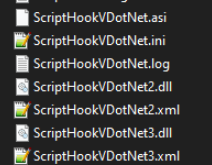
Remove all ScriptHookVDotNet files and retry.
-
This, but without MODS like here: Enable edit mode, hit copy to mods folder.

-
The path you mentioned above is the correct one for a vehicles meta file. You should be able to go to the same path outside the mods folder, enable edit mode and hit copy to mods folder when the red banner will appear.
-
This topic has been moved to the appropriate forum. Please post in the correct location in the future.
-
The log mentions "officer porci" plugin? Can you remove that and try again to see if that's the root cause?
-
You'll have to go to a PD and go on duty through the locker room to create a character. Your log indicates that you have not done that yet.
-
For Backup units or ambiently spawned units? Your topic has been moved to LSPDFR 0.4 Support. Please post in the correct location in the future.
-
PolicerAdvanced is crashing due to a missing INI file, thus crashing your LSPDFR entirely. Your topic has been moved to LSPDFR 0.4 Support. Please post in the correct location in the future.
-
6 GB isn’t a lot. Maybe 3000?
-
How much ram does your GPU have? You can try increasing the limit a bit, maybe that helps.
-
Do you have any addon or replacement cars installed? Whats your resource adjuster set to?
-
I’ve used Quant with LWE just fine before. NVE was quite heavy in my experience.
-
No. PR and LSPDFR use a different syntax.
-
Ambient spawns aren't handled by Policing Redefined. You'll have to edit the files found in lspdfr\data\custom for customised units to spawn ambiently in the world.
-
Do you have a large number of add-on cars, map mods, high-res textures, etc., installed?
-
Line 110 of your custom regions file is faulty.
-
Not really sure. Open your SHV log and you'll see it near the bottom.
-
Does this also happen when you only use one graphic mod? The QuantV Discord strongly discourages mixing it with NVE.
-
Your topic has been moved to GTA V Support, this is not LSPDFR related. Please post in the correct location in the future.
-
Looks fine except that PedDamageOverhaulV.asi is crashing.
-
Your topic has been moved to LSPDFR 0.4 Support. Please post in the correct location in the future.
-
Did your game crash during that last playthrough? Your log appears to end abruptly on an ambient unit spawning nearby. If so, navigate to your lspdfr.ini in "GTAV/lspdfr/" and set AmbientSpawn.DisableRandomUnits = true. Regarding your original issue, I don't see how Open All Interiors would cause your phone contacts to disappear. Are there any other modifications in your "scripts" folder? Try removing all files that have something with SHV Dot Net in their name and install a fresh nightly build. RPH log will be rather useless here; perhaps attach your ScriptHookV and ScriptHookVDotNet.log after trying the steps above to no avail.

