




Charlie686
Members
-
Joined
Everything posted by Charlie686
-
Hey there, Thanks for the detail! 🙂 Please attach your RagePluginHook log - this is a text document found in your main directory.
-
Hey there, Please provide further detail & attach your RagePluginHook log - this is a text document found in your main directory. Thank you! 🙂
-
Hey there, This appears to be a random crash - and they happen! You are modding a game in the end. If you experience persistent issues / crashes, please let me know & upload a new log. Thanks. 🙂
-
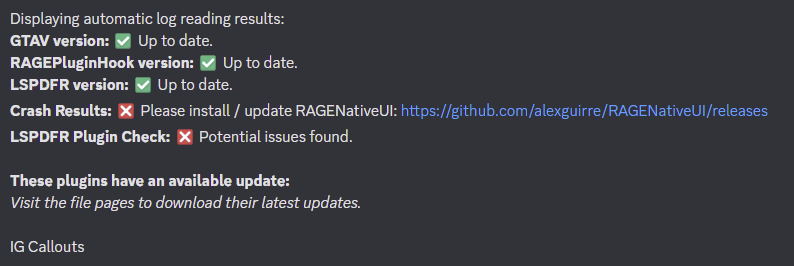
Hey there, Please read the below. RAGENativeUI link found here.
-
Way to go, solving it on your own.
-
You're most welcome, enjoy!
-
Hey there, If you'd like to use Ultimate Backup for backup when called through Grammar Police, head to your custom.ini file. Then, head to the Natives section, and for backup set the native to false. Hope this helps. 😄
-
Nice to hear, enjoy!
-
Hey there, Please update RAGENativeUI. Let me know how this goes. 🙂
-
Most likely Windows is recommending you open it with something like 'Photos'. The file extension will be okay, you just need to right click the file > Open with > then something like WinRAR / 7Zip. 😄
-
No problem at all! Take care. 😄
-
Haha, no problem at all. You are now missing RAGENativeUI, which can be downloaded here. Things should hopefully be ironed out now!
-
Sounds like you need to update your mods folder! This is needed after the GTAV Title Update. Please delete update2.rpf from your mods folder & re-add a fresh copy from GTAV/update. Note that any graphics modifications will need to be re - installed, this cannot be avoided.
-
Please attach an updated log for me to check over. 🙂
-
Ahhhh! This is why you don't make 2 threads...I've now responded in the other. 😄 You can check my response here:
-
Hey there, Following the recent GTAV Title Update, you would need to update your mods folder. Failing to do so means you'll experience infinite loading - so it sounds like this is the case for you! To update your mods folder, simply delete update2.rpf within GTAV/mods/update. Then, copy & paste a fresh copy from GTAV/update. Update2.rpf contains graphic-related files, so you may need to reinstall any graphic-related modifications. Hope this helps. 😄
-
Hey there, You are missing a file required for LSPDFR: outfits.xml. This is acquired in the LSPDFR manual install. LSPD First Response: [FATAL] Error loading outfits System.IO.FileNotFoundException: Failed to find file:lspdfr/data/outfits.xml Hope this helps. 🙂
-
That sounds like the ScriptHookVDotNet conflict with RPH! Remove it (and Pursuit Pack) then retry.
-
Heya, Your plugins are failing to load because Pursuit Pack requires ScriptHookVDotNet, which you haven't installed. You can get it here. Note that sometimes users have conflicts between RPH & SHVDotNet, but hopefully you don't run into any more problems. 😄
-
Hey there, You may be encountering a known conflict between LSPDFR and ScriptHookVDotNet. If you have ScriptHookVDotNet installed, remove all its files in your GTAV main directory & retry. Let me know how it goes. 🙂
-
First, you will need to add that task to get the peds to drive away. The problem really lies with why a pursuit isn't being initiated. I suspect that the code is not being repeatedly checked / something is preventing Process() from looping. I would add some logging to: A) Check Process() is looping - where you are checking whether a pursuit should occur. B) Add some logging to check the status of your parameters put forth in your if statement - and ensure they are being met. This could explain why a pursuit isn't being created. This should help troubleshoot your problem. 😄 EDIT: After a more thorough review of your code, I've found a problem. You are checking if (Game.LocalPlayer.Character.DistanceTo(SuspectVhicle.Position) <= 20f) but you are only checking this if the player is within 10f of the SpawnPoint. That means - it will stop looping. Because as soon as the player leaves the original spawnpoint to find the vehicle, your code for checking a pursuit stops! And therefore, no pursuit will be created because your code stops checking for it!
-
That's the correct version! 😄 The install download is a little misleading, as it says '8432' when we are on '8433'. So the version in your log is indeed, correct. @LMS might this be worth altering to prevent future confusion?
-
A screenshot would be fantastic.
-
Your log shows you are on an old version. Either: A) It isn't up to date. (Most likely) B) You've attached an old log.
-
You should revert your recent changes made to your mods folder & if the issue still persists, you'll need to make a new one. 🙂


