




Charlie686
Members
-
Joined
Everything posted by Charlie686
-
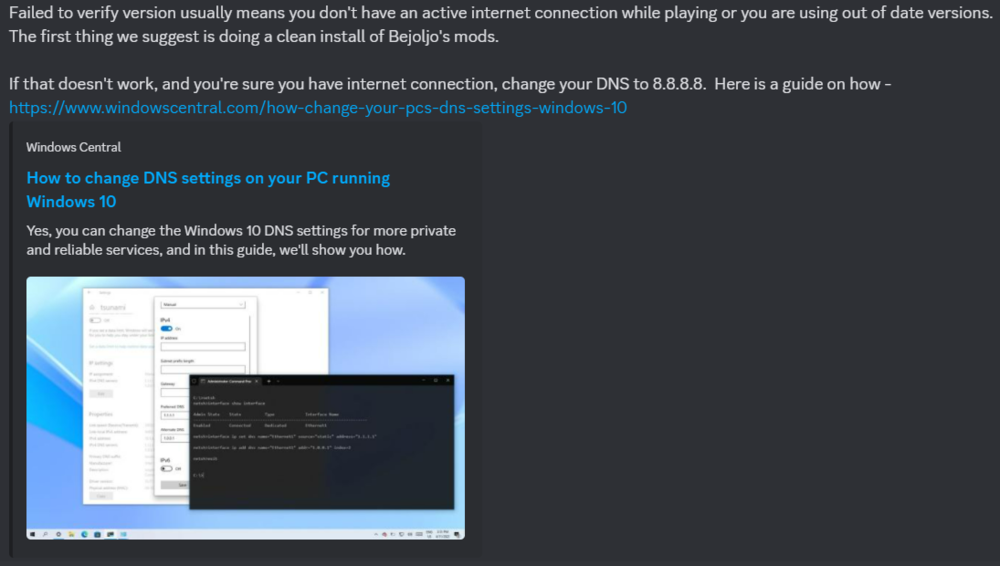
Read this from Bejoijo's Discord.
-
Because ScriptHookV has not been updated.
-
Yes, the red banner will change with the updated information. 🙂
-
Not quite, it says the latest version is available in the LSPDFR download. The latest version, indeed, is only found in the LSPDFR download. But just because it is the latest, doesn't mean it is updated. 😄 I agree - it is a little misleading, however!
-
You can extrapolate an estimated time by looking at how long past updates took. This information can be viewed here:
-
You can look at the past updates, found below, to extrapolate an estimated time:
-
Read this. You'll be able to extrapolate an estimated time by referring to the past updates over the last year +
-
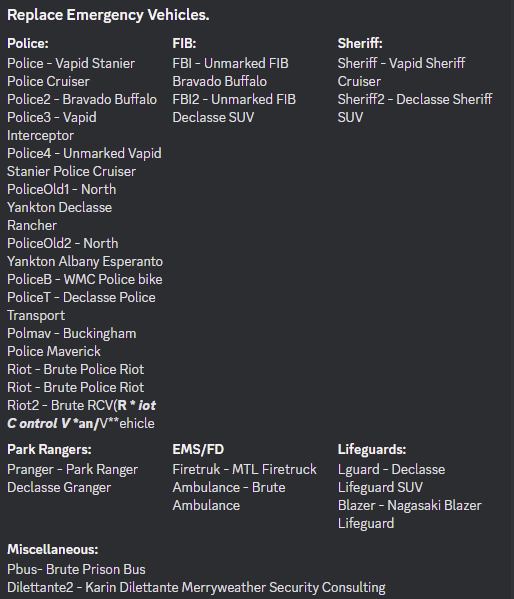
See image attached above. Remember, addon vehicles exist too! That's when you can add additional slots to your game, such as vehicles.
-
You're crashing because you are on LSPDFR version 0.4.9 (8433) which is not backwards compatible with older versions of GTAV. You are on v2699, which is quite old now. You should update your game, and then RPH & LSPDFR when they update following the recent GTAV Title Update.
-
I'd just wait. Things will be updated soon, your best option is just playing something else in the meantime! 😄
-
Yep, but unfortunately to my knowledge this feature no longer works. 😦 It hasn't done for a little while now.
-
No problem! Let me know if you need anything else.
-
Hey there, Please rename your mods folder to _mods & retry. This is a diagnostic step that will temporarily disable it. Let me know how it goes! 🙂
-
Hey there, It looks like you changed your plugin timeout threshold to 6,000 instead of 60,000. Fixing that should resolve your problem. 🙂
-
I'm not seeing an LSPDFR crash in either of them? Can you clarify what the issue is - if it is an LSPDFR crash, please attach a log containing it. 🙂
-
Sounds like a faulty handling.meta entry. Have you edited it at all?
-
Responded in other thread.
-
Please attach your RagePluginHook log, a text document found in your main directory. Thanks. 🙂
-
Hey there, This means you probably have a faulty ELS VFS file (ELS/pack_default) In order to figure out which one this is, please attach your ELS log - a text document found in your main directory. Thanks. 🙂
-
Hey there, Please update RAGENativeUI from here. Hope this helps. 🙂
-
Your RagePluginHook log would be great, same location as the one you uploaded previously.
-
-
Thank you! Please remove ScriptHookVDotNet and retry. Keep me posted.
-
Hey there, Please attach a screenshot of your main directory. Thanks! 🙂
-
Hey there, 1. Please explain your problem in more detail. 2. Attach your RagePluginHook log - a text document found in your main directory, not your logs folder. Thanks. 🙂




